Tag: UI Design

  • What’s the Difference Between AR and VR?

    What’s the Difference Between AR and VR?

    AR (Augmented Reality) and VR (Virtual Reality) are both technologies that allow users to experience computer-generated environments, but there are key differences between them.

    • Reality-based: AR enhances or adds to the user’s real-world experience by overlaying digital information on the physical world, while VR replaces the real world with a fully computer-generated environment.
    • Interactivity: AR is generally less interactive, as users are still aware of their real-world surroundings, while VR is fully immersive and offers more opportunities for interactivity.
    • Equipment: AR can be experienced through a smartphone or tablet, while VR typically requires a headset or other dedicated device.
    • Use cases: AR is often used for practical purposes, such as navigation, education, and training, while VR is used for more immersive and interactive experiences, such as gaming, entertainment, and simulation.

    In conclusion, AR and VR are both technologies that allow users to experience digital environments, but they differ in how they integrate with the real world and the type of experience they offer.

  • 9 Tips For Passing a Whiteboard Test

    9 Tips For Passing a Whiteboard Test

    A whiteboard test is a type of interview used to assess a candidate’s design skills and problem-solving abilities. During a whiteboard test, the interviewer presents a design challenge and asks the candidate to solve it using a whiteboard or marker board. The candidate is expected to sketch, wireframe, or create a simple prototype of their solution, and explain their design decisions and thought process.

    The whiteboard test is a way for the interviewer to evaluate a candidate’s ability to think through a design problem, consider the needs of the user, and create a user-centered solution. It allows the interviewer to see how the candidate thinks about design and how they communicate their ideas.

    The whiteboard test is often used in UX/UI design interviews, but it can also be used for other design-related roles, such as product design, interaction design, and graphic design. The goal of a whiteboard test is to assess a candidate’s design skills and abilities and determine whether they have the knowledge and experience to be successful in the role.

    Here are some tips for passing a whiteboard test:

    1. Practice: Before you try this in front of your peers, you’ll want to practice at home (trust me). You can find lists of whiteboard design challenges online.  If you do not have a whiteboard at home,  you can use cloud software, or even a piece of paper.
    2. Ask clarifying questions: Make sure you understand the problem and context of the whiteboard test by asking clarifying questions. Personally, I like to divide the whiteboard into four quadrants for: Business Goals, User Description, User Goals, and Tech Constraints.  I typically have several questions already prepared to ask for each category.
    3. Think aloud: Share your thought process as you work through the problem, explaining your assumptions, design decisions, and rationale.
    4. Show your design thinking: Demonstrate your design thinking by considering the user’s needs, goals, and context and showing how your design solution meets those needs.
    5. Think through the problem: Take time to think through the problem and brainstorm different solutions before starting to sketch your design.
    6. Discuss trade-offs: Discuss the trade-offs you considered and explain why you made certain design decisions.
    7. Design a user flow: Before you begin sketching screen, show a high-level user flow outlining a common path that a user would take through your solution
    8. Be visually clear and concise: Present a clear, visually appealing, and organized solution, using sketches
    9. Be open to feedback: Be prepared to receive feedback and adapt your solution if needed.

    Note: The number one mistake that I see designers make on a whiteboard test is to start designing wireframes first. Remember, your goal here is to demonstrate how you solve a problem using your design thinking skills. That said, you should be asking questions about the constraints first.

    By following these tips, you can show your design skills, problem-solving abilities, and ability to communicate your design decisions. The goal is to demonstrate your ability to design user-centered solutions that meet the needs of the users and the business.

    PS. If you really want to impress the hiring manager, bring your own whiteboard markers and eraser ;o)

  • The Perfect Handoff

    The Perfect Handoff

    In this week’s article we’ll explore how design becomes code using Inspect by InVision.  I’ll walk you through some of the challenges Designers and Developers have traditionally faced during this exchange. Then, I’ll discuss how you can combine a few popular tools to make the perfect handoff between design and development. Let’s get started…

    Problem

    The process of handing off design specs and assets to developers can be a stressful, and seemingly never-ending experience. In the past, designers have had to manually write-out the specs, drop assets into folders, email links, etc. -all of which can be extremely time consuming. In addition, developers have had to constantly chase down images, fonts, measurements, and require further clarification from the designer. As a result the collaboration can become difficult (or breakdown altogether), tension can rise, and you put yourself at risk to delay delivery.

    Solution

    Just as problems emerge, so do solutions and in our case, we see new tools! While there are many tools to choose from (Zeplin, Handoff, etc.) we’re going to focus on Inspect by InVision. To be transparent, I chose Inspect because of its popularity and it’s what I am the most comfortable with -I currently/actively administer an enterprise InVision account. That said, Inspect is a great way to collaborate with developers and ensure a smooth handoff.

    A solid playbook

    As a designer, you’ll need to have your assets organized, in repeatable patterns, and easy to access and maintain. You’ll want to spend as little time as possible maintaining the assets so you can focus on putting them into practice.

    This is where a design symbol library can help you. If you are unfamiliar with the power of symbol libraries, checkout my article here to learn more. In a nutshell, symbol libraries exponentially speed-up your time to deliver assets. You’ll have to sacrifice a little extra time up front but it’s well worth it in the long run. Once you have a library in place, you can assemble interfaces with ease.

    Tip: Name your layers. Try following a naming convention that your developers will understand. In my example, we can see elements represented in their respective code format (e.g. H1)

    Good communication

    Your playbook wont do you much good if your teammates don’t know what to expect. I suggest consulting with at least one developer throughout your entire design process. Don’t keep developers guessing until it’s time to hand-off the assets. I’ve found that including developers in the initial planning meeting, and the design reviews, is a great way to ensure they know what’s coming their way.

    Tip: Design System Documentation. Another great way to keep your developers, um, developing, is to document your specs online for reference. You don’t need to include everything, just the basics. 

    The perfect handoff

    At this point, we should have a solid playbook and a shared understanding of how to make it work. Now, it’s time to execute the play! Once your mockups/prototypes are approved, you can start handing off the design assets. In my example, I exported my design assets from Sketch into InVision via Craft.

    The developers can view the design in ‘Inspect’ mode and see the fonts, spacing, colors, and other specifications, as well as download images and icons -all in one place! Also without the need for the designer to document anything, the software does all of the work.

    Benefits

    With a perfect handoff in place, our process becomes smoother, clearer, and faster. For me personally, I have a mechanism that enables me to keep-up with an entire team of high-performing engineers. I can spend more time with my users, learning more about our products, and our Product Owners can feel confident that quality is built-in to the process. Further, with everything in one place and a common and clear vision on how to implement it is included, we’ve set ourselves up for success.

    Conclusion

    Now that you have an idea on how to handoff design assets to developers, it’s time to give it a shot. To get started, organize your design assets and interface patterns into a library.

    Then, distribute/communicate your library (and the specifications it contains) to your development team early and often. Finally, spend some time pairing with your developers and walking them through how to read the spec -regardless of what tool you are using. Until next time, thanks for reading!


    Have an idea I could help with? Let’s chat! While I’m currently on assignment, I’m excited to hear about the next big thing. Email me.

  • Practicing Diversity in UI Design

    Practicing Diversity in UI Design

    In the spirit of constant self improvement, I’ve challenged myself to be more conscious of cultural and racial diversity. I struggled a bit to identify where/how to get started but soon realized that I could make the biggest impact through my work. In this article, I’ll walk you through a few tips on practicing cultural and racial diversity as a User Interface Designer.

    Getting Started

    I started my exploration by analyzing past and current projects and created a checklist to guide myself along; 

    • Do your personas include people from different cultural and racial backgrounds?
    • Do the photographs you choose represent people from different ethnicities?
    • Are you including multicultural names in your interface designs? 
    • Are you including users from different ethnic backgrounds in your user testing?
    • Have you provided aid to non-native language speaking users?

    The first thing that stood out to me is that the user names in my interface designs did not represent my entire audience. I thought that would be a good place to start so I created a list of influential leaders from a variety of racial and cultural backgrounds, to use in my next design.

    In addition, I also realized that many of my illustrations were lacking diversity too. I decided to create a few new characters and in doing so, I realized that having a skin tone chart would be handy (below) when selecting colors. Note, I referenced this skin tone article on Jezebel. Also note, this may be the first (and last) time that I reference Jezebel. Haha!

    Skin Tone Hex CodeShading Hex Code
    #88583B (dark brown)#6E472F
    #E8CDA8 (light brown)#CFB695
    #D4B5AB (mocha)#AD958C
    #FBC5A4 (apricot peach)#E0B092
    #FFCC99 (peach)#BF9973
    #FAE7D0 (pale cream beige)#E0CFBA

    Next Steps

    Now that you have an idea on how to practice racial and cultural diversity as a UX/UI Designer, it’s time to give it a shot. To get started, try analyzing your current work and see if there are some areas to improve. Then, consider making adjustments to your designs based on your findings. To learn more about culture, race, and ethnicity, checkout this article on the Cliffs Notes website.

    Finally, if you have some additional ideas, I’d love to hear about them in the comments section below. Until next time, thanks for reading!


    Have an idea I could help with? Let’s chat! While I’m currently on assignment, I’m excited to hear about the next big thing. Email me.

  • A Day In The Life

    A Day In The Life

    Introduction

    This week’s article was inspired by a list of questions that I received from one of my students at Springboard.com. I am asked these questions often so I decided to collect my thoughts in one spot. Hopefully, this article will provide you with some insight into what life is like as a Product Designer. Let’s begin our Q&A…

    Questions & Answers

    What does your day to day look like?

    My day always starts off with a cup of coffee. During this time, I read my notes from the prior day and write down my agenda for the current day. Then, I’ll transfer notes from my sketchbook into a project management tool (e.g. Jira, Rally, VersionOne).

    After my daily preparation is complete, I am ready to meet with my team (or client) for a daily briefing. If I am missing any assets or requirements, this is the time to make that known. Emails, direct messages, phone messages, smoke signals, etc. often get lost in the noise. After working over 15 years in the industry I have learned that face-to-face communication is the best way to get things done.

    After my briefing, I’ll go heads-down and focus on my work for about 2-3 hours. I pull my work requests from a prioritized backlog and try to only work on one request at a time. I do leave two hours open for meetings and/or requests that are outside of the scope of my daily commitments. I divide that time in two so that I am available for one hour in the morning and one hour in the afternoon.

    This approach seems to work well as an embedded designer as well as a shared service. After a quick bite to eat, I’ll dive right back into my heads-down work for another 2-3 hours. Rinse and repeat! I should also mention that not everyday is the same… I have scheduled planning sessions on a bi-weekly and quarterly basis. I’ll spend about a day preparing for my bi-weekly planning and four days for quarterly planning. 

    What kind of tools do you use for work?

    Design Tools

    For the first ten years of my career, I used Adobe Photoshop & Illustrator exclusively. Then when I started working as an independent consultant, I shifted to using UXPin to save money. I’ve also used Adobe XDFigma, and Axure, before finding Sketch.

    Now, I design in Sketch, prototype in InVision, and keep my personas and journey maps in UXPressia. In addition, I use a whiteboard daily -all of my ideas start on a whiteboard! Finally, I use my Design Thinking Toolkit to conduct my design thinking exercises.

    Discovery Tools

    To aggregate feedback from users I use a combination of several tools. For heat mapping, I like to use Crazy Egg but I should mention that I follow Neil Patel so I’m biased. Ha!

    For engagement, adoption, retention, and time-on-task metrics, I use Google Analytics. To measure happiness, I have used HotJar in the past but now I’m currently into using SurveyMonkey.

    To conduct remote user testing sessions, I use the Google Suite for my templates, recruits/participants lists, and to conduct the actual interviews themselves (via Meet). However, I just started using UserTesting.com and I look forward to enhancing my research strategies through their software. 

    Do you have a stronger preference for UX vs UI? 

    While I feel UX is equally (if not more) important as UI, I prefer to work on the interface. I am right-brain dominant and have a strong background in traditional and digital art. In addition, I worked for many years as a Front End Developer and developed an expertise working with CSS and HTML.

    Having a very fine understanding of how an interface design (and it’s interactions) will translate to code is like having a super-power. That said, you must still base your design decisions on data and/or testable assumptions.

    I believe form and function should be treated equally as users often perceive aesthetically pleasing design as design that’s more usable, aka, The Aesthetic Usability Effect.

    In my ideal scenario, these two roles are split and require some crossover knowledge (80/20) and a healthy working relationship. To me, it feels like two detectives working side-by-side on solving the same case. Think Sherlock and Watson or Dexter and Deborah Morgan, if that’s more your thing.

    Do you work on non-work related projects for fun? 

    All. The. Time. I’d consider myself an “idea guy” above all else. I’m constantly white-boarding new ideas and asking friends for their feedback. Every once in a while, I’ll commit to developing one of my ideas just for fun and to see how far I can take it.

    For example, in 2015, I hired a small team of designers, developers, and copywriters to help bring Time Roundup to life. Note: this product was sunset in 2018 due to lack of resources. Check out my Whiteboard page (removed) to see what ideas I may bring to life next ;o)

    Have you ever done contract/freelance work?

    In 2013, I started my own product design consultancy, Antfarm Collaborative. For over four years, I worked with startups to Fortune enterprises on enhancing customer satisfaction and brand loyalty by designing digital products end-to-end. I enjoyed working on freelance gigs as I could pick and choose my projects and switch clients (and subject matter) more often -all while working from my home office.

    However, working freelance jobs comes with it’s fair share of disadvantages. For example, getting paid on time was a constant battle. Further, when the market is less-demanding, there’s less work available and sometimes you have to work on something you’re really not passionate about just to pay the bills.

    I would never rule-out having my own consultancy again but for now, I enjoy the stability of a full-time job, and that I have an amazing manager to help mentor me. Finally, I do still create and manage WordPress websites for several small businesses. It’s more or less a “rubber stamp” process that feels like passive income. It pays my coffee expenses!

    Conclusion

    In conclusion, a day in the life of a Product Designer is always evolving -from tools, to process, to people. My final piece of advice is to use what you think are the best tools for you, for your specific scenario, and be open to change. Some clients will require specific tools and you must learn to adapt quickly. 

    It is not the strongest or the most intelligent who will survive but those who can best manage change.” – Charles Darwin


    Have an idea I could help with? Let’s chat! While I’m currently on assignment, I’m excited to hear about the next big thing. Email me.
  • Whats the difference between UX Design and UI Design?

    Whats the difference between UX Design and UI Design?

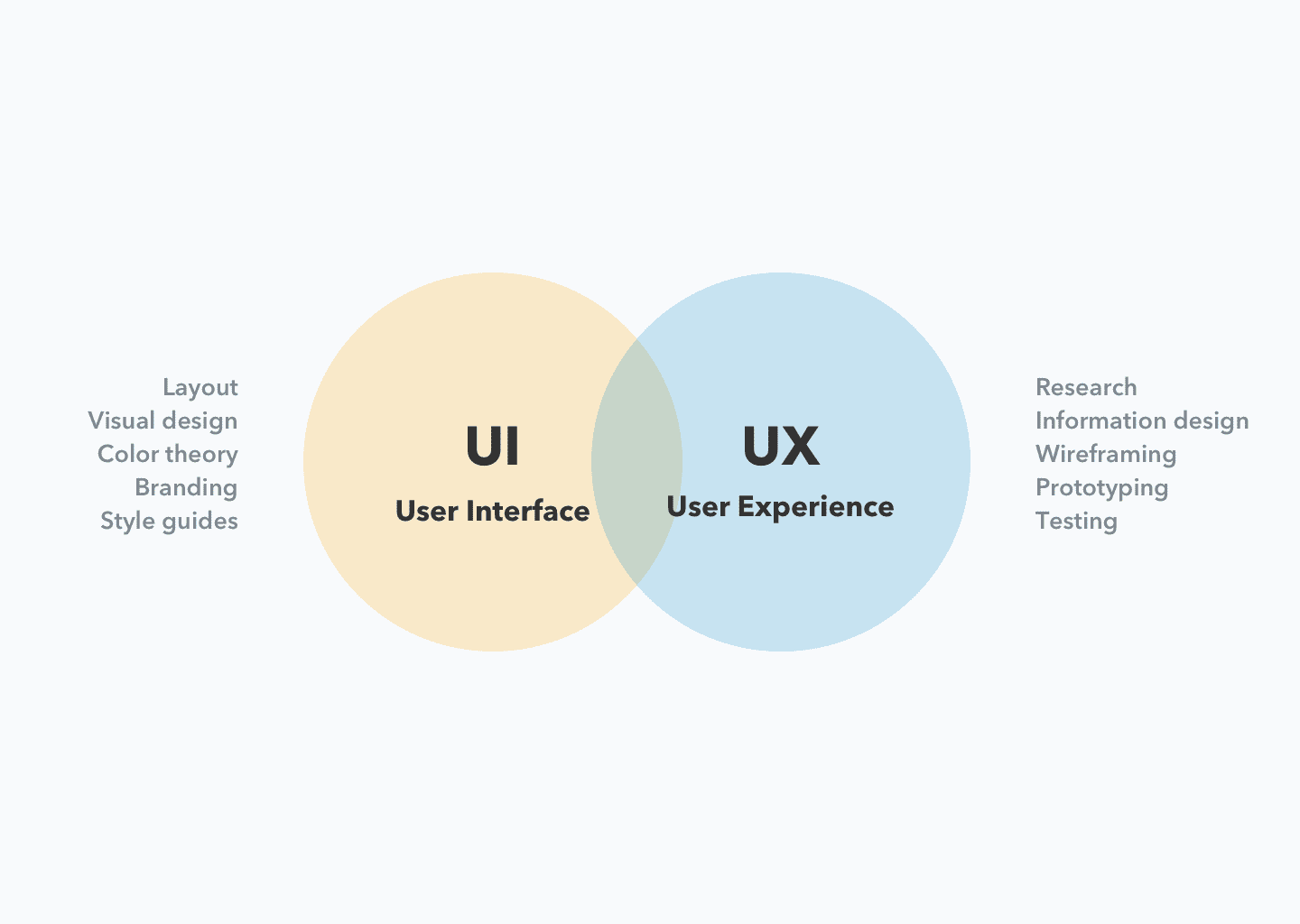
    UX (User Experience) Design and UI (User Interface) Design are two related but distinct fields in digital product design.

    UX design is focused on the overall feel of the product and how it meets the user’s needs and expectations. It involves research, prototyping, testing, and iterating to create a product that is both usable and enjoyable. UX designers focus on creating a seamless, intuitive, and efficient experience for users.

    UI design, on the other hand, is focused on the look and layout of the product’s interface. UI designers are responsible for creating the visual design, including the color scheme, typography, and the placement of elements on the screen. UI design is concerned with how the product is presented to the user, and how users interact with it.

    In conclusion, UX design is focused on the user’s experience, while UI design is focused on the visual and interactive design of the product. Both disciplines are important for creating successful digital products, and often work together to create a cohesive and delightful user experience.

  • 8 Tips on User Research

    8 Tips on User Research

    User research is the process of gathering data about users to inform design and product decisions. It involves studying and understanding the behavior, motivations, goals, and pain points of the people who will use a product.

    The goal of user research is to create products that are not only usable and functional, but also meet the needs and expectations of the target audience.

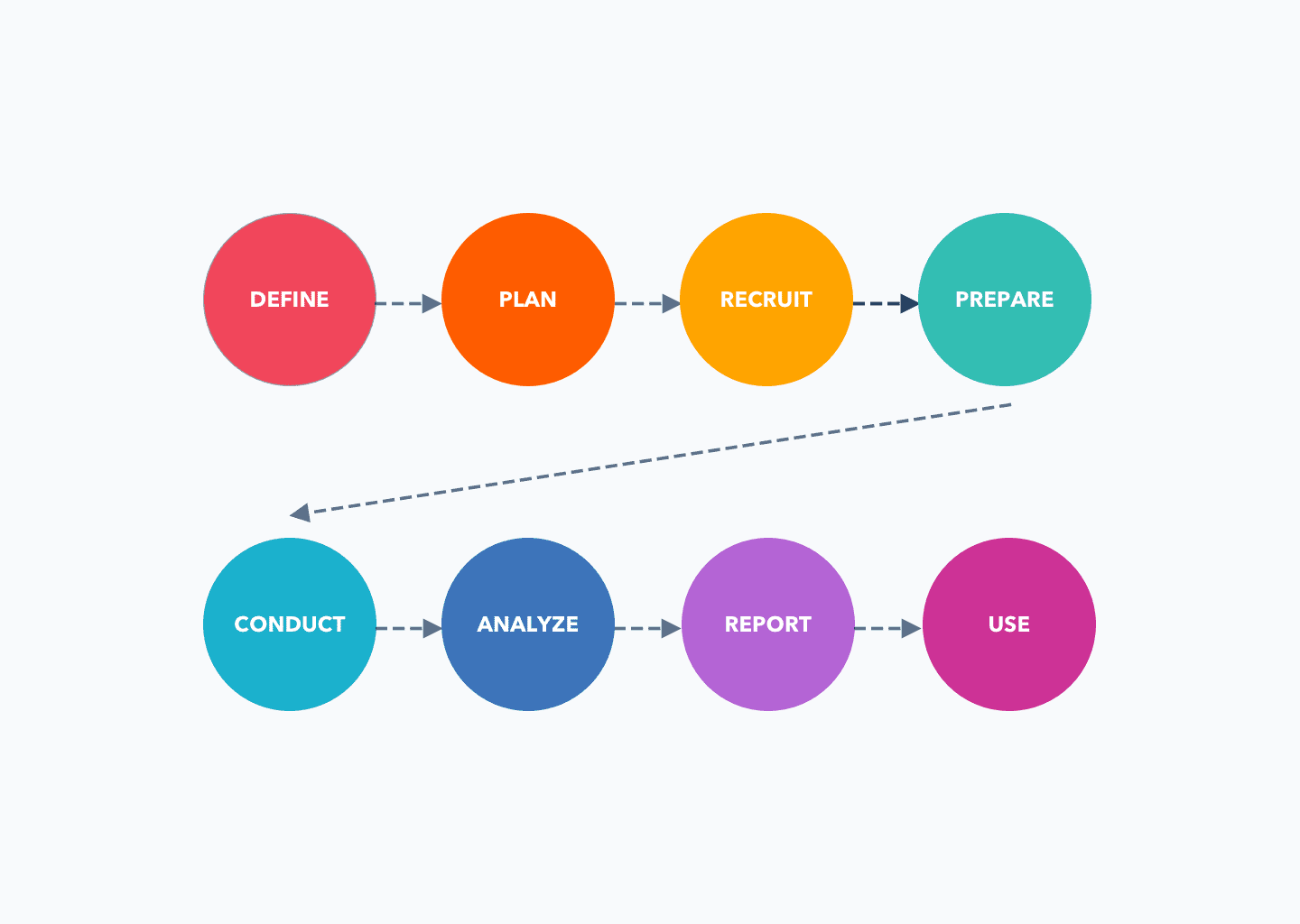
    Conducting user research involves the following steps:

    1. Define the research objectives: Clearly define what you want to learn from the research and what questions you need to answer.
    2. Plan the research methods: Choose the research methods that will best achieve your objectives, such as surveys, interviews, focus groups, usability testing, or other methods.
    3. Recruit participants: Identify and recruit participants who are representative of your target user group.
    4. Prepare for the research: Plan and prepare for each research method, including developing questions or tasks, setting up the environment, and testing equipment if necessary.
    5. Conduct the research: Carry out the research, following the methods and procedures you have planned.
    6. Analyze the data: Analyze the data you have collected, looking for patterns, trends, and insights.
    7. Report the findings: Summarize the findings of your research and present them in a clear and accessible way.
    8. Use the findings: Use the insights from your research to inform design and product decisions.

    User research can be qualitative or quantitative, and can involve a variety of methods, such as surveys, interviews, focus groups, usability testing, and observation.

    The data gathered through user research can inform design decisions, such as the features to include, the design of the interface, and the overall user experience.

    User research is an important part of the design process and helps ensure that products are designed with the user in mind. It should be an ongoing process, as you should continually gather feedback from users to ensure that your product meets their needs and expectations.

  • What is Agile Product Design?

    What is Agile Product Design?

    Agile Product Design is a design approach that follows the principles of Agile software development, which values collaboration, flexibility, and continuous iterations.

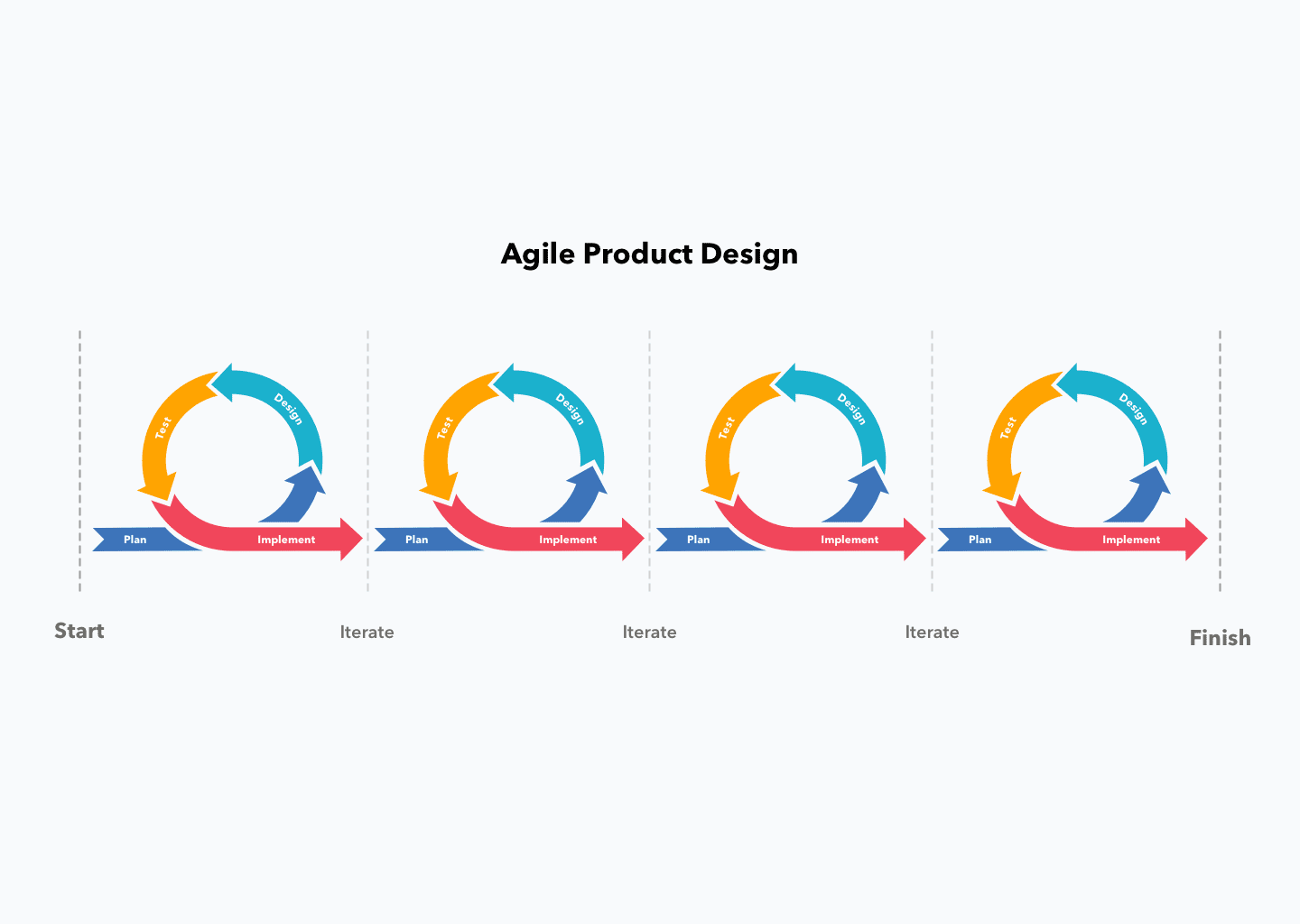
    It emphasizes rapid prototyping, user testing, and the integration of feedback into the design process to create high-quality products that meet the needs of users.

    In Agile Product Design, design teams work closely with development teams and stakeholders to ensure that the design solution is delivered quickly and efficiently, while also being able to adapt to changing requirements.

    The goal of Agile Product Design is to create a design process that is flexible, responsive, and delivers value to the end-user.

    Becoming an Agile design team involves adopting the principles and practices of Agile methodologies and integrating them into the design process. Here are some steps to get started:

    1. Adopt an Agile mindset: The team should embrace the Agile values of collaboration, transparency, and continuous improvement.
    2. Emphasize user-centered design: Agile design prioritizes the needs of users and emphasizes testing and iteration to ensure that the design solution meets those needs.
    3. Collaborate with cross-functional teams: Agile design requires close collaboration between design, development, and other stakeholders to ensure that the design solution is delivered efficiently and effectively.
    4. Use iterative design process: Agile design involves a series of rapid iterations, each building upon the previous, to deliver a minimum viable product (MVP) as soon as possible and then refine the solution based on user feedback.
    5. Use Agile tools and techniques: Tools such as project management software, design sprints, and design thinking workshops can help the team work more efficiently and effectively in an Agile environment.
    6. Continuous improvement: Agile design requires continuous improvement and adaptation based on user feedback and changing requirements.

    By following these steps and incorporating Agile principles into the design process, teams can become more efficient, effective, and responsive in delivering high-quality design solutions that meet the needs of users.