This article is part of a series on Design System Management.
Welcome to Lesson 4, where we explore the tools and technologies essential for developing and maintaining design systems. In this lesson, we’ll introduce Figma as a powerful platform for creating design systems, discuss collaborative workflows for design system development, and explore version control and documentation practices to ensure the integrity and consistency of design systems.
Introduction to Design Systems in Figma
Figma has emerged as a popular tool for designing and prototyping user interfaces, and its collaborative features make it well-suited for developing design systems. Figma’s components, styles, libraries, and shared libraries can be leveraged to establish and maintain a cohesive design system. Additionally, Figma’s real-time collaboration features facilitate seamless communication and collaboration among designers and developers working on a design system.
In this lesson, we’ve explored using Figma as tool/technology for Design System management. By understanding the importance of effective collaboration and documentation, and implementing them effectively, designers can create cohesive and impactful designs quickly, that resonate with users and reinforce brand identity.
Caption:The Material 3 Figma Design Kit provides a comprehensive design system, with styles and components to help you get started.
Collaborative Workflows for Design System Development
Effective collaboration is key to the successful development of a design system. Cross-functional teams can collaborate efficiently using Figma to iterate on design system components, gather feedback, and incorporate changes. Figma enables communication, alignment, and accountability among team members throughout the design system development process.
Caption: This screenshot shows a user generated comment in Figma. Give feedback, ask a question, or just leave a note -enable comment mode and click anywhere in a Figma file to leave a comment.
Version Control and Documentation
Version control and documentation are essential for maintaining the integrity and consistency of a design system over time. Figma’s version history and branching features can be used to track changes, manage revisions, and ensure version control in collaborative environments. Additionally, Figma’s tools enable documenting and maintaining comprehensive design documentation including; design system guidelines, standards, and best practices.
Caption:This screenshot displays the Version History panel in Figma (right).
Final Thoughts
In this lesson, we’ve explored using Figma as tool/technology for Design System management. By understanding the importance of effective collaboration and documentation, and implementing them effectively, designers can create cohesive and impactful designs quickly, that resonate with users and reinforce brand identity.
Thank you for taking the time to read my article! I value your interest and engagement. I invite you to continue the conversation by sharing your thoughts, questions, or feedback in the comments section below.
Don’t forget to like and share this article with your network if you found it valuable. And remember to check back in a couple weeks for my next insightful article. Until then, stay creative and keep exploring!
In the fast-paced world of product design, efficiency is paramount. Artificial Intelligence is becoming a game changer in design automation. This article explores how AI is transforming the creative landscape by automating repetitive tasks. From generating design variations to streamlining layout processes, AI enhances efficiency, unlocks creative potential, and reshapes the future of design.
The Challenge of Repetitive Design Tasks
Design across graphic, web, and product disciplines often involves repetitive work that can be time consuming and mentally draining. Tasks such as resizing images, adjusting layouts, and producing multiple variations for A/B testing are necessary but can slow innovation and reduce time available for higher level creativity.
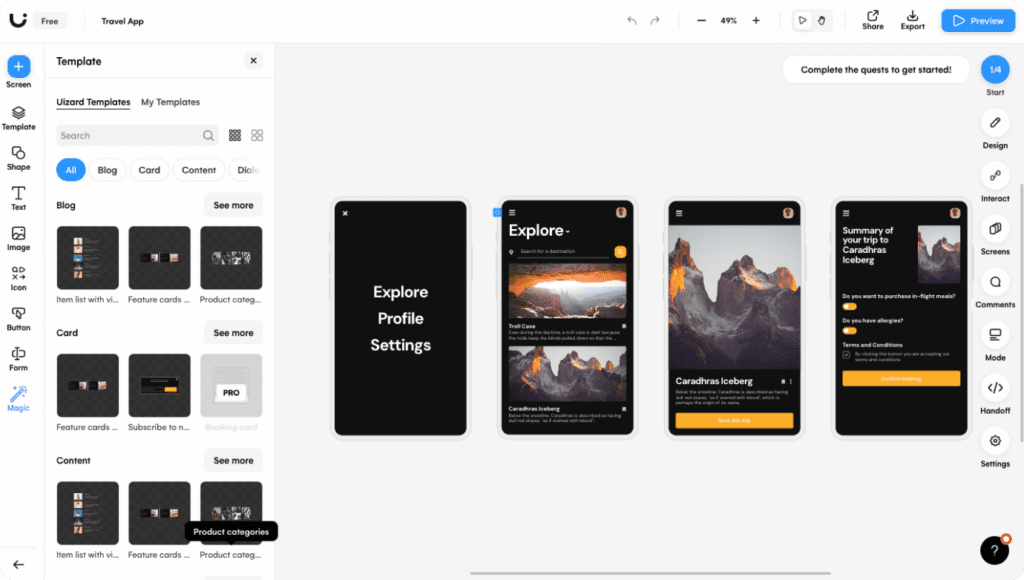
Caption: UIzard is one of the easiest-to-use design and ideation tools powered by AI.
The Promise of AI in Design Automation
AI in design automation offers liberation from repetitive effort. By delegating routine tasks to intelligent systems, designers gain more time for strategic thinking and creative exploration. Key areas of impact include the following.
AI-Generated Design Variations
AI tools can rapidly generate multiple visual directions such as color schemes, typography pairings, and layout options. This expands creative possibilities while saving significant time.
Layout Design Streamlining
AI algorithms can automatically arrange elements, manage spacing, and optimize hierarchy using established design principles. This accelerates layout creation while preserving quality.
Image Editing and Enhancement
AI driven tools can retouch photos, remove backgrounds, and enhance clarity automatically, reducing hours of manual editing.
Content Generation
In marketing and product design, AI copy tools can produce ad text, product descriptions, and articles. This speeds production and maintains consistency.
Rapid Prototyping
AI powered platforms can convert wireframes into interactive prototypes, minimizing the need for manual coding and enabling faster validation.
The Synergy of AI and Human Creativity
AI does not replace creativity. It amplifies it. Designers and AI work best as partners, where AI manages the repetitive workload and humans focus on vision, storytelling, and refinement. This collaboration boosts efficiency without sacrificing originality or quality.
Challenges and Considerations
As adoption grows, several issues require attention.
Data Quality: AI systems depend on large datasets. Ensuring diversity and fairness is critical to avoid reinforcing bias.
Ethical Implications: Concerns such as copyright, authorship, and plagiarism must be addressed when generating automated content.
User-Centric Design: Automation should support human insight, not override it. Designers must maintain balance between efficiency and empathy.
The Future of Design Automation
AI will continue to expand its influence across creative industries.
Real-Time Collaboration: Designers will increasingly work alongside intelligent assistants that provide instant feedback and suggestions.
Hyper-Personalization: Interfaces and content will be tailored dynamically to individual preferences.
Cross-Disciplinary Integration: AI will connect design with marketing, analytics, and engineering, producing more holistic solutions.
Conclusion
AI driven design automation marks a new era of efficiency and creativity. By offloading repetitive work to intelligent tools, designers can focus on innovation, deliver higher quality outcomes faster, and adapt to an evolving digital landscape. As collaboration between AI and human creativity deepens, the future of design promises greater speed, personalization, and imaginative potential.
If you enjoyed reading this article, consider sharing it with a colleague or friend, and stay tuned for the next piece on ethical considerations in AI driven design.
This lesson immerses us in the art of creating vivid representations of diverse user segments. We’ll explore the meticulous process of defining, refining, and leveraging user personas to capture the essence of various user groups. From empathy mapping to iterative refinement, this lesson unveils the techniques essential for crafting personas that drive empathetic and user-centric design.
Defining and Constructing Comprehensive User Personas
Creating user personas involves defining detailed profiles that represent different user segments. For instance, in a fitness app context, personas might include “Fitness Enthusiast Emma,” outlining her goals, frustrations, and habits. “Beginner Brian” might represent a different segment, highlighting his motivations and challenges. Crafting personas involves extensive research synthesis to capture diverse user characteristics, preferences, and pain points.
Example
Step 1: Research and Data Collection
Gather extensive information through user interviews, surveys, observations, and analytics. Aim to understand user demographics, behaviors, motivations, goals, pain points, and preferences.
Step 2: Identify Patterns and Commonalities
Analyze collected data to identify recurring themes, common behaviors, and shared pain points among users. Group similar characteristics and behaviors to form distinct user segments.
Step 3: Persona Definition
Choose a primary user segment and begin crafting the persona. Give the persona a name, age, background, and job title that aligns with the identified user group. For example:
Name: Marcus
Age: 29
Occupation: Graphic Designer
Background: Marcus is a talented graphic designer with a passion for visual storytelling and creative expression. He holds a Bachelor’s degree in Graphic Design and has been working in the industry for five years. Marcus is known for his bold and innovative design style, which he incorporates into his work across various mediums, including branding, digital marketing, and illustration. Outside of work, Marcus is an avid music lover and enjoys exploring new artists and genres.
Step 4: Persona Detailing
Add depth to the persona by including details such as:
Demographics: Location, education, family status.
Motivations: What drives their actions and decisions.
Goals: What are they looking for or trying to achieve.
Challenges and Pain Points: Obstacles they face in achieving their goals.
Behaviors: How they interact with the product/service.
Step 5: Empathy Mapping
Create an empathy map to visualize the persona’s thoughts, feelings, pains, and gains related to your product/service. For instance, understand Marcus’ feelings about music apps, his thoughts on variety, his pains in choosing one, and his gains interest in finding features that enhance his music listening experience..
Step 6: Validate and Iterate
Share the persona with stakeholders and team members for feedback. Validate the persona’s accuracy through additional user research or user testing. Iterate the persona based on feedback or new insights gathered.
Step 7: Persona Utilization
Leverage the persona across the design process. Use it as a reference point when making design decisions, crafting user journeys, or evaluating features to ensure alignment with user needs and behaviors.
Creating a user persona is an iterative process that involves continuous refinement based on evolving user insights and feedback. Remember, the goal is to create a detailed, representative profile that empathetically captures the needs and motivations of a specific user segment.
Utilizing Empathy Maps for Persona Development
Empathy maps serve as powerful tools for visualizing user personas’ emotions, thoughts, and behaviors. For example, mapping Emily’s feelings about workout intensity or Brian’s thoughts about using fitness tracking features helps in understanding their perspectives. These visual representations aid in empathizing with users, providing deeper insights for persona development by incorporating emotional and behavioral dimensions.
A user empathy map (above) is a chart that helps you understand your user’s perspective. Capture what users say, do, think, and feel about a product or experience using quotes, behaviors, and emotions to uncover their needs and motivations.
How To
Filling out an empathy map involves capturing insights and observations about a user’s thoughts, feelings, actions, and needs. Here’s how you can fill out each section of the empathy map:
Says: Record direct quotes or statements made by the user. These could be expressions of their needs, desires, frustrations, or aspirations. Use quotes obtained from interviews or user feedback to provide firsthand insights into the user’s thoughts and preferences.
Thinks: Document the internal thoughts, beliefs, and attitudes of the user. Consider what the user might be thinking about, such as their goals, motivations, concerns, or expectations. Use empathy and intuition to infer what the user might be thinking based on their behavior and verbal expressions.
Does: Capture the observable actions, behaviors, and interactions of the user. Observe how the user interacts with products, services, or environments in different situations. Pay attention to both routine behaviors and specific actions taken in response to certain triggers or stimuli.
Feels: Explore the emotions, feelings, and sentiments experienced by the user. Consider how the user might be feeling in various situations, such as happy, frustrated, anxious, excited, or confused. Use empathy to empathize with the user’s emotional state and understand the underlying reasons for their feelings.
Influences: External factors that may impact the user’s behavior and decision-making process. Consider the people, things, and places that play a role in shaping the user’s actions and preferences. Examples of influences could include friends and family, cultural norms, societal trends, media, advertisements, or environmental factors.
To fill out an empathy map effectively, it’s essential to gather insights from user research, observations, interviews, surveys, and user testing. Engage with users directly to gain a deeper understanding of their experiences, motivations, and challenges. Use empathy and active listening to empathize with the user’s perspective and fill out the empathy map with rich, detailed insights that inform design decisions and solutions.
Refinement Strategies for Iterative Persona Building
Iterative persona building involves continuous refinement based on ongoing research and feedback. For instance, revisiting personas to incorporate new data might reveal that Emma’s goals have evolved, requiring persona adjustments. Collaborating with stakeholders and validating personas through user testing ensures accuracy. Iterative refinement ensures personas stay relevant and reflective of users’ evolving needs.
Example Persona Refinement Strategy
Quarterly Review:
Every three months, schedule a review of user personas to ensure they remain accurate and relevant.
Allocate 1-2 hours for the review session.
Step 1: Data Collection (Week 1-2):
Gather quantitative data from analytics tools, such as website traffic, user engagement metrics, and customer surveys.
Conduct qualitative research, including user interviews, usability testing, and customer feedback sessions.
Step 2: Analysis and Synthesis (Week 3-4):
Analyze the collected data to identify patterns, trends, and insights related to user behaviors, needs, and preferences.
Synthesize the findings to update or refine existing user personas based on the new insights.
Step 3: Persona Workshop (Week 5):
Host a persona workshop with key stakeholders, including designers, product managers, marketers, and customer support representatives.
Present the updated personas and discuss the rationale behind the changes.
Collaboratively review and validate the updated personas to ensure they accurately represent the target audience.
Step 4: Documentation and Distribution (Week 6):
Document the updated personas, including demographic information, behavioral traits, goals, pain points, and motivations.
Distribute the updated personas to relevant teams and departments, such as product development, marketing, sales, and customer support.
Ensure that everyone has access to the latest personas and understands how to use them effectively in their work.
Step 5: Implementation and Monitoring (Ongoing):
Implement changes and updates to products, services, and marketing strategies based on the insights from the updated personas.
Monitor user feedback, engagement metrics, and other relevant data to assess the impact of the changes.
Iterate on the personas as needed based on ongoing research and feedback from stakeholders.
By following this schedule, you can ensure that your user personas remain accurate, actionable, and aligned with the evolving needs of your target audience.
Key Takeaways
Comprehensive Persona Construction: Building detailed personas involves in-depth research and synthesis to capture diverse user segments.
Empathy Maps for Deeper Insights: Empathy maps provide visual representations of user emotions and behaviors, enhancing understanding for persona development.
Iterative Persona Refinement: Continuous refinement based on ongoing research and feedback ensures personas remain accurate and aligned with users’ evolving needs.
Through comprehensive persona construction, utilization of empathy maps, and iterative refinement strategies, designers gain a profound understanding of their users. These insights fuel the creation of tailored and impactful solutions that resonate with diverse user segments.
Thank you for taking the time to read my article! I value your interest and engagement. I invite you to continue the conversation by sharing your thoughts, questions, or feedback in the comments section below.
Don’t forget to like and share this article with your network if you found it valuable. And remember to check back in a couple weeks for my next insightful article. Until then, stay creative and keep exploring!