Category: UX Design

  • Journey Mapping in UXPressia

    Journey Mapping in UXPressia

    In my last article, I researched using different software for creating user personas and journey maps. I tested three different products; UserforgeWeave, and UXPressia, and ended up choosing UXPressia. In this article, I’m going to discuss how we used our personas to create User Journey Maps.

    Approach

    In the past, I had been storing persona data in many different ways. I’ve done everything from printed and framed subway posters to basic yellow sticky notes, and everything in-between. To be honest, I’d rather have one tool in my toolbox for this job -UXPressia seems to fill the bill. 

    Execution

    Similar to our persona building exercise, I invited a cross-functional group to join me in completing this workshop. We had already spent some time drafting personas and journey maps in previous workshops. I had copied and pasted that data into a UXPressia journey map template for us to get started with.

    Next, I had the group diverge and complete the journey maps for all four of the personas that we created. After two additional, two-hour workshops, we had completed four journey maps. We converged for the final session and shared our information.

    Journey mapping in UXPressia
    Persona Mapping UXPressia
    Persona Mapping

    Conclusion

    I enjoyed creating our organization’s Journey Maps and Personas in UXPressia and would highly recommend checking out the product. It was easy to use (for me and the group) and after we had one repeatable template, we were cruising right along.

    Perhaps my favorite part about this entire project is that we have all of our personas and journey maps stored in one centralized (and versioned) repository.


    Have an idea? Let’s chat! While I’m currently on assignment, I’m open to hearing about the next big thing. Email me.

  • Persona Mapping in UXPressia

    Persona Mapping in UXPressia

    This week, I researched using different software for creating user personas and journey maps. I tested three different products; UserforgeWeave, and UXPressia. My acceptance criteria included; storing data in a centralized and versioned repository, with easy access to share/export, that includes OOB persona templates, and “feels like the right tool for the job”. Enter UXPressia…

    Approach

    In the past, I had been storing persona data in many different ways. I’ve done everything from printed and framed subway posters to basic yellow sticky notes, and everything in-between. To be honest, I’d rather have one tool in my toolbox for this job -UXPressia seems to fill the bill. 

    Execution

    I invited a cross-functional group to join me in completing this workshop. We had already spent some time drafting personas and journey maps in previous workshops. I had copied and pasted that data into a UXPressia persona template for us to get started with.

    The next steps we’re pretty easy, validate the data, and repeat the process for our other personas. After two, two-hour workshops, we had completed four personas. UXPressia is as simple as using Google Docs but adds a lot more capabilities, specifically around persona mapping.

    Persona Mapping UXPressia
    Persona Mapping
    Persona Mapping

    Conclusion

    I enjoyed creating our organization’s personas in UXPressia and would highly recommend checking out the product. It was easy to use (for me and the group) and after we had one repeatable template, we were cruising right along.

    Perhaps my favorite part about this entire project is that we have all of our personas in one centralized (and versioned) repository.  In my next article, I’ll discuss how we used our personas to create User Journey Maps.


    Have an idea? Let’s chat! While I’m currently on assignment, I’m open to hearing about the next big thing. Email me.

  • Whats the difference between UX Design and UI Design?

    Whats the difference between UX Design and UI Design?

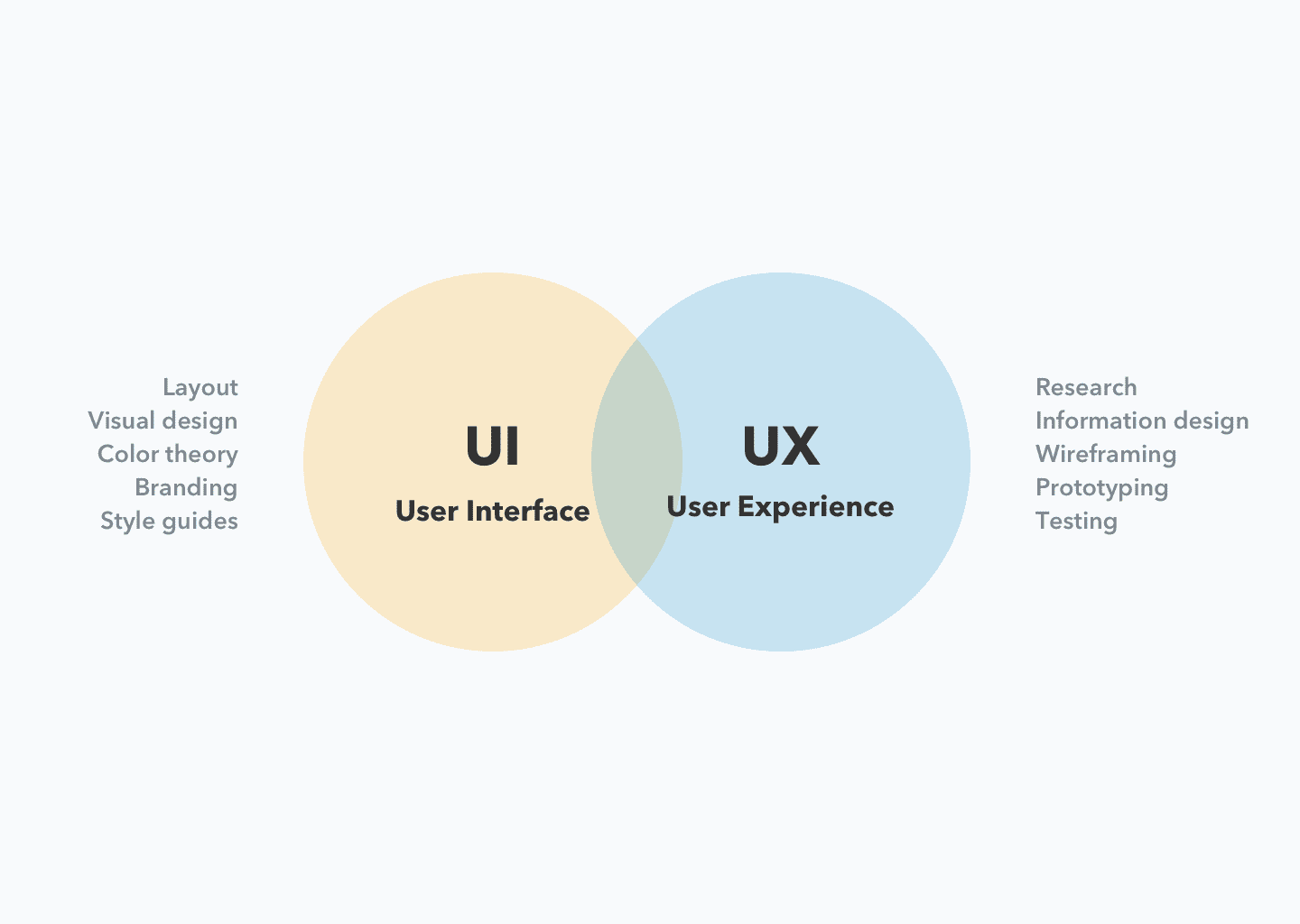
    UX (User Experience) Design and UI (User Interface) Design are two related but distinct fields in digital product design.

    UX design is focused on the overall feel of the product and how it meets the user’s needs and expectations. It involves research, prototyping, testing, and iterating to create a product that is both usable and enjoyable. UX designers focus on creating a seamless, intuitive, and efficient experience for users.

    UI design, on the other hand, is focused on the look and layout of the product’s interface. UI designers are responsible for creating the visual design, including the color scheme, typography, and the placement of elements on the screen. UI design is concerned with how the product is presented to the user, and how users interact with it.

    In conclusion, UX design is focused on the user’s experience, while UI design is focused on the visual and interactive design of the product. Both disciplines are important for creating successful digital products, and often work together to create a cohesive and delightful user experience.

  • 8 Tips on User Research

    8 Tips on User Research

    User research is the process of gathering data about users to inform design and product decisions. It involves studying and understanding the behavior, motivations, goals, and pain points of the people who will use a product.

    The goal of user research is to create products that are not only usable and functional, but also meet the needs and expectations of the target audience.

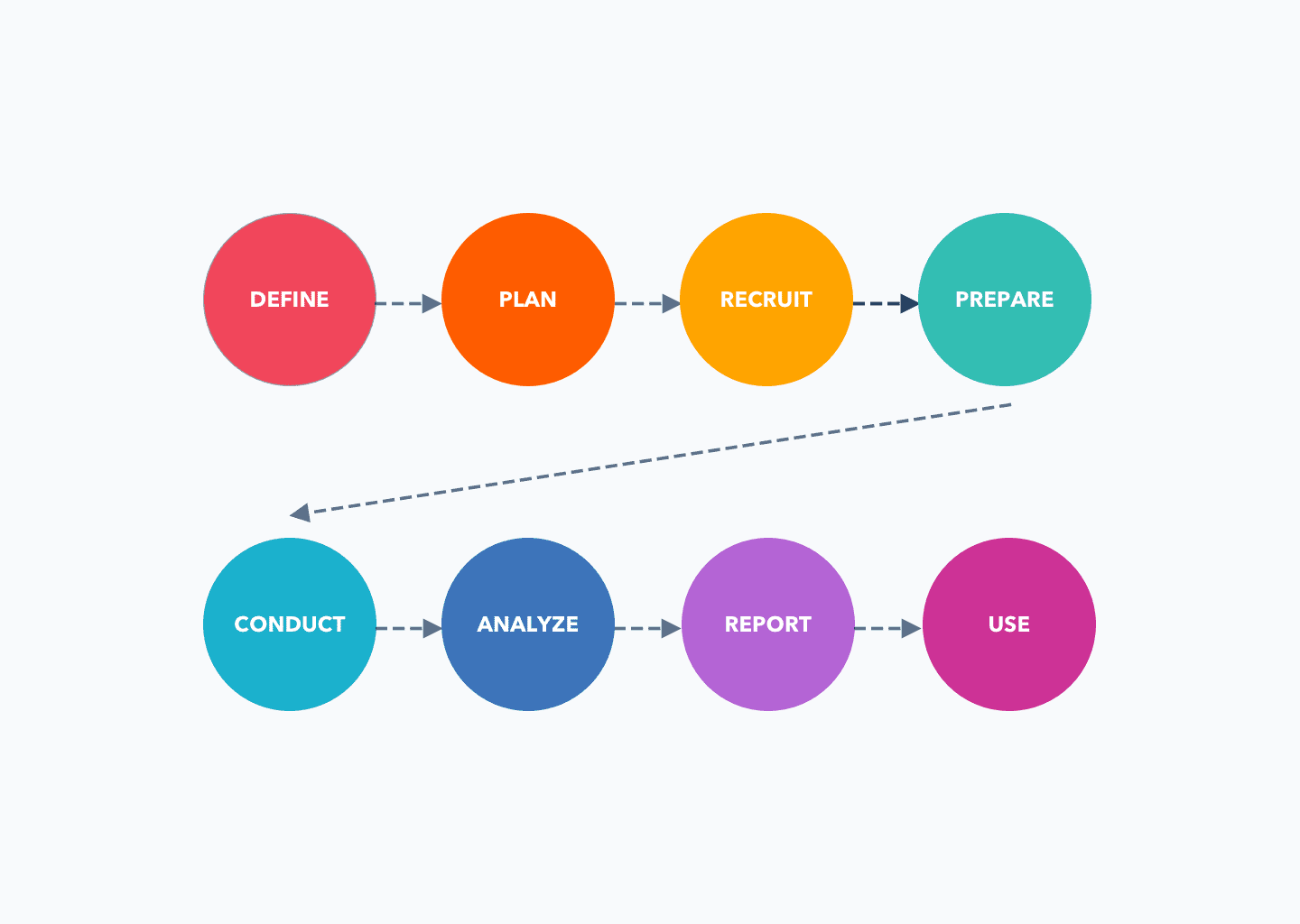
    Conducting user research involves the following steps:

    1. Define the research objectives: Clearly define what you want to learn from the research and what questions you need to answer.
    2. Plan the research methods: Choose the research methods that will best achieve your objectives, such as surveys, interviews, focus groups, usability testing, or other methods.
    3. Recruit participants: Identify and recruit participants who are representative of your target user group.
    4. Prepare for the research: Plan and prepare for each research method, including developing questions or tasks, setting up the environment, and testing equipment if necessary.
    5. Conduct the research: Carry out the research, following the methods and procedures you have planned.
    6. Analyze the data: Analyze the data you have collected, looking for patterns, trends, and insights.
    7. Report the findings: Summarize the findings of your research and present them in a clear and accessible way.
    8. Use the findings: Use the insights from your research to inform design and product decisions.

    User research can be qualitative or quantitative, and can involve a variety of methods, such as surveys, interviews, focus groups, usability testing, and observation.

    The data gathered through user research can inform design decisions, such as the features to include, the design of the interface, and the overall user experience.

    User research is an important part of the design process and helps ensure that products are designed with the user in mind. It should be an ongoing process, as you should continually gather feedback from users to ensure that your product meets their needs and expectations.