Category: UX Design

  • The Next Frontier in Product Design

    The Next Frontier in Product Design

    As technology advances at an unprecedented pace, interface and experience design are undergoing a transformative shift. The future of design is poised to be defined by groundbreaking innovations that not only enhance how we interact with digital content but also how we perceive and navigate our surroundings. This article, inspired by the AI and Innovation presentations from the 2024 Config (Figma Conference), explores three pivotal trends shaping this future: spatial computing, designing for canvases, and rendering 3D content. By learning more about these areas, we can glimpse the exciting possibilities that lie ahead and understand how they will revolutionize our digital interactions.

    Spatial Computing

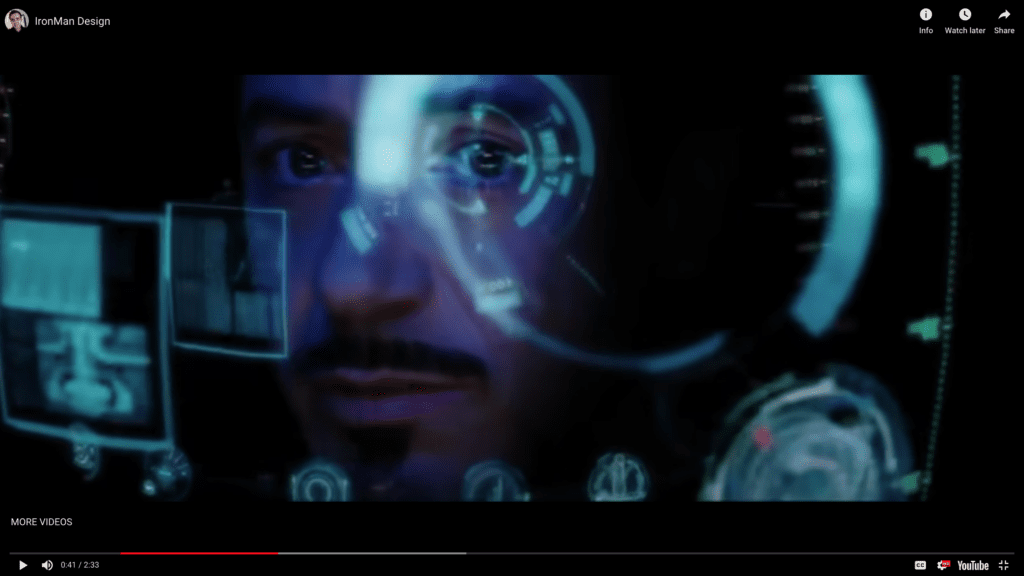
    Spatial computing represents a paradigm shift in how we interact with technology. Moving beyond traditional screens, spatial computing immerses users in a 3D environment where digital content seamlessly integrates with the physical world. Imagine Tony Stark, aka Iron Man, who can view and process multiple forms of data in real time, giving him superhuman intelligence.
    The Apple Vision Pro exemplifies this innovation, offering a glimpse into the potential of augmented reality (AR), virtual reality (VR), and mixed reality (MR) to reshape everyday experiences. By leveraging advanced sensors and spatial mapping, the Vision Pro allows users to interact with digital elements as if they were tangible objects in their environment. This immersive experience opens up new possibilities for entertainment, education, and productivity, setting the stage for a future where the boundaries between the digital and physical worlds blur.

    Designing for Canvases Instead of Portals

    As we transition into an era dominated by advanced computing, the approach to designing user interfaces must evolve. Traditional interfaces, confined to rectangular screens or “portals,” with a lot of vertical scrolling, will give way to dynamic and flexible “canvases” that adapt to various contexts and environments. This shift demands a reimagining of design principles, focusing on creating intuitive and immersive experiences that leverage the full potential of spatial computing.
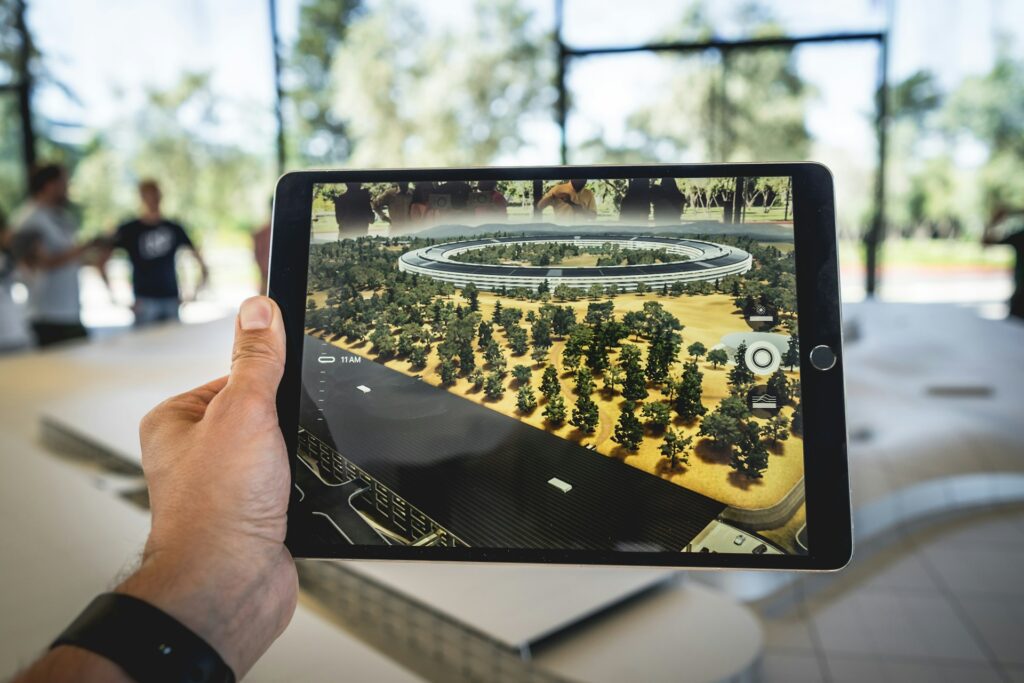
    For example, imagine an architect using AR to project a 3D model of a building onto a construction site, allowing stakeholders to explore and interact with the design in real time.

    Additionally, consider the new infotainment systems in vehicles. Instead of a traditional dashboard, these systems provide a customizable canvas that adapts to the driver’s needs, displaying navigation, media, vehicle performance, and even real-time updates from the road environment. This flexible interface not only enhances the driving experience but also improves safety and convenience by providing contextually relevant information seamlessly integrated into the driving environment.

    Virtual reality (VR) further expands the possibilities for designing beyond traditional portals. The Meta Quest, for example, offers an immersive environment where users can interact with digital content in a fully 3D space. In a VR setting, designers can create entire virtual worlds that users can explore and engage with, providing experiences that are both deeply interactive and visually stunning. Whether it’s for gaming, virtual meetings, or training simulations, VR can transform user experiences by offering a limitless canvas that goes beyond the physical constraints of conventional screens. This opens up new avenues for creativity and functionality, making the user experience more immersive and engaging than ever before.

    Rendering 3D Content in the Browser

    The ability to render 3D content directly in web browsers has been a game-changer for UX designers and developers. WebGL, a powerful graphics library, enables the creation of rich, interactive 3D experiences that run seamlessly across different devices and platforms. This technology has opened the door to a new realm of possibilities, from immersive gaming experiences to intricate data visualizations.

    A prime example is NASA’s Eyes applications, which use WebGL to offer an interactive exploration of our solar system. Users can navigate through space, zoom in on planets and moons, and witness real-time data visualizations of spacecraft trajectories. By bringing high-quality 3D graphics to the web, WebGL empowers designers to create more engaging and interactive experiences that captivate users and drive deeper engagement.

    Parting Words

    The future of user experience is a thrilling frontier where spatial computing, canvas-based design, and WebGL-powered 3D content converge to redefine how we interact with technology. These innovations promise to create more immersive, intuitive, and engaging experiences, seamlessly blending the digital and physical worlds.

    As we continue to explore and harness the potential of these technologies, the possibilities for enhancing our daily lives are boundless. By embracing these trends, designers and developers can pave the way for a future where user experience transcends traditional boundaries, delivering unprecedented levels of interactivity and immersion. The journey has just begun, and the future of UX holds exciting prospects that will reshape our digital experiences in ways we can only begin to imagine.
  • Elevating Excellence: A Guide for Graphic Designers Transitioning to UX/UI

    Elevating Excellence: A Guide for Graphic Designers Transitioning to UX/UI

    The journey from graphic design to UX/UI design is a rewarding but challenging transformation. While both fields prioritize creating visually appealing work, the approach, methodology, and end goals differ significantly. Graphic design emphasizes aesthetics, while UX/UI design centers around user experience, functionality, and interactivity. For graphic designers looking to transition into product design, understanding these differences and mastering new skills is essential.

    Understanding the Core Differences

    Designing for Different Canvases

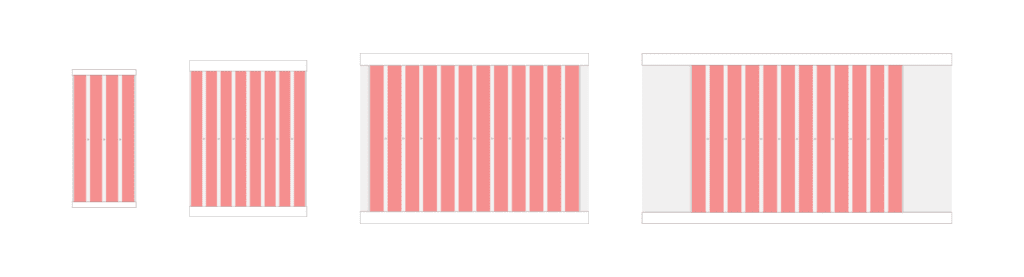
    Graphic designers often work with static, fixed-size canvases. In contrast, product designers must consider multiple devices and screen sizes. Responsive design is crucial in UX/UI, requiring designers to create flexible layouts that work across desktops, tablets, and mobile devices. Understanding how to design for various screen sizes and ensuring a consistent user experience is a fundamental skill for product designers.

    Web and mobile canvases

    Caption: This illustration shows four different canvases — mobile, tablet, desktop, and wide screens — and their basic layout properties.

    Focus on Functionality and User Experience

    Graphic design is primarily about creating visually engaging content, such as logos, posters, and marketing materials. The emphasis is on aesthetics, typography, and visual harmony. In contrast, UX/UI design focuses on how a product feels and functions. It involves understanding user needs, creating intuitive interfaces, and ensuring a seamless user experience. The mantra of UX/UI design is “form follows function,” meaning that the design’s primary goal is to serve the user’s needs effectively before considering visual appeal.

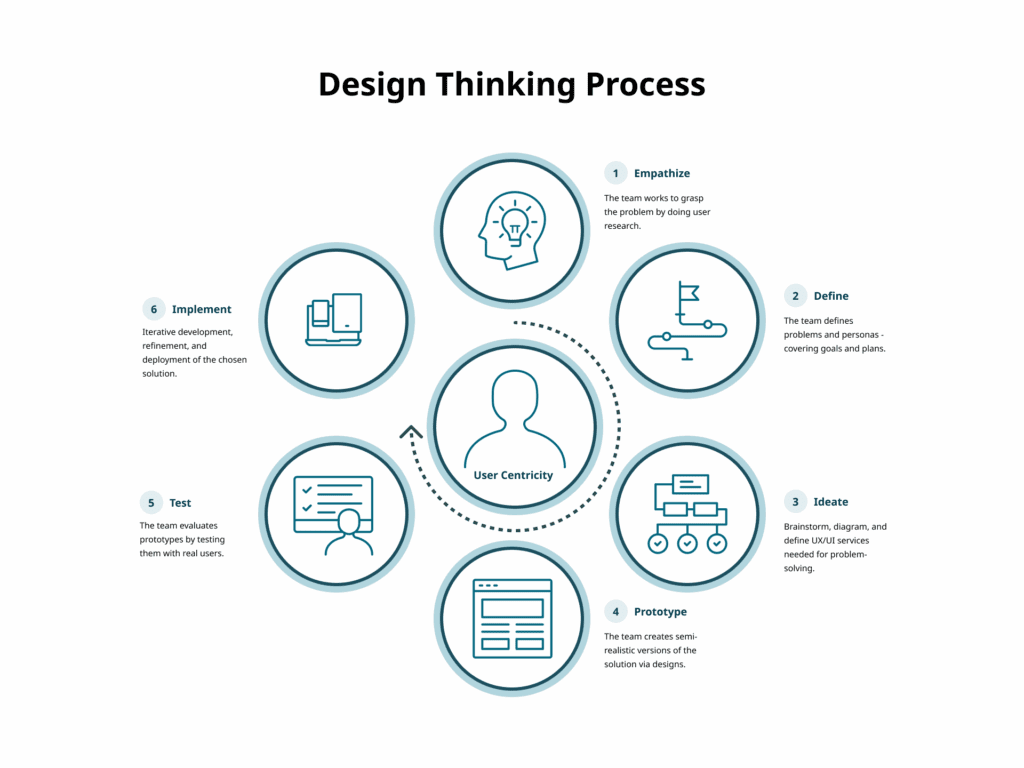
    The Design Thinking Process

    The UX/UI design process is more structured and iterative than traditional graphic design. It typically involves:

    1. Empathize

    Understand the needs, experiences, and challenges of users through research.

    Techniques include:

    • User interviews
    • Observation
    • Surveys and questionnaires

    2. Define

    Clearly articulate the problem you are aiming to solve.

    Methods include:

    • User personas
    • Problem statements
    • User journey maps

    3. Ideate

    Generate a wide range of ideas and potential solutions.

    Techniques include:

    • Brainstorming sessions
    • Mind mapping
    • Sketching

    4. Prototype

    Create simple and cost-effective versions of proposed solutions.

    Methods include:

    • Paper prototypes
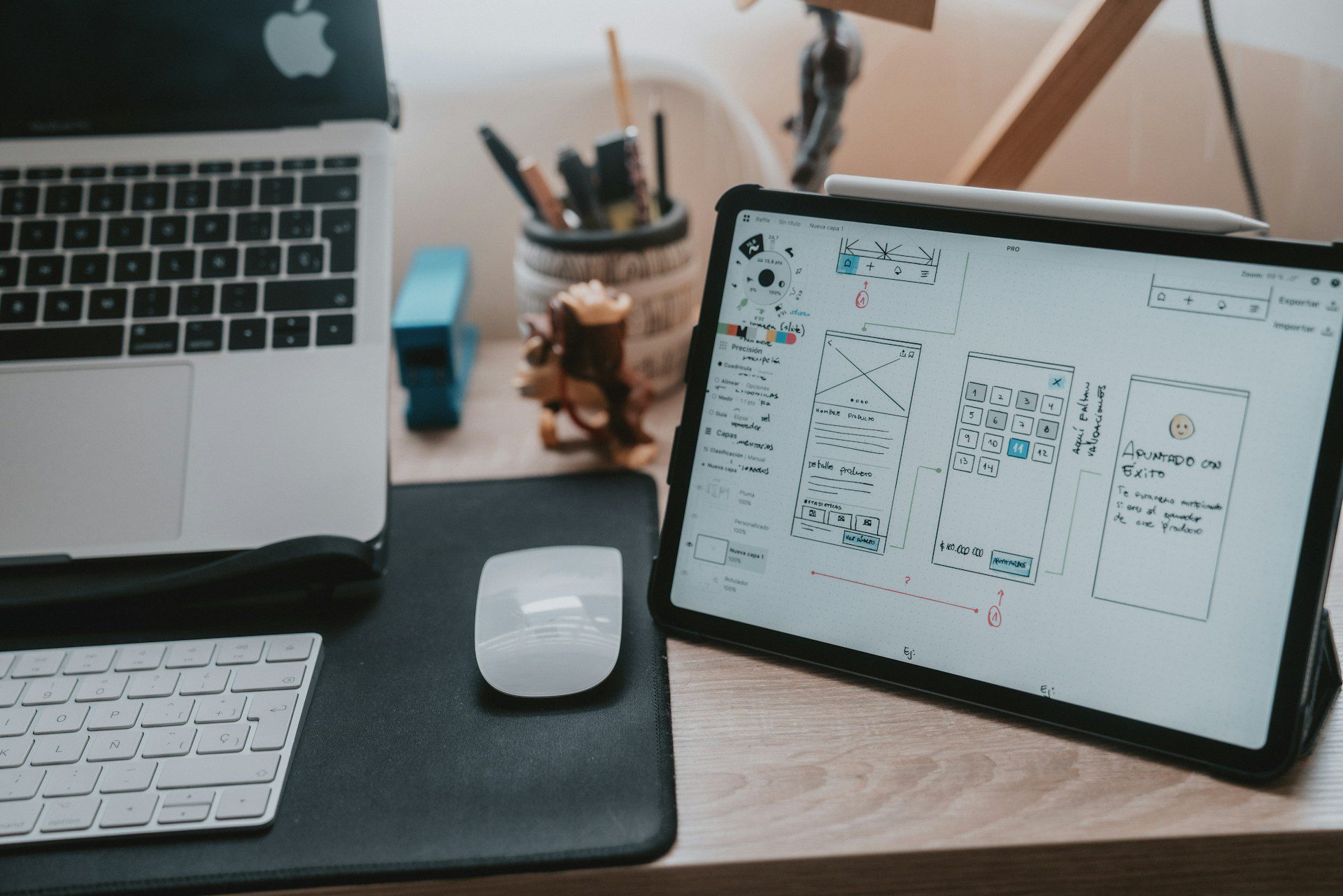
    • Digital prototypes using tools like Sketch or Figma
    • Storyboards

    5. Test

    Evaluate prototypes with real users to gather feedback.

    Methods include:

    • Usability testing
    • A/B testing
    • Feedback sessions

    6. Implement

    Translate the final design into a functional product.

    This involves:

    • Design handoff with specifications and assets
    • Collaboration with developers
    • Quality assurance testing
    • Launch
    • Post-launch monitoring

    Iteration

    Design thinking is an iterative process. Based on feedback, designers may revisit previous steps to continually refine and improve solutions.

    Learning the Technical Basics

    One major difference between graphic and product design is the need for technical knowledge, particularly web technologies. Understanding HTML, CSS, and JavaScript is vital. While graphic designers often focus on pixel-perfect visuals, product designers must also consider technical constraints and browser behavior.

    HTML (Hypertext Markup Language)

    HTML defines structure and content.

    Key basics:

    • Common tags such as div, span, p, a, img, h1–h6, ul, ol
    • Semantic HTML using header, footer, article, section
    • Attributes like class, id, href, src
    • Forms using form, input, label, button

    CSS (Cascading Style Sheets)

    CSS controls styling and layout.

    Key basics:

    • Selectors and properties
    • The box model: content, padding, border, margin
    • Flexbox and Grid for layout
    • Responsive design with media queries

    Caption: The CSS Box Model Module Level 3, provided by the W3C.

    JavaScript

    JavaScript adds interactivity.

    Key basics:

    • Syntax fundamentals and variables
    • DOM manipulation using getElementById, querySelector, addEventListener, classList
    • Event handling
    • Libraries and frameworks such as jQuery or React

    Mastering these foundations helps designers collaborate effectively with developers and build responsive, functional interfaces.

    Building a UX/UI Skillset

    Developing a robust UX/UI skillset is crucial. Visual design remains important, but expanding into research, architecture, interaction, and technical literacy is essential.

    Key areas to develop:

    • User research
    • Information architecture
    • Wireframing and prototyping with tools like Figma
    • Interaction design principles
    • Usability and accessibility
    • Technical literacy in HTML, CSS, and JavaScript

    Practical Steps to Transition

    Transitioning can be challenging but manageable with a clear plan.

    • Education and Training: Take UX/UI courses or workshops.
    • Build a Portfolio: Redesign existing products or create new concepts that demonstrate your process.
    • Get Mentored: Seek guidance and feedback from experienced UX/UI professionals.
    • Gain Experience: Pursue internships or freelance projects to build practical skills.

    Parting Words

    Transitioning from graphic design to product design involves a shift in mindset, skillset, and process. By focusing on user experience, learning technical fundamentals, and embracing iterative design, graphic designers can successfully enter UX/UI. This evolution broadens your capabilities and enables you to create products that are both visually compelling and highly functional.

    Key Takeaways

    • Emphasis on User Experience: Functionality and interaction take priority over pure aesthetics.
    • Designing for Multiple Devices: Responsive design is essential.
    • Comprehensive Skillset: Expand beyond visuals into research, architecture, and technical literacy.
    • Structured Design Thinking: Follow an iterative process of empathy, definition, ideation, prototyping, testing, and implementation.
    • Technical Integration: Understanding HTML, CSS, JavaScript, and the box model is critical for building responsive digital products.
  • Designing with Empathy: Evaluating and Scaling Empathetic Design

    Designing with Empathy: Evaluating and Scaling Empathetic Design

    In this lesson, we embark on a journey to assess and expand upon the empathetic design principles we’ve cultivated thus far. We’ll explore methods for measuring the effectiveness of empathetic design through metrics and assessment tools. Additionally, we’ll uncover strategies for scaling empathy across teams and organizations, fostering a culture of user-centricity that extends beyond individual projects. Finally, we’ll draw inspiration from real-world case studies and best practices, providing valuable insights into successful implementations of empathetic design. Get ready to evaluate and scale your empathetic design practices, enriching your approach and impact in the realm of design.

    Measuring Empathy in Design: Metrics and Assessment Tools

    Measuring empathy in design involves utilizing specific metrics and assessment tools to gauge the effectiveness of empathetic strategies. Metrics might include user satisfaction ratings, emotional engagement metrics, or feedback on user experiences. Assessment tools like surveys, empathy mapping techniques, and usability testing help quantify and qualify the impact of empathetic design on user interactions.

    Example User Satisfaction Survey

    Thank you for participating in this survey to help us evaluate the effectiveness of our product. Your feedback is invaluable in shaping our approach to creating user-centric experiences.

    1. On a scale of 1 to 5, how satisfied are you with your recent experience using our product/service?
      • 1: Very Dissatisfied
      • 2: Dissatisfied
      • 3: Neutral
      • 4: Satisfied
      • 5: Very Satisfied
    2. How well did our product/service address your emotional needs and preferences?
      • Not at all
      • Somewhat
      • Moderately
      • Very well
      • Exceptionally well
    3. To what extent do you feel that our design reflects an understanding of your needs and concerns?
      • Not at all
      • Somewhat
      • Moderately
      • Very much
      • Completely
    4. Did you feel that our product/service demonstrated empathy towards your situation or challenges?
      • Not at all
      • Somewhat
      • Moderately
      • Very much
      • Absolutely
    5. How easy was it for you to navigate and interact with our product/service?
      • Very Difficult
      • Difficult
      • Neutral
      • Easy
      • Very Easy
    6. Based on your experience, how likely are you to recommend our product/service to others?
      • Not at all likely
      • Slightly likely
      • Moderately likely
      • Very likely
      • Extremely likely
    7. Do you have any suggestions or feedback on how we can further enhance our empathetic design approach?

    Thank you for taking the time to complete this survey. Your input is invaluable in helping us improve our products/services to better meet your needs and expectations.

    Strategies for Scaling Empathy Across Teams and Organizations

    Scaling empathy across teams and organizations requires a cultural shift towards prioritizing user-centricity. Strategies include fostering a shared understanding of the importance of empathy, integrating empathy into company values and processes, and conducting empathy-focused training sessions. Encouraging cross-department collaboration and regularly sharing user stories and insights further embeds empathy in the organizational DNA.

    Here are some strategies to achieve this:

    1. Leadership Support and Modeling: Leadership should demonstrate and advocate for empathetic behavior in all interactions, both internally and externally. When leaders prioritize empathy, it sets a precedent for the rest of the organization to follow.
    2. Training and Workshops: Offer training sessions and workshops on empathy and its importance in various aspects of the organization, including customer service, product development, and team collaboration. These sessions can include case studies, role-playing exercises, and discussions to reinforce understanding and application.
    3. Incorporate Empathy into Values and Mission: Integrate empathy into the organization’s core values and mission statement. By explicitly stating the importance of empathy, it becomes a guiding principle that informs decision-making and actions at all levels.

    By implementing these strategies, organizations can create a culture where empathy is valued, understood, and practiced by all employees. This not only leads to better relationships with customers and stakeholders but also fosters a more inclusive and supportive work environment.

    Real-World Case Studies and Best Practices in Empathetic Design Implementation

    Exploring real-world case studies and best practices offers tangible examples of successful empathetic design implementations. These case studies highlight how organizations applied empathy to solve user problems effectively. Analyzing these cases provides valuable insights into the practical application of empathetic design principles, offering inspiration and guidance for implementation.

    A compelling real-world case study in empathetic design is Airbnb’s “Open Homes” initiative. This initiative allows hosts to offer free housing to displaced individuals during crises such as natural disasters or conflicts. By empathizing with the needs of displaced individuals, adopting a user-centric approach, collaborating with communities, measuring impact, and ensuring scalability and sustainability, Airbnb has created a solution that makes a meaningful difference in people’s lives during times of crisis.

    Another excellent example of empathetic design is the redesign of the Mayo Clinic’s patient experience. It exemplifies empathetic design principles by understanding patient needs, co-creating with patients, creating a welcoming environment, streamlining processes, empowering patients, and prioritizing continuous improvement. This patient-centered approach has resulted in a more compassionate, supportive, and effective healthcare experience for patients and their families.

    Key Takeaways

    • Empathy Measurement Tools: Utilize metrics and assessment tools to measure the impact of empathetic design on user experiences.
    • Cultural Integration Strategies: Implement strategies to scale empathy, fostering a user-centric culture across teams and organizations.
    • Learning from Case Studies: Real-world case studies provide valuable insights and best practices for effective empathetic design implementation.

    By employing measurement tools to assess empathy’s impact, implementing strategies for scaling empathy across teams, and drawing inspiration from successful case studies, organizations can systematically integrate and amplify empathetic design practices. This fosters a culture where empathetic design is not just a concept but a fundamental guiding principle driving impactful user experiences.


    Thank you for taking the time to read my article! I value your interest and engagement. I invite you to continue the conversation by sharing your thoughts, questions, or feedback in the comments section below.

    Don’t forget to like and share this article with your network if you found it valuable. And remember to check back in a couple weeks for my next insightful article. Until then, stay creative and keep exploring!

  • Designing with Empathy: Empathy in Product Development

    Designing with Empathy: Empathy in Product Development


    From ideation to prototyping, this lesson explores how embedding empathy in the creative process enriches designs with emotional resonance. Additionally, we’ll uncover the art of testing for user empathy and emotional responses, refining products for enhanced user experiences. Lastly, we’ll address the delicate balance required to harmonize empathy with functional and business objectives, ensuring that empathetic design aligns seamlessly with broader goals.

    Implementing Empathy in Ideation and Prototyping

    Infusing empathy into ideation involves considering users’ emotional needs and experiences right from the initial concept phase. Design thinking sessions that focus on understanding user stories, pain points, and desires pave the way for ideation steeped in empathy. Prototyping with empathy means creating tangible representations that reflect users’ emotions and interactions, allowing for iterative improvements based on empathetic feedback.

    Testing for User Empathy and Emotional Response

    User testing goes beyond functionality to assess how users emotionally engage with a product or service. Techniques like user interviews, observation, and task-based assessments uncover emotional responses. Understanding users’ emotional reactions helps refine design elements to evoke desired emotional responses and enhance overall user experiences.

    Balancing Empathy with Functional and Business Objectives

    While empathy is pivotal, it must align with functional requirements and business goals. Designers navigate a delicate balance between creating emotionally resonant experiences and meeting functional needs and business objectives. This entails considering trade-offs where necessary to ensure that empathetic design doesn’t compromise usability or financial viability.

    Key Takeaways

    • Empathy-driven Ideation: Incorporating empathy from the ideation stage fosters designs that resonate emotionally with users.
    • Testing Emotional Responses: User testing focused on emotional engagement helps refine designs for enhanced user experiences.
    • Harmonizing Empathy with Goals: Balancing empathy with functional and business objectives ensures designs are both emotionally engaging and aligned with broader goals.

    By integrating empathy into ideation and prototyping, testing for emotional responses, and striking a balance between empathy and practical objectives, designers create products that are not only functional but also emotionally resonant. This approach ensures that user experiences are deeply empathetic while meeting business and functional requirements.


    Thank you for taking the time to read my article! I value your interest and engagement. I invite you to continue the conversation by sharing your thoughts, questions, or feedback in the comments section below.

    Don’t forget to like and share this article with your network if you found it valuable. And remember to check back in a couple weeks for my next insightful article. Until then, stay creative and keep exploring!

  • Designing with Empathy: Infusing Empathy into Design Processes

    Designing with Empathy: Infusing Empathy into Design Processes

    In this lesson, we’ll explore how empathy becomes the cornerstone of UI/UX design, fostering intuitive interfaces that resonate with users on a deeper emotional level. Additionally, we’ll uncover the collaborative dynamics with stakeholders through an empathetic lens, ensuring design alignment with diverse perspectives. Finally, we’ll establish the importance of continuous feedback loops, facilitating ongoing empathy integration for designs that evolve with users’ changing needs.

    Integrating Empathy in UI/UX Design

    Empathy in UI/UX design involves understanding users’ emotions, behaviors, and needs to create interfaces that cater to their experiences. This segment explores designing with empathy, such as using inclusive design principles, intuitive navigation, and visually appealing elements to evoke positive user emotions and enhance usability.

    Inclusive Design Principles

    • Accessibility: Implementing features like alt text for images, keyboard navigation, and sufficient color contrast ensures access for users with disabilities, fostering a sense of inclusivity.
    • Diverse Representation: Including diverse imagery, content, and language that resonate with a wide range of users promotes inclusivity and a sense of belonging.
    • Adaptability: Designing interfaces that adapt to various devices and user preferences accommodates different user needs, enhancing usability for all.

    Intuitive Navigation

    • Clear Hierarchy: Structuring information hierarchically with clear headings, categories, and menus allows users to navigate seamlessly, reducing confusion and frustration.
    • Consistency: Maintaining consistent design elements and patterns across the interface aids users in predicting the system’s behavior, promoting ease of use.
    • User-Centric Flow: Designing workflows that align with users’ mental models and expectations enables intuitive interactions, leading to a positive emotional experience.

    Visually Appealing Elements

    • Engaging Visuals: Using high-quality images, appealing colors, and aesthetically pleasing layouts creates a visually engaging experience that evokes positive emotions.
    • Whitespace and Balance: Utilizing whitespace effectively and ensuring a balanced layout avoids overwhelming users, contributing to a more comfortable and pleasant interaction.
    • Emotionally Resonant Design: Incorporating design elements that evoke specific emotions—such as calming colors for relaxation apps or vibrant tones for energetic experiences—enhances user engagement.

    By implementing these principles, navigation techniques, and visually appealing elements, designers create an environment where users feel included, guided, and emotionally connected to the interface. This approach not only enhances usability but also fosters a positive emotional connection with the product or service.

    Collaborative Approaches with Stakeholders through Empathetic Lens

    Collaborating with stakeholders through an empathetic lens fosters a deeper understanding of diverse perspectives. By empathizing with stakeholders’ goals, concerns, and limitations, designers can align their design strategies with broader organizational objectives, ensuring inclusivity and shared understanding.

    Establishing Feedback Loops for Ongoing Empathy Integration

    Creating feedback loops ensures ongoing integration of empathy into design processes. These loops involve collecting user feedback, analyzing usability testing results, and actively seeking input from diverse user groups. Incorporating this feedback iteratively enhances empathy-driven design by addressing evolving user needs.

    Key Takeaways

    • UI/UX Design with Empathy: Integrating empathy in UI/UX enhances user experiences through intuitive and emotionally resonant designs.
    • Empathetic Collaboration: Engaging stakeholders empathetically fosters alignment between design goals and broader organizational objectives.
    • Continuous Feedback Integration: Establishing feedback loops enables iterative improvements, ensuring designs remain empathetic and responsive to evolving user needs.

    By embedding empathy into UI/UX design, fostering empathetic collaboration with stakeholders, and establishing continuous feedback loops, designers create experiences that resonate deeply with users while aligning with organizational goals. This empathetic approach ensures that design solutions are not only user-centric but also reflective of diverse perspectives and constantly evolving user needs.


    Thank you for taking the time to read my article! I value your interest and engagement. I invite you to continue the conversation by sharing your thoughts, questions, or feedback in the comments section below.

    Don’t forget to like and share this article with your network if you found it valuable. And remember to check back in a couple weeks for my next insightful article. Until then, stay creative and keep exploring!

  • Designing with Empathy: Journey Mapping Strategies

    Designing with Empathy: Journey Mapping Strategies

    This lesson delves into the powerful world of customer journey mapping—an essential tool for understanding user experiences comprehensively. We’ll explore the meticulous process of creating detailed journey maps that trace users’ interactions from start to finish. From pinpointing touchpoints and pain points to mapping emotional states throughout the user journey, this lesson equips designers with the tools to empathetically visualize and analyze the user’s holistic experience.

    Creating Comprehensive Customer Journey Maps

    Customer journey maps visualize the end-to-end experience users have with a product or service. Start by outlining the various stages users go through, from initial awareness to post-purchase interactions. For instance, in an e-commerce platform, stages might include ‘Browsing,’ ‘Adding to Cart,’ ‘Checkout,’ ‘Product Delivery,’ and ‘Customer Support.’ Each stage should detail user actions, emotions, and pain points encountered.

    Caption: A journey map (above) is a visual representation of the user’s experience with a product or service, illustrating their interactions, emotions, and pain points across various touchpoints. To fill in a journey map, plot the user’s actions, thoughts, and emotions at each stage of their journey, using insights from user research.

    Example

    1. Define the Scope and Purpose: Identify the specific user experience you want to map, whether it’s a product, service, or specific interaction. Determine the objectives of the map—whether it’s to improve a particular stage of the user journey or to gain a holistic understanding.
    2. Identify Personas and Stages: Refer to previously crafted user personas and outline the stages of the journey your users go through. Define the key stages from the user’s perspective, starting from initial awareness to post-interaction phases.
    3. Gather Data and Insights: Collect qualitative and quantitative data from user interviews, surveys, analytics, and feedback to understand user behaviors, emotions, pain points, and touchpoints at each stage.
    4. Plot Touchpoints and Actions: Within each stage, map out the touchpoints—every interaction point users have with your product or service. Identify the actions users take and the touchpoints they encounter, such as website visits, app usage, customer support interactions, etc.
    5. Highlight Emotional States and Pain Points: Document the emotional highs and lows users experience at different touchpoints. Pinpoint pain points—areas where users face difficulties, frustrations, or negative emotions.
    6. Create the Visual Representation: Design the journey map using visual elements like timelines, charts, or diagrams. Display the stages, touchpoints, actions, emotions, and pain points clearly to facilitate understanding.
    7. Validate and Iterate: Share the journey map with stakeholders, team members, or even users to validate its accuracy. Incorporate feedback and refine the map iteratively based on new insights or changes in the user experience.
    8. Utilize and Iterate: Use the journey map as a reference for making design decisions, improving user experiences, and aligning strategies. Regularly revisit and update the map to reflect changes in user behaviors or product/service modifications.

    Creating a customer journey map is an iterative process that involves continual refinement based on evolving user insights and feedback. The aim is to create a visual representation that empathetically captures the user’s experience, allowing for informed design decisions that enhance overall user satisfaction.

    Identifying Touchpoints and Pain Points in User Experience

    Within each stage of the journey map, identify touchpoints—moments where users interact with the product or service. These touchpoints could be website visits, app interactions, customer service calls, etc. Simultaneously, highlight pain points—areas where users encounter difficulties, frustrations, or negative emotions. Pinpointing these pain points helps in addressing areas for improvement.

    Mapping Emotional States Throughout User Interaction

    An essential aspect of journey maps is capturing the emotional journey of users. Document the emotional highs and lows users experience at different touchpoints. For example, during the ‘Checkout’ stage, a user might feel excited about finalizing a purchase but frustrated due to a complex payment process. Mapping these emotions provides insights into user sentiments and helps in tailoring experiences to evoke positive emotions.

    Key Takeaways

    • Comprehensive Journey Mapping: Visualizing the entire user journey helps in understanding the holistic user experience.
    • Touchpoints and Pain Points: Identifying touchpoints and pain points aids in focusing on areas that significantly impact user satisfaction.
    • Emotional Mapping for User Insights: Mapping emotional states helps in understanding and addressing user sentiments, influencing design decisions for better user experiences.

    By meticulously crafting comprehensive customer journey maps, identifying touchpoints and pain points, and mapping emotional states, designers gain a holistic view of the user experience. This understanding forms the foundation for creating solutions that address user needs and emotions at every stage of their interaction.


    Thank you for taking the time to read my article! I value your interest and engagement. I invite you to continue the conversation by sharing your thoughts, questions, or feedback in the comments section below.

    Don’t forget to like and share this article with your network if you found it valuable. And remember to check back in a couple weeks for my next insightful article. Until then, stay creative and keep exploring!

  • Designing with Empathy: Crafting User Personas

    Designing with Empathy: Crafting User Personas

    This lesson immerses us in the art of creating vivid representations of diverse user segments. We’ll explore the meticulous process of defining, refining, and leveraging user personas to capture the essence of various user groups. From empathy mapping to iterative refinement, this lesson unveils the techniques essential for crafting personas that drive empathetic and user-centric design.

    Defining and Constructing Comprehensive User Personas

    Creating user personas involves defining detailed profiles that represent different user segments. For instance, in a fitness app context, personas might include “Fitness Enthusiast Emma,” outlining her goals, frustrations, and habits. “Beginner Brian” might represent a different segment, highlighting his motivations and challenges. Crafting personas involves extensive research synthesis to capture diverse user characteristics, preferences, and pain points.

    Example

    Step 1: Research and Data Collection

    Gather extensive information through user interviews, surveys, observations, and analytics. Aim to understand user demographics, behaviors, motivations, goals, pain points, and preferences.

    Step 2: Identify Patterns and Commonalities

    Analyze collected data to identify recurring themes, common behaviors, and shared pain points among users. Group similar characteristics and behaviors to form distinct user segments.

    Step 3: Persona Definition

    Choose a primary user segment and begin crafting the persona. Give the persona a name, age, background, and job title that aligns with the identified user group. For example:

    • Name: Marcus
    • Age: 29
    • Occupation: Graphic Designer
    • Background: Marcus is a talented graphic designer with a passion for visual storytelling and creative expression. He holds a Bachelor’s degree in Graphic Design and has been working in the industry for five years. Marcus is known for his bold and innovative design style, which he incorporates into his work across various mediums, including branding, digital marketing, and illustration. Outside of work, Marcus is an avid music lover and enjoys exploring new artists and genres.

    Step 4: Persona Detailing

    Add depth to the persona by including details such as:

    • Demographics: Location, education, family status.
    • Motivations: What drives their actions and decisions.
    • Goals: What are they looking for or trying to achieve.
    • Challenges and Pain Points: Obstacles they face in achieving their goals.
    • Behaviors: How they interact with the product/service.

    Step 5: Empathy Mapping

    Create an empathy map to visualize the persona’s thoughts, feelings, pains, and gains related to your product/service. For instance, understand Marcus’ feelings about music apps, his thoughts on variety, his pains in choosing one, and his gains interest in finding features that enhance his music listening experience..

    Step 6: Validate and Iterate

    Share the persona with stakeholders and team members for feedback. Validate the persona’s accuracy through additional user research or user testing. Iterate the persona based on feedback or new insights gathered.

    Step 7: Persona Utilization

    Leverage the persona across the design process. Use it as a reference point when making design decisions, crafting user journeys, or evaluating features to ensure alignment with user needs and behaviors.

    Creating a user persona is an iterative process that involves continuous refinement based on evolving user insights and feedback. Remember, the goal is to create a detailed, representative profile that empathetically captures the needs and motivations of a specific user segment.

    Utilizing Empathy Maps for Persona Development

    Empathy maps serve as powerful tools for visualizing user personas’ emotions, thoughts, and behaviors. For example, mapping Emily’s feelings about workout intensity or Brian’s thoughts about using fitness tracking features helps in understanding their perspectives. These visual representations aid in empathizing with users, providing deeper insights for persona development by incorporating emotional and behavioral dimensions.

    A user empathy map (above) is a chart that helps you understand your user’s perspective. Capture what users say, do, think, and feel about a product or experience using quotes, behaviors, and emotions to uncover their needs and motivations.

    How To

    Filling out an empathy map involves capturing insights and observations about a user’s thoughts, feelings, actions, and needs. Here’s how you can fill out each section of the empathy map:

    1. Says: Record direct quotes or statements made by the user. These could be expressions of their needs, desires, frustrations, or aspirations. Use quotes obtained from interviews or user feedback to provide firsthand insights into the user’s thoughts and preferences.
    2. Thinks: Document the internal thoughts, beliefs, and attitudes of the user. Consider what the user might be thinking about, such as their goals, motivations, concerns, or expectations. Use empathy and intuition to infer what the user might be thinking based on their behavior and verbal expressions.
    3. Does: Capture the observable actions, behaviors, and interactions of the user. Observe how the user interacts with products, services, or environments in different situations. Pay attention to both routine behaviors and specific actions taken in response to certain triggers or stimuli.
    4. Feels: Explore the emotions, feelings, and sentiments experienced by the user. Consider how the user might be feeling in various situations, such as happy, frustrated, anxious, excited, or confused. Use empathy to empathize with the user’s emotional state and understand the underlying reasons for their feelings.
    5. Influences: External factors that may impact the user’s behavior and decision-making process. Consider the people, things, and places that play a role in shaping the user’s actions and preferences. Examples of influences could include friends and family, cultural norms, societal trends, media, advertisements, or environmental factors. 

    To fill out an empathy map effectively, it’s essential to gather insights from user research, observations, interviews, surveys, and user testing. Engage with users directly to gain a deeper understanding of their experiences, motivations, and challenges. Use empathy and active listening to empathize with the user’s perspective and fill out the empathy map with rich, detailed insights that inform design decisions and solutions.

    Refinement Strategies for Iterative Persona Building

    Iterative persona building involves continuous refinement based on ongoing research and feedback. For instance, revisiting personas to incorporate new data might reveal that Emma’s goals have evolved, requiring persona adjustments. Collaborating with stakeholders and validating personas through user testing ensures accuracy. Iterative refinement ensures personas stay relevant and reflective of users’ evolving needs.

    Example Persona Refinement Strategy

    Quarterly Review:

    • Every three months, schedule a review of user personas to ensure they remain accurate and relevant.
    • Allocate 1-2 hours for the review session.

    Step 1: Data Collection (Week 1-2):

    • Gather quantitative data from analytics tools, such as website traffic, user engagement metrics, and customer surveys.
    • Conduct qualitative research, including user interviews, usability testing, and customer feedback sessions.

    Step 2: Analysis and Synthesis (Week 3-4):

    • Analyze the collected data to identify patterns, trends, and insights related to user behaviors, needs, and preferences.
    • Synthesize the findings to update or refine existing user personas based on the new insights.

    Step 3: Persona Workshop (Week 5):

    • Host a persona workshop with key stakeholders, including designers, product managers, marketers, and customer support representatives.
    • Present the updated personas and discuss the rationale behind the changes.
    • Collaboratively review and validate the updated personas to ensure they accurately represent the target audience.

    Step 4: Documentation and Distribution (Week 6):

    • Document the updated personas, including demographic information, behavioral traits, goals, pain points, and motivations.
    • Distribute the updated personas to relevant teams and departments, such as product development, marketing, sales, and customer support.
    • Ensure that everyone has access to the latest personas and understands how to use them effectively in their work.

    Step 5: Implementation and Monitoring (Ongoing):

    • Implement changes and updates to products, services, and marketing strategies based on the insights from the updated personas.
    • Monitor user feedback, engagement metrics, and other relevant data to assess the impact of the changes.
    • Iterate on the personas as needed based on ongoing research and feedback from stakeholders.

    By following this schedule, you can ensure that your user personas remain accurate, actionable, and aligned with the evolving needs of your target audience.

    Key Takeaways

    • Comprehensive Persona Construction: Building detailed personas involves in-depth research and synthesis to capture diverse user segments.
    • Empathy Maps for Deeper Insights: Empathy maps provide visual representations of user emotions and behaviors, enhancing understanding for persona development.
    • Iterative Persona Refinement: Continuous refinement based on ongoing research and feedback ensures personas remain accurate and aligned with users’ evolving needs.

    Through comprehensive persona construction, utilization of empathy maps, and iterative refinement strategies, designers gain a profound understanding of their users. These insights fuel the creation of tailored and impactful solutions that resonate with diverse user segments.


    Thank you for taking the time to read my article! I value your interest and engagement. I invite you to continue the conversation by sharing your thoughts, questions, or feedback in the comments section below.

    Don’t forget to like and share this article with your network if you found it valuable. And remember to check back in a couple weeks for my next insightful article. Until then, stay creative and keep exploring!

  • Designing with Empathy: User Research Techniques

    Designing with Empathy: User Research Techniques

    In this lesson, we dive into the practical strategies essential for gathering, analyzing, and interpreting user insights. From conducting insightful interviews, crafting impactful surveys, to astute observations, we’ll explore diverse methods for collecting rich user data. Through real-world examples and hands-on approaches, you’ll gain the skills needed to distill this data into actionable insights that drive informed design decisions.

    Conducting Effective User Interviews, Surveys, and Observations

    Mastering user interviews involves framing open-ended questions that encourage detailed responses. For instance, in an app development scenario, asking users about their frustrations with current apps can reveal pain points. Crafting surveys with concise yet comprehensive questions, such as rating features on a scale of importance, can offer quantifiable insights. Observations, like tracking how users navigate a website, unveil behaviors difficult to capture through direct questioning.

    Example Questions

    1. Tell me about a recent experience using [Product/Service]. What stood out to you the most during that experience?
    2. Can you walk me through the process of [specific task or goal]? What steps did you take, and were there any challenges along the way?
    3. How do you typically [use/interact with] [Product/Service]? What do you like/dislike about this process?
    4. Could you describe a situation where [Product/Service] exceeded your expectations? What made that experience memorable?
    5. When it comes to [specific feature or aspect], what would make it more useful/easier for you?
    6. What frustrations or challenges have you encountered while [using/navigating] [Product/Service]? How did it impact your overall experience?
    7. Can you share an instance where [Product/Service] made a significant impact on your daily routine or work? How did it influence your tasks or decisions?

    Analyzing and Synthesizing User Research Data

    Consider a scenario where interview transcripts and survey responses need synthesis. Coding similar themes or sentiments across different data sources can reveal patterns. Tools like affinity diagrams or journey maps can organize these patterns, providing visual representations that aid analysis. Synthesizing data might involve recognizing that user complaints about slow loading times align with frustration during peak traffic hours.

    user testing feedback example

    Interpreting Insights for Design Decision Making

    Imagine discovering through research that users struggle with the app’s onboarding process. This insight could lead to a redesign focusing on simplifying the initial user experience. Understanding that users prefer a streamlined checkout process could prompt the elimination of unnecessary steps. Interpreting insights might mean recognizing that a specific demographic prefers visual cues over written instructions, impacting interface design choices.

    Interpreting insights from user testing and effectively sharing them with stakeholders is crucial for informing decision-making and driving improvements in the design process. Here’s how you can do it:

    • Highlight Key Findings: Summarizing the most significant insights helps stakeholders quickly grasp the essential takeaways from the user testing sessions. This ensures that key areas for improvement or further exploration are clearly identified and prioritized.
    • Recommendations for Improvement: Providing clear and actionable recommendations based on the insights gathered from user testing guides stakeholders on the next steps for improving the design. This helps translate insights into concrete actions that drive meaningful changes in the design process.
    • Engage Stakeholders: Engaging stakeholders in a collaborative discussion about the insights from user testing fosters a shared understanding and buy-in for proposed changes. It allows for questions, feedback, and contributions from stakeholders, ensuring that decisions are informed by a diverse range of perspectives.

    By following these steps, you can effectively interpret insights from user testing and communicate them to stakeholders in a way that informs decision-making and drives improvements in the design process.

    Key Takeaways

    • Effective Data Gathering: Different methods like interviews, surveys, and observations offer unique insights into user behavior.
    • Data Analysis Proficiency: Organizing data using tools like affinity diagrams aids in recognizing user patterns and pain points.
    • Data-Driven Design Decisions: Interpreting research insights directly influences design choices for improved user experiences.

    By exploring these techniques with practical examples, this lesson equips designers to not only gather data effectively but also to distill and interpret it in ways that significantly impact design decisions.


    Thank you for taking the time to read my article! I value your interest and engagement. I invite you to continue the conversation by sharing your thoughts, questions, or feedback in the comments section below.

    Don’t forget to like and share this article with your network if you found it valuable. And remember to check back in a couple weeks for my next insightful article. Until then, stay creative and keep exploring!

  • Designing with Empathy: Introduction to Empathetic Design

    Designing with Empathy: Introduction to Empathetic Design

    This lesson sets the stage for an empathetic design journey, highlighting the pivotal role empathy plays in creating ethically sound, culturally sensitive, and user-centric solutions. Through discussions, case studies, and interactive activities, participants will grasp the transformative power of empathy in design thinking.

    Understanding the Role of Empathy in Design Thinking

    Empathy lies at the foundation of successful design thinking, serving as the bridge between the designer and the user. Empathy is the driving force in the creative process. By grasping users’ needs, desires, and pain points, designers gain invaluable insights that inform thoughtful, user-centric solutions. Empathy enables designers to step into users’ shoes, fostering a deep understanding that transcends mere functionality and aesthetics.

    Empathy is the driving force in the creative process.

    Ethics and Cultural Sensitivity in Design Practices

    In today’s diverse and interconnected world, ethics and cultural sensitivity stand as indispensable pillars of design. Within design practices, ethical considerations underscore the significance of cultural awareness and inclusivity. It entails designing for a multitude of cultural contexts and recognizing the ethical responsibilities that designers hold in ensuring their creations are respectful, inclusive, and mindful of diverse perspectives.

    Here are three examples of how you can practice ethics and cultural sensitivity in design:

    1. Research and Understanding: Conduct thorough research and strive to understand the cultural backgrounds, values, and norms of the target audience. This includes engaging with diverse communities, consulting cultural experts, and immersing yourself in relevant literature and resources. By gaining insights into different cultural perspectives, you can design more inclusive and culturally sensitive solutions.
    2. Inclusive Design Principles: Incorporate inclusive design principles into your design process. This involves considering the needs and preferences of diverse users, including those with disabilities, different cultural backgrounds, and varying levels of technological literacy. Designing with inclusivity in mind (particularly in your imagery) ensures that your products and services are accessible and equitable for all users.
    3. User Testing and Feedback: Conduct user testing with diverse groups of users to gather feedback and insights from different cultural perspectives. Encourage open and honest communication, and actively listen to the experiences and suggestions of users from various cultural backgrounds. By incorporating diverse feedback into your design iterations, you can refine your solutions to better meet the needs of all users.

    By implementing these practices, you can demonstrate a commitment to ethics and cultural sensitivity in your design work, fostering more inclusive and empathetic solutions that resonate with diverse audiences.

    Significance of Empathy in User-Centered Solutions

    Empathy is the cornerstone of user-centered design, fundamentally altering the way products and services are conceptualized and delivered. Empathetic design fosters a deeper connection between users and their experiences. By understanding users’ emotions, motivations, and behaviors, designers can craft solutions that resonate on a profound level, leading to increased user satisfaction, loyalty, and a more impactful overall user experience.

    Practicing empathy as a designer involves actively seeking to understand and empathize with your users’ perspectives, needs, and experiences.

    Here are some ways you can practice empathy:

    • Empathy Interviews: Conduct empathy interviews where you ask open-ended questions and actively listen to users’ stories, emotions, and experiences. Focus on understanding their perspectives without judgment or bias.
    • Empathy Maps: An empathy map is a visual tool used to understand and empathize with users by capturing their thoughts, feelings, actions, and needs. It helps designers and teams gain deeper insights into users’ experiences, motivations, and challenges, allowing them to create more empathetic and user-centered solutions.
    • Persona Development: Create user personas based on your research findings to represent different user groups. Use personas to empathize with users’ needs, goals, and preferences throughout the design process.

    By incorporating these practices into your design process, you can cultivate empathy as a designer and create solutions that truly resonate with and address the needs of your users.

    Key Takeaways

    • Empathy as a Design Catalyst: Empathy is the catalyst that propels design thinking, enabling designers to deeply understand user needs and motivations.
    • Ethical Design Principles: Cultural sensitivity and ethical considerations are integral to design, ensuring inclusivity and respect for diverse perspectives.
    • Impact of Empathy in User-Centricity: Empathetic design transforms products and services, creating meaningful connections and enhancing overall user experiences.

    Parting Words

    This lesson has set a solid foundation for understanding empathetic design, highlighting empathy’s transformative power in creating ethically sound, culturally sensitive, and user-centric solutions. Through discussions and examples, we’ve covered the pivotal role of empathy in design thinking, gaining insights into users’ needs and perspectives.

    Additionally, we’ve learned about the importance of ethics and cultural sensitivity in design, with practical examples and strategies provided. Moving forward, let’s emain committed to empathy, ethics, and cultural sensitivity as we strive to create impactful experiences for all users.


    Thank you for taking the time to read my article! I value your interest and engagement. I invite you to continue the conversation by sharing your thoughts, questions, or feedback in the comments section below.

    Don’t forget to like and share this article with your network if you found it valuable. And remember to check back in a couple weeks for my next insightful article. Until then, stay creative and keep exploring!

  • Designing with Empathy: User research, personas, and journey mapping

    Designing with Empathy: User research, personas, and journey mapping

    This course is a journey into the heart of user-centered design, where empathy serves as the guiding principle. In an increasingly interconnected world, understanding and connecting with users on a profound level is paramount for impactful design.

    Through seven comprehensive lessons, we’ll dive into the intricate nuances of empathetic design, exploring user research methodologies, persona creation, journey mapping, and the seamless integration of empathy into every stage of the design process. Get ready to revolutionize your approach to design by placing empathy at its core.

    Outline

    • Lesson 1: Introduction to Empathetic Design
      • Understanding the Role of Empathy in Design Thinking
      • Ethics and Cultural Sensitivity in Design Practices
      • Significance of Empathy in User-Centered Solutions
    • Lesson 2: User Research Techniques
      • Conducting Effective User Interviews, Surveys, and Observations
      • Analyzing and Synthesizing User Research Data
      • Interpreting Insights for Design Decision Making
    • Lesson 3: Crafting User Personas
      • Defining and Constructing Comprehensive User Personas
      • Utilizing Empathy Maps for Persona Development
      • Refinement Strategies for Iterative Persona Building
    • Lesson 4: Journey Mapping Strategies
      • Creating Comprehensive Customer Journey Maps
      • Identifying Touchpoints and Pain Points in User Experience
      • Mapping Emotional States Throughout User Interaction
    • Lesson 5: Infusing Empathy into Design Processes
      • Integrating Empathy in UI/UX Design
      • Collaborative Approaches with Stakeholders through Empathetic Lens
      • Establishing Feedback Loops for Ongoing Empathy Integration
    • Lesson 6: Empathy in Product Development
      • Implementing Empathy in Ideation and Prototyping
      • Testing for User Empathy and Emotional Response
      • Balancing Empathy with Functional and Business Objectives
    • Lesson 7: Evaluating and Scaling Empathetic Design
      • Measuring Empathy in Design: Metrics and Assessment Tools
      • Strategies for Scaling Empathy Across Teams and Organizations
      • Real-World Case Studies and Best Practices in Empathetic Design Implementation

    Each lesson will provide a comprehensive understanding and practical application of empathy-driven design principles, enabling participants to create products and services that deeply resonate with users’ needs and emotions.


    Thank you for taking the time to read my article! I value your interest and engagement. I invite you to continue the conversation by sharing your thoughts, questions, or feedback in the comments section below.

    Don’t forget to like and share this article with your network if you found it valuable. And remember to check back in a couple weeks for my next insightful article. Until then, stay creative and keep exploring!