Category: Product Design

  • 15 Recommended Product Design Books

    15 Recommended Product Design Books

    I‘m often asked what my recommendations are for product design books. I typically respond with, “what are you trying to learn?”. These are the books (below) that I find myself re-reading often -the “product design classics”. The books are listed in no particular order and I’ve included a brief description and a link to where you can pick up a copy. 

    1. A Project Guide to UX Design by Carolyn Chandler and Russ Unger

    This is pretty much a cook book for UX projects -all the recipes you’ll need. I picked this up early on in my freelance career and it… made me look like a pro! I would recommend this if you are getting started or just need to brush-up on your UX design skills.

    2. Don’t Make Me Think by Steve Krug

    This book is about usability engineering (for the web) and it’s fun to read. After reading this book, I learned to have more empathy for the end user and to say “no” to complicated UI requests.

    3.  Rocket Surgery Made Easy by Steve Krug

    Test early, test often, and test on any budget… is what you can expect to learn from this one.

    4.  The Elements of User Experience by Jesse James Garrett

    It’s hard to believe the model is 20 years old as I reference The Elements often.  For the most part, the same rules still apply.

    5. Lean UX by Jeff Gothelf and Josh Seiden

    Understanding the three pillars of Lean UX will help you manage your time, budget, and resources while conducting UX Design activities.

    6. Hooked by Nir Eyal and Ryan Hoover

    Learning the Hook model revolutionized how I approach building products -particularly B2C. Read this book to learn more about how UX works in the brain and how to build habit-forming products.

    7. The Design of Everyday Things by Don Norman

    Understanding how an object will be used is paramount to understanding how to design it. 

    8. Usability Engineering by Jakob Nielsen

    Fire-up the time machine, Marty! We’re going to go way back to the year 1993. Believe it or not, I had a desktop computer at home that wasn’t the size of a refrigerator. In this book, you’ll learn about the development lifecycle, basic usability engineering methods, and how to build quality into your work.

    9. Information Architecture: For the Web and Beyond by Louis Rosenfeld

    If you’re not familiar with Rosenfeld, he started one of the most successful UX practices (Rosenfeld Media) in the early 2000’s. He also founded the Information Architecture Institute in 2002. On the streets, he’s known as the Godfather of IA. This book will teach you how to identify who will be using your site, what they’ll be using it for, and how to organize the information to best accommodate users goals.

    D10. esign Systems Handbook by Diana Mounter, Marco Suarez, Katie Sylor-Miller, Roy Stanfield, Jina Anne

    This book will help you learn best practices around design systems, with insights from lead product designers at Shopify, Google, Apple, Twitter, and LinkedIn. In addition to Amazon, this book is also available (for free) at, https://www.designbetter.co/design-systems-handbook

    https://www.amazon.com/Design-Systems-Handbook/dp/B07Z5GLMZB

    11. Atomic Design by Brad Frost

    Atomic Design covers best practices around creating and maintaining design systems. The book introduces a methodology for thinking of your UI as hierarchies, and discusses how to streamline UI design production.

    https://shop.bradfrost.com

    12. Sprint by Jake Knapp

    This book will walk you through the five stages of a design sprint: 1) problem framing, 2) understanding the problem, 3) sketching and deciding on a solution, 4)building a prototype, and 5) testing with customers.

    13. Principles of Product Design by Aarron Walter

    This is another free book from DesignBetter.com,  https://www.designbetter.co/principles-of-product-design, that will walk you through design thinking and additional product design best practices.

    https://www.amazon.com/Principles-of-Product-Design/dp/B07Z5GPZ2S

    14. Mobile First by Luke Wroblewski

    This is my go-to guide on mobile web design. After attending my first, An Event Apart, I started reading all of the books, following the authors, and designing mobile first. 

    https://abookapart.com/collections/books

    15. Designing for Emotion by Aaron Walter

    This is another book from the A List Apart series and another great read. Aaron Walter guides you through how to design for humans with case studies and psychologically-grounded principles.

    https://abookapart.com/collections/books

    Conclusion

    The next time you’re looking for advice on product design, try checking out one of the books I have listed above. Whether you’re an expert, or just getting started, I’ll always recommend having something on your nightstand. Happy reading!


    Have an idea I could help with? Let’s chat! While I’m currently on assignment, I’m excited to hear about the next big thing. Email me.
  • 3 Design System Libraries for Sketch

    3 Design System Libraries for Sketch

    Overview

    Sketch has quickly become one of the most popular product design tools on the market. It’s low cost, short learning curve, and extensibility through libraries (and plugins), make it an attractive option to enterprises and students alike. In this article, I’ll share my three favorite design system libraries for Sketch and cover how to install them.

    What’s a Design System?

    Before we begin, let’s briefly discuss design systems. A design system provides guidance on how to create and manage design assets. They also offer guidance on how to align branding standards, across multiple products, to ensure a consistent experience. In software development, design systems outline the visual specification for a user interface (e.g. colors, typography, spacing) and can be managed through shareable libraries.

    Why a Library?

    With Sketch libraries, you can quickly insert interface components into your designs. This will exponentially speed-up your production rate. No more hotkeys to remember, no documentation to read through, just getting things done -and without sacrificing quality! In addition, if you work on a team (or across multiple teams) you can all work from the same library to ensure consistency. Right click, insert… done! Simply put, Sketch libraries streamline production and collaboration, for individuals and teams.

    3 Design System Libraries for Sketch

    The three design system libraries that I’ll focus on for today are: Material by Google, iOS by Apple, and Lightning by Salesforce. I chose these specific libraries because of their popularity, familiarity, and ease of use. I’ll provide a little insight into my experience using the systems and provide links to download the Sketch libraries. Let’s get started…

    Material Design

    Material Design (by Google) was the first enterprise design system that I learned. I began studying the system in 2014 and it took me roughly a month to learn. If you’re already familiar with Google products, which most folks are, this is a great place to start. The Sketch library itself is robust and will include everything you need to create web and mobile applications. Visit the Material Design Resources page to download the design kit for Sketch, 

    https://material.io/resources

    iOS

    As a product designer, you’ll most likely find yourself working on mobile applications at some point in your career. Much like Material, iOS is robust and very well documented. However, if you don’t use Apple products, it may feel unfamiliar to you and could take a bit longer to learn. Stay patient… you can’t avoid this one! It’s a great skill to have on your resume too. Visit the Apple Design Resources page to download the iOS Sketch LIbrary, 

    https://developer.apple.com/design/resources

    Salesforce Lightning Design System

    In 2018, I started learning the Salesforce Lightning Design System (SLDS). Since then, it has become my favorite design system as it suits my style really well -I love to illustrate! The guidelines are well organized, easy to read/ follow, and are updated often. In my opinion, SLDS is the most approachable design system, but I am also biased… so there ya go! Download the Sketch UI Kit to get started with Lightning,

    https://www.lightningdesignsystem.com/resources/downloads

    Installing a Sketch Library

    The installation in Sketch library files is simple. Open Sketch’s Preferences by selecting Sketch > Preferences, and then click on the Libraries tab. From there, click the Add Library… button to browse for your file(s).

    Note: The SLDS library is now managed through a plugin, https://www.lightningdesignsystem.com/tools/sketch/. The process for installing a plugin is even easier than installing a library… just double-click the installation file and the Wizard will guide you through.

    Next Steps

    Now that you have a design system installed, you can begin to use it’s components in your interface designs. To get started, create a new Artboard in Sketch. Then, right click within the Artboard to insert a component from a library. Pretty neat, right!? For more information on Sketch Libraries, including how to create your own, check out  https://www.sketch.com/docs/libraries/. Until next time, thanks for reading!


    Have an idea I could help with? Let’s chat! While I’m currently on assignment, I’m excited to hear about the next big thing. Email me.
  • What is a Design System?

    What is a Design System?

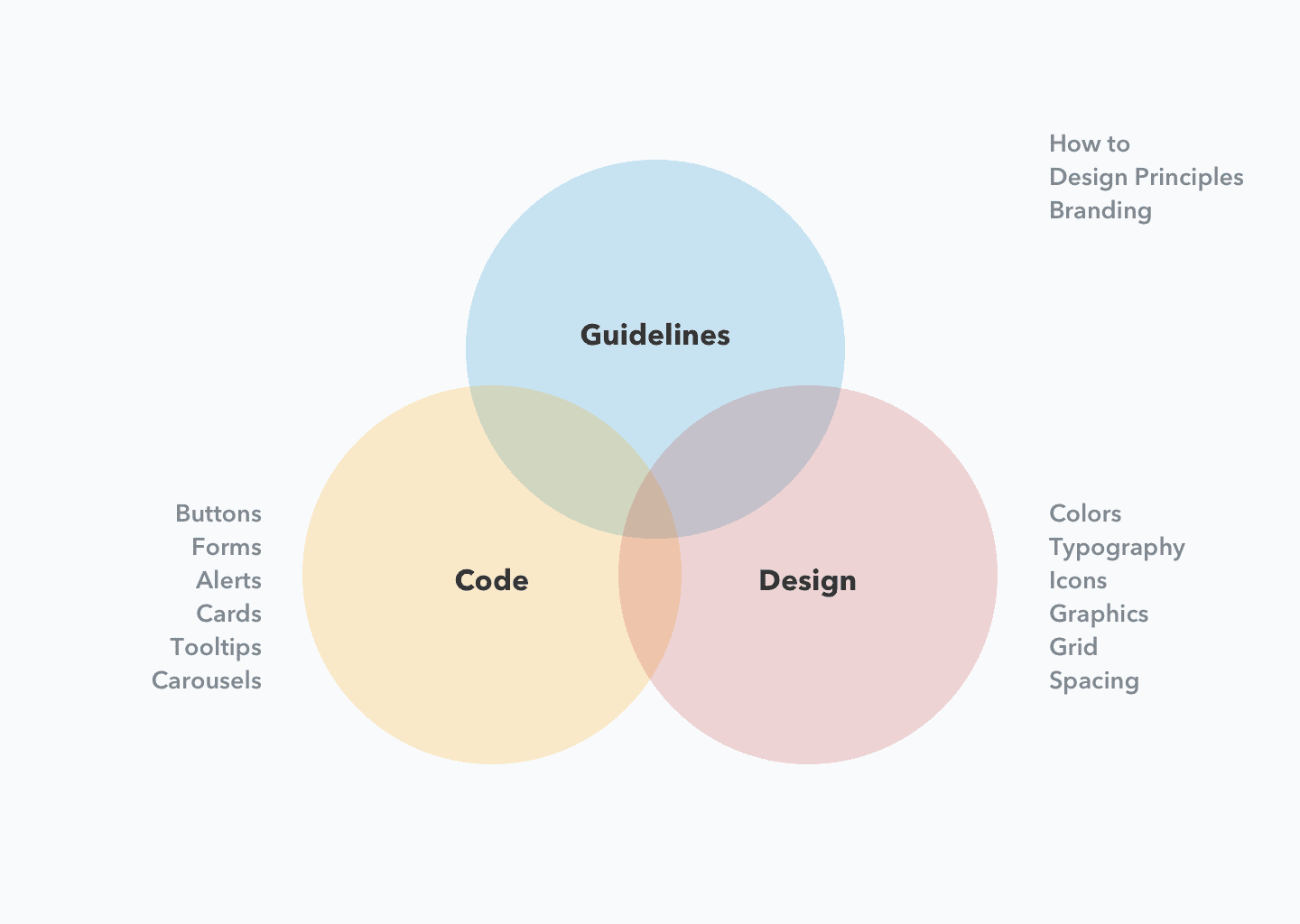
    A design system is a collection of design guidelines, components, and tools that helps teams create consistent and cohesive user experiences. It is a living framework that defines the visual and interactive elements of a product, including typography, color, iconography, buttons, forms, and more.

    A design system serves as a shared understanding of how a product should look and feel, and helps teams work efficiently and effectively by providing a common language and a set of reusable components.

    By creating a design system, teams can ensure that products are consistent in both appearance and behavior, and can focus on creating new features and solving complex problems, instead of reinventing the wheel every time they create a new product or feature.

    Design systems can be applied to a variety of products, including websites, mobile apps, software applications, and even physical products. They can be created and maintained by a dedicated design team or by a cross-functional team that includes designers, engineers, and product managers.

    How Do You Create a Design System?

    Creating a design system requires careful planning, collaboration, and iteration. Here are the steps you can follow to get started:

    1. Define your goals: Determine what you want to achieve with your design system, such as creating consistency across your product portfolio, improving the efficiency of your design and development teams, or providing a better user experience.
    2. Gather existing assets: Take inventory of existing design assets, such as style guides, design patterns, and components, and assess their effectiveness. Determine which assets should be included in your design system, and which need to be updated or redesigned.
    3. Define your design language: Develop a shared vocabulary and a set of principles that will guide your design decisions. This may include guidelines for color, typography, imagery, and other visual elements.
    4. Create and document components: Develop a library of reusable components, such as buttons, forms, icons, and navigation elements, and document their usage and interactions.
    5. Implement and test: Start using your design system in your design and development processes, and test it with users to get feedback and make improvements. Be prepared to iterate and evolve your design system over time as your needs change and your product portfolio grows.
    6. Train and communicate: Ensure that everyone who will be using your design system understands how it works and why it is important. Provide training and resources to help them work with it effectively.

    Creating a design system is an ongoing process that requires collaboration, testing, and iteration. The goal is to create a flexible and adaptable framework that can evolve with your product and your users’ needs.

    Design System Examples

    There are many examples of design systems used by companies and organizations, some of the most well-known are:

    1. Material Design: A visual language developed by Google that provides guidelines for designing digital products.
    2. Apple’s Human Interface Guidelines (HIG): A set of design principles and guidelines for Apple products, including the iPhone, iPad, and Mac.
    3. Salesforce Lightning Design System: A design system used by Salesforce to create consistent and cohesive experiences across their products.
    4. IBM Design Language: A design system used by IBM to create digital products and services.
    5. Airbnb Design System: A design system used by Airbnb to create consistent and coherent experiences for their customers.
    6. Microsoft Fluent Design System: A design language developed by Microsoft to provide a consistent look and feel across all of their products and platforms.

    These design systems help ensure that products are consistent in both appearance and behavior, and they make it easier for designers and developers to create new features and solve problems. They are also valuable assets that help companies build a recognizable brand and provide a better user experience.

  • Whats the difference between UX Design and UI Design?

    Whats the difference between UX Design and UI Design?

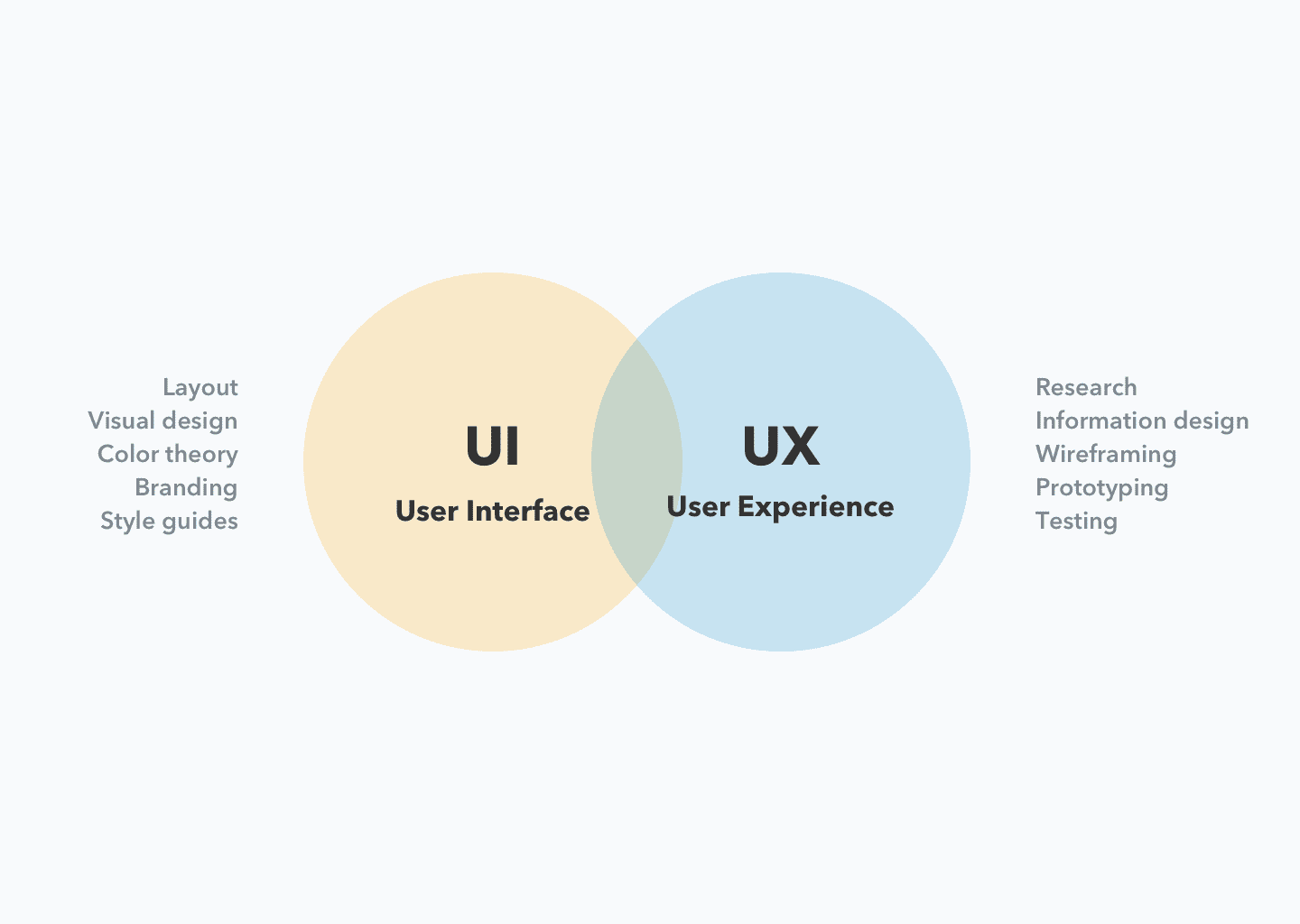
    UX (User Experience) Design and UI (User Interface) Design are two related but distinct fields in digital product design.

    UX design is focused on the overall feel of the product and how it meets the user’s needs and expectations. It involves research, prototyping, testing, and iterating to create a product that is both usable and enjoyable. UX designers focus on creating a seamless, intuitive, and efficient experience for users.

    UI design, on the other hand, is focused on the look and layout of the product’s interface. UI designers are responsible for creating the visual design, including the color scheme, typography, and the placement of elements on the screen. UI design is concerned with how the product is presented to the user, and how users interact with it.

    In conclusion, UX design is focused on the user’s experience, while UI design is focused on the visual and interactive design of the product. Both disciplines are important for creating successful digital products, and often work together to create a cohesive and delightful user experience.

  • 8 Tips on User Research

    8 Tips on User Research

    User research is the process of gathering data about users to inform design and product decisions. It involves studying and understanding the behavior, motivations, goals, and pain points of the people who will use a product.

    The goal of user research is to create products that are not only usable and functional, but also meet the needs and expectations of the target audience.

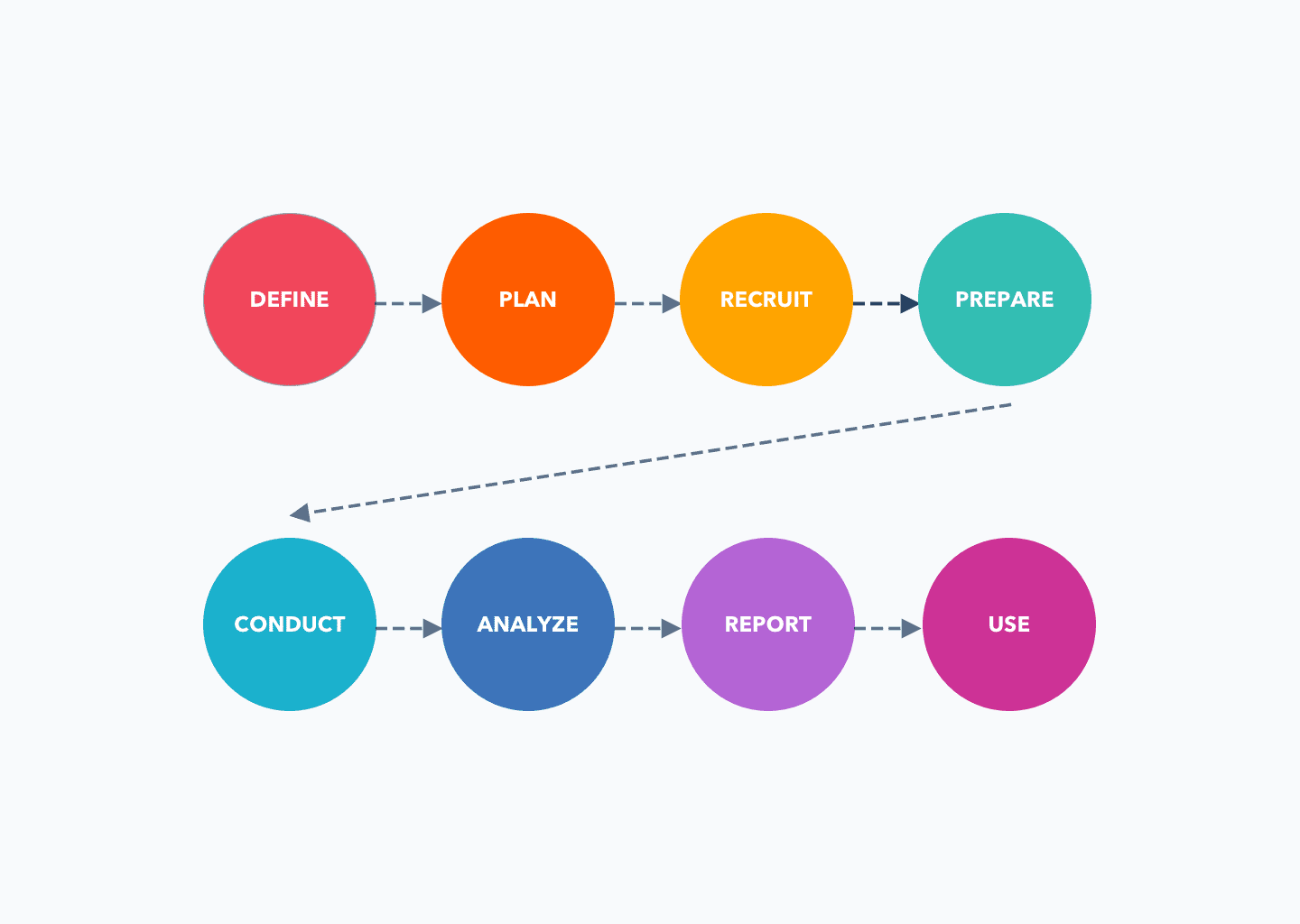
    Conducting user research involves the following steps:

    1. Define the research objectives: Clearly define what you want to learn from the research and what questions you need to answer.
    2. Plan the research methods: Choose the research methods that will best achieve your objectives, such as surveys, interviews, focus groups, usability testing, or other methods.
    3. Recruit participants: Identify and recruit participants who are representative of your target user group.
    4. Prepare for the research: Plan and prepare for each research method, including developing questions or tasks, setting up the environment, and testing equipment if necessary.
    5. Conduct the research: Carry out the research, following the methods and procedures you have planned.
    6. Analyze the data: Analyze the data you have collected, looking for patterns, trends, and insights.
    7. Report the findings: Summarize the findings of your research and present them in a clear and accessible way.
    8. Use the findings: Use the insights from your research to inform design and product decisions.

    User research can be qualitative or quantitative, and can involve a variety of methods, such as surveys, interviews, focus groups, usability testing, and observation.

    The data gathered through user research can inform design decisions, such as the features to include, the design of the interface, and the overall user experience.

    User research is an important part of the design process and helps ensure that products are designed with the user in mind. It should be an ongoing process, as you should continually gather feedback from users to ensure that your product meets their needs and expectations.

  • What is Agile Product Design?

    What is Agile Product Design?

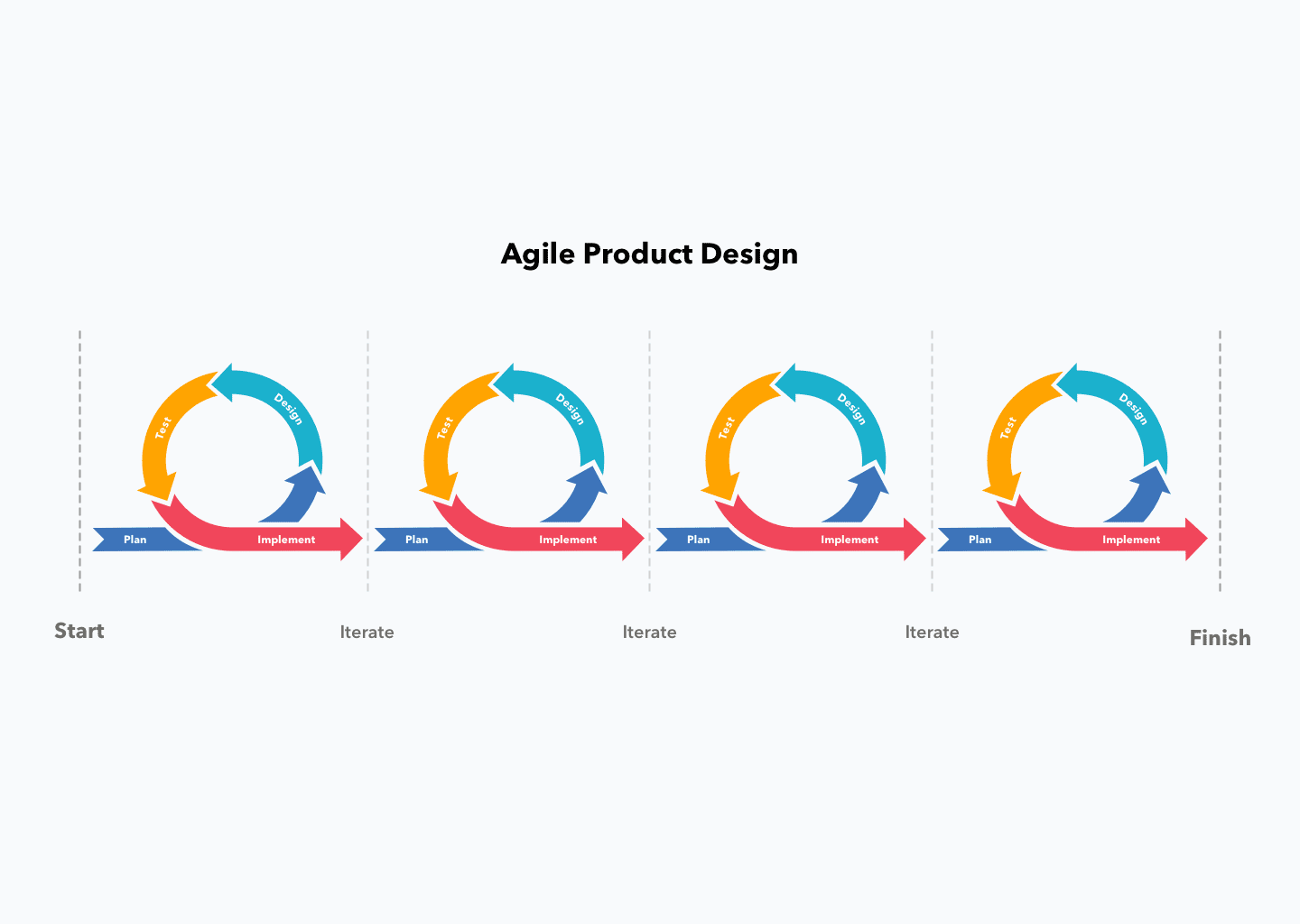
    Agile Product Design is a design approach that follows the principles of Agile software development, which values collaboration, flexibility, and continuous iterations.

    It emphasizes rapid prototyping, user testing, and the integration of feedback into the design process to create high-quality products that meet the needs of users.

    In Agile Product Design, design teams work closely with development teams and stakeholders to ensure that the design solution is delivered quickly and efficiently, while also being able to adapt to changing requirements.

    The goal of Agile Product Design is to create a design process that is flexible, responsive, and delivers value to the end-user.

    Becoming an Agile design team involves adopting the principles and practices of Agile methodologies and integrating them into the design process. Here are some steps to get started:

    1. Adopt an Agile mindset: The team should embrace the Agile values of collaboration, transparency, and continuous improvement.
    2. Emphasize user-centered design: Agile design prioritizes the needs of users and emphasizes testing and iteration to ensure that the design solution meets those needs.
    3. Collaborate with cross-functional teams: Agile design requires close collaboration between design, development, and other stakeholders to ensure that the design solution is delivered efficiently and effectively.
    4. Use iterative design process: Agile design involves a series of rapid iterations, each building upon the previous, to deliver a minimum viable product (MVP) as soon as possible and then refine the solution based on user feedback.
    5. Use Agile tools and techniques: Tools such as project management software, design sprints, and design thinking workshops can help the team work more efficiently and effectively in an Agile environment.
    6. Continuous improvement: Agile design requires continuous improvement and adaptation based on user feedback and changing requirements.

    By following these steps and incorporating Agile principles into the design process, teams can become more efficient, effective, and responsive in delivering high-quality design solutions that meet the needs of users.