Category: Product Design

  • Crafting Consistency for Scale: Tools and Technologies for Design Systems

    Crafting Consistency for Scale: Tools and Technologies for Design Systems


    This article is part of a series on Design System Management.

    Welcome to Lesson 4, where we explore the tools and technologies essential for developing and maintaining design systems. In this lesson, we’ll introduce Figma as a powerful platform for creating design systems, discuss collaborative workflows for design system development, and explore version control and documentation practices to ensure the integrity and consistency of design systems.

    Introduction to Design Systems in Figma

    Figma has emerged as a popular tool for designing and prototyping user interfaces, and its collaborative features make it well-suited for developing design systems. Figma’s components, styles, libraries, and shared libraries can be leveraged to establish and maintain a cohesive design system. Additionally, Figma’s real-time collaboration features facilitate seamless communication and collaboration among designers and developers working on a design system.

    In this lesson, we’ve explored using Figma as tool/technology for Design System management. By understanding the importance of effective collaboration and documentation, and implementing them effectively, designers can create cohesive and impactful designs quickly, that resonate with users and reinforce brand identity. 

    Caption:The Material 3 Figma Design Kit provides a comprehensive design system, with styles and components to help you get started. 

    Collaborative Workflows for Design System Development

    Effective collaboration is key to the successful development of a design system. Cross-functional teams can collaborate efficiently using Figma to iterate on design system components, gather feedback, and incorporate changes. Figma enables communication, alignment, and accountability among team members throughout the design system development process.

    Caption: This screenshot shows a user generated comment in Figma. Give feedback, ask a question, or just leave a note -enable comment mode and click anywhere in a Figma file to leave a comment.

    Version Control and Documentation

    Version control and documentation are essential for maintaining the integrity and consistency of a design system over time. Figma’s version history and branching features can be used to track changes, manage revisions, and ensure version control in collaborative environments. Additionally, Figma’s tools enable documenting and maintaining comprehensive design documentation including; design system guidelines, standards, and best practices.

    Caption:This screenshot displays the Version History panel in Figma (right).

    Final Thoughts

    In this lesson, we’ve explored using Figma as tool/technology for Design System management. By understanding the importance of effective collaboration and documentation, and implementing them effectively, designers can create cohesive and impactful designs quickly, that resonate with users and reinforce brand identity.


    Thank you for taking the time to read my article! I value your interest and engagement. I invite you to continue the conversation by sharing your thoughts, questions, or feedback in the comments section below.

    Don’t forget to like and share this article with your network if you found it valuable. And remember to check back in a couple weeks for my next insightful article. Until then, stay creative and keep exploring!

  • Crafting Consistency for Scale: Creating a Design Language

    Crafting Consistency for Scale: Creating a Design Language

    This article is part of a series on Design System Management.

    In this lesson, we’l explore the process of creating a design language that forms the foundation of a cohesive and impactful design system. We’ll delve into three key aspects: establishing design principles and values, developing a visual language that reflects brand identity, and documenting design guidelines and standards.

    Establishing Design Principles and Values

    Design principles serve as guiding philosophies that shape the approach to design and decision-making. They define the core values and beliefs that inform every aspect of the design process. In this section, we’ll discuss the importance of establishing clear design principles and values and explore methods for defining them. By articulating a set of guiding principles, designers can ensure consistency, coherence, and user-centeredness in their designs.

    Example design principles and values;

    1. Simplicity: Strive for simplicity in design, eliminating unnecessary elements and complexity to create intuitive and easy-to-use interfaces.
    2. Clarity: Ensure clarity in communication by using clear and concise language, visual hierarchy, and logical organization of content.
    3. Consistency: Maintain consistency in design elements, such as typography, color, layout, and interaction patterns, to create a cohesive and familiar user experience.
    4. Accessibility: Design with accessibility in mind, ensuring that all users, including those with disabilities, can access and interact with the product effectively.
    5. User-Centricity: Prioritize the needs and preferences of users throughout the design process, empathizing with their perspectives and striving to create solutions that meet their goals and expectations.
    6. Flexibility: Design systems that are adaptable and flexible, capable of accommodating diverse user needs, contexts, and devices.
    7. Innovation: Foster a culture of innovation by encouraging experimentation, exploration, and continuous improvement in design solutions.
    8. Authenticity: Reflect the brand’s identity, values, and personality authentically through design, creating experiences that resonate with users on an emotional level.

    Developing a Visual Language that Reflects Brand Identity

    A visual language encompasses the visual elements that define a brand’s identity and personality. It includes aspects such as typography, color palette, imagery, and iconography, which collectively convey the brand’s essence and differentiate it from competitors. In this section, we’ll examine strategies for developing a visual language that aligns with the brand’s identity and resonates with its target audience. By crafting a cohesive visual language, designers can reinforce brand identity and create memorable and meaningful experiences for users.

    Developing a visual language that aligns with a brand’s identity and resonates with its target audience requires careful consideration and strategic planning.

    Here are some strategies to help you achieve this:

    • Understand the Brand Identity: Start by thoroughly understanding the brand’s identity, values, personality, and positioning in the market. Conduct brand research, review brand guidelines, and engage with key stakeholders to gain insights into what the brand represents and how it wants to be perceived.
    • Define Visual Attributes: Identify the visual attributes that are most closely associated with the brand, such as colors, typography, imagery, and iconography. Consider the emotions, associations, and meanings evoked by these visual elements and how they align with the brand’s identity and values.
    • Research the Target Audience: Gain a deep understanding of the target audience’s demographics, psychographics, preferences, and behaviors. Conduct user research, surveys, and interviews to uncover insights into what resonates with the audience visually and emotionally.
    • Create Mood Boards and Style Guides: Develop mood boards and style guides that visually represent the brand’s identity and desired aesthetic. Curate visual references, including colors, textures, patterns, and imagery, that capture the essence of the brand and evoke the desired emotional response.
    • Iterate and Refine: Iterate on visual concepts and designs based on feedback from stakeholders and target audience testing. Refine visual elements to ensure they effectively communicate the brand’s identity and resonate with the audience.
    • Consider Brand Touchpoints: Consider how the visual language will be applied across various brand touchpoints, including digital platforms, print materials, packaging, signage, and advertising. Ensure consistency and coherence in visual execution across all touchpoints to reinforce brand identity and messaging.
    • Stay Authentic and Relevant: Maintain authenticity in visual expression, ensuring that the visual language authentically reflects the brand’s identity and values. Stay attuned to cultural trends, industry standards, and audience preferences to ensure the visual language remains relevant and resonant over time.
    • Test and Iterate: Continuously test and iterate on visual elements and designs to ensure they effectively resonate with the target audience. Solicit feedback from users through usability testing, surveys, and analytics, and use insights gained to refine and improve the visual language iteratively.

    By following these strategies and incorporating insights from brand research and audience analysis, you can develop a visual language that authentically represents the brand’s identity and resonates with its target audience, ultimately strengthening brand perception and engagement.

    Documenting Design Guidelines and Standards

    Documentation plays a crucial role in ensuring consistency and coherence in design execution. It provides a reference point for designers, developers, and stakeholders, guiding them in the application of design principles and visual elements.

    In this section, we’ll explore best practices for documenting design guidelines and standards, including the use of style guides, pattern libraries, and design documentation tools. By documenting design guidelines and standards, organizations can facilitate collaboration, streamline communication, and maintain fidelity to the established design language.

    Here are some best practices for documenting design guidelines and standards, including the use of style guides, pattern libraries, and design documentation tools:

    • Create a Comprehensive Style Guide: Develop a comprehensive style guide that documents all aspects of the design system, including typography, color palette, spacing, layout grids, UI components, and interaction patterns. Organize the style guide into clear sections with detailed explanations, examples, and usage guidelines for each element.
    • Use Consistent Naming Conventions: Establish consistent naming conventions for design elements, such as UI components, variables, and classes, to ensure clarity and ease of reference across different teams and projects. Document these naming conventions in the style guide to facilitate consistent implementation.
    • Include Visual Examples and Specifications: Provide visual examples and specifications for each design element documented in the style guide. Include screenshots, mockups, and diagrams to illustrate how elements should look and behave in different contexts and states. Specify dimensions, spacing, alignment, and other visual attributes to ensure accurate implementation.
    • Document Design Patterns and Best Practices: Document commonly used design patterns, workflows, and best practices in the style guide to guide designers and developers in their work. Include guidelines for navigation, form design, content layout, error handling, and other common design scenarios, along with explanations and rationale for each recommendation.
    • Use Pattern Libraries for Reusable Components: Develop pattern libraries or component libraries that provide a repository of reusable UI components, such as buttons, forms, cards, and navigation bars. Document each component in the library with specifications, usage guidelines, and code snippets for easy implementation in design and development projects.
    • Provide Code Samples and Implementation Guidelines: Include code samples and implementation guidelines for developers to facilitate the translation of design elements into code. Document coding standards, naming conventions, markup structure, and CSS styles for each component to ensure consistency and maintainability in the codebase.
    • Maintain Version Control and Revision History: Implement version control for the style guide and pattern libraries to track changes, revisions, and updates over time. Maintain a revision history that documents the evolution of the design system and allows team members to review and revert changes as needed.
    • Use Design Documentation Tools: Utilize design documentation tools and platforms, such as Figma, or dedicated design system management tools like Zeroheight or Storybook, to create and maintain the style guide, pattern libraries, and design documentation. These tools provide collaborative features, version control, and integration with design and development workflows.

    By following these best practices and leveraging style guides, pattern libraries, and design documentation tools effectively, teams can establish clear and comprehensive guidelines and standards for design execution, promoting consistency, efficiency, and collaboration across projects and teams.

    Final Thoughts

    In this lesson, we’ve explored the process of creating a design language, focusing on three key aspects: establishing design principles and values, developing a visual language that reflects brand identity, and documenting design guidelines and standards.

    By understanding the importance of these elements and implementing them effectively, designers can create cohesive and impactful design systems that resonate with users and reinforce brand identity. Let’s continue our journey in creating compelling and meaningful user experiences through the power of design language.


    Thank you for taking the time to read my article! I value your interest and engagement. I invite you to continue the conversation by sharing your thoughts, questions, or feedback in the comments section below.

    Don’t forget to like and share this article with your network if you found it valuable. And remember to check back in a couple weeks for my next insightful article. Until then, stay creative and keep exploring!

  • Crafting Consistency for Scale: Key Elements of a Design System

    Crafting Consistency for Scale: Key Elements of a Design System


    This article is part of a series on Design System Management.

    In this lesson, we’ll explore the key elements that contribute to establishing consistency, coherence, and visual harmony within a product’s design.

    Typography: Fonts, Sizes, and Styles

    Typography plays a crucial role in shaping the visual identity and readability of a product. Design systems define fonts, sizes, weights, and styles to ensure consistency across different interfaces. By establishing a cohesive typographic hierarchy, designers can enhance readability and create a unified brand voice.

    Color Palette: Primary, Secondary, and Accent Colors

    A well-defined color palette is essential for creating visually appealing and harmonious designs. Design systems specify primary, secondary, and accent colors, along with guidelines for their usage. Consistent color choices not only reinforce brand identity but also improve usability and accessibility for users.

    Icons and Illustrations: Consistent Visual Language

    Icons and illustrations are powerful visual elements that aid in communication and navigation within a product. Design systems provide libraries of standardized icons and illustrations, ensuring a consistent visual language across different interfaces. By adhering to predefined styles and guidelines, designers can maintain coherence and clarity in their designs.

    Components: Buttons, Forms, Cards, etc.

    Components are reusable building blocks that make up the interface of a product. Design systems define a variety of components, including buttons, forms, cards, and more, each with consistent styling and behavior. By standardizing these components, design systems facilitate rapid prototyping and ensure a cohesive user experience.

    Layout Grids: Establishing Consistent Spacing and Alignment

    Layout grids provide a framework for organizing content and establishing visual hierarchy within a product. Design systems define consistent spacing, alignment, and proportions across different screen sizes and devices. By adhering to layout grids, designers can maintain alignment and coherence in their designs, improving usability and readability.

    Motion: Guidelines for Animations and Transitions

    Motion design adds depth and interactivity to user interfaces, enhancing the overall user experience. Design systems provide guidelines for animations and transitions, ensuring consistency and coherence in motion design across different interactions. By following predefined motion guidelines, designers can create seamless and intuitive transitions that delight users.

    Final Thoughts

    In conclusion, we’ve explored the key components of a design system, including typography, color palette, icons and illustrations, components, layout grids, and motion. These components collectively contribute to establishing consistency, coherence, and visual harmony within a product’s design, ultimately enhancing the user experience. By understanding and implementing these components effectively, designers can create compelling and cohesive designs that resonate with users.


    Thank you for taking the time to read my article! I value your interest and engagement. I invite you to continue the conversation by sharing your thoughts, questions, or feedback in the comments section below.

    Don’t forget to like and share this article with your network if you found it valuable. And remember to check back in a couple weeks for my next insightful article. Until then, stay creative and keep exploring!

  • Crafting Consistency for Scale: Introduction to Design Systems

    Crafting Consistency for Scale: Introduction to Design Systems

    This article is part of a series on Design System Management.

    This lesson will teach you about design systems, their importance in modern product design, and the positive impact they have on user experience. You’ll learn what design systems are and how they ensure consistency across a product’s design. You’ll also discover the benefits of design systems, including streamlined workflows, improved collaboration, and brand consistency.

    Finally, you’ll see real-world examples of successful design systems and how they’ve helped companies deliver better user experiences. By the end, you’ll understand why design systems are crucial for modern product design.

    Definition and purpose of design systems

    Design systems are comprehensive collections of reusable components, patterns, guidelines, and assets that are meticulously crafted to ensure consistency and cohesiveness across all aspects of a product’s design. At its core, a design system serves as a centralized source of truth for design elements, empowering designers and developers to create cohesive user experiences efficiently and effectively.

    Benefits of using design systems in product design

    Design systems serve a vital role in product design by promoting consistency, streamlining efficiency, and enabling scalability. They establish standardized elements and guidelines to ensure a cohesive user experience across all touchpoints.

    By providing reusable components and fostering rapid iteration, design systems enhance productivity and accelerate time-to-market.

    Additionally, they offer a scalable framework that adapts to product evolution, facilitating seamless collaboration and communication across teams.

    Design System Benefits

    Consistency: One of the primary purposes of design systems is to promote consistency in design across all touchpoints of a product. By establishing standardized design elements and guidelines, design systems ensure that users have a cohesive and familiar experience regardless of where they interact with the product.

    Efficiency: Design systems streamline the design and development process by providing reusable components and guidelines that reduce duplication of effort and minimize design debt. Designers can leverage pre-defined components and patterns to rapidly prototype and iterate on designs, resulting in faster time-to-market and increased productivity.

    Scalability: As products evolve and grow over time, design systems provide a scalable framework that accommodates changes and additions without compromising consistency or quality. By maintaining a centralized source of truth for design elements, design systems facilitate seamless collaboration and communication across cross-functional teams, enabling products to scale gracefully as they expand.

    Examples of successful design systems

    In the field of digital product design, industry giants have established exemplary standards through successful design systems. From Google’s Material Design to IBM’s Design Language, these systems provide cohesive guidelines and reusable components for creating consistent user experiences across platforms.

    Let’s explore how these leading companies leverage their design systems to drive efficiency and elevate user satisfaction.

    • Material Design by Google: Material Design is a comprehensive design system developed by Google, providing guidelines, components, and resources for creating cohesive and visually appealing user interfaces across different platforms and devices. It offers a unified design language that emphasizes bold colors, responsive animations, and intuitive interactions, and it has been widely adopted by developers and designers worldwide.
    • IBM Design Language: IBM’s design system, known as the IBM Design Language, provides a set of principles, guidelines, and assets for creating consistent and user-centered experiences across IBM’s products and services. It emphasizes accessibility, inclusivity, and usability, and it includes design resources such as UI components, typography, color palettes, and icon libraries.
    • Salesforce Lightning Design System: Salesforce Lightning Design System is a design system developed by Salesforce, offering a collection of guidelines, components, and patterns for designing enterprise applications on the Salesforce platform. It provides a unified design language that promotes consistency, efficiency, and scalability, and it includes resources such as UI components, design tokens, and accessibility guidelines.
    • Atlassian Design System: Atlassian’s design system, known as Atlassian Design, provides a framework for creating cohesive and user-friendly experiences across Atlassian’s suite of products, including Jira, Confluence, and Trello. It offers a set of design principles, guidelines, and components for building intuitive and efficient interfaces, and it emphasizes collaboration, flexibility, and accessibility.
    • Airbnb Design Language: Airbnb’s design system, known as the Airbnb Design Language, offers a set of guidelines, components, and tools for creating consistent and delightful user experiences across Airbnb’s website and mobile apps. It includes resources such as UI components, typography, color palettes, and iconography, and it promotes a user-centered approach to design that prioritizes clarity, simplicity, and accessibility.

    These examples demonstrate how design systems can empower organizations to create cohesive, efficient, and scalable user experiences that drive user engagement, satisfaction, and business success.

    Final Thoughts

    In conclusion, this lesson has provided an exploration of design systems, highlighting their essential role in modern product design. We began by demystifying the concept of design systems, emphasizing their significance as foundational frameworks for maintaining consistency and coherence in product design. We then examined the numerous benefits design systems offer, from streamlining workflows to fostering collaboration and ensuring brand consistency.

    Lastly, real-world examples illustrated how leading companies leverage design systems to deliver exceptional user experiences and drive innovation. With this understanding, you’re now equipped to navigate the intricate landscape of design systems and harness their power to create impactful designs. Let’s continue our journey into the fascinating world of design systems in our next lesson.


    Thank you for taking the time to read my article! I value your interest and engagement. I invite you to continue the conversation by sharing your thoughts, questions, or feedback in the comments section below.

    Don’t forget to like and share this article with your network if you found it valuable. And remember to check back in a couple weeks for my next insightful article. Until then, stay creative and keep exploring!

  • Crafting Consistency for Scale: A guide to design system management

    Crafting Consistency for Scale: A guide to design system management

    Outline

    In this series, we’ll explore the essential role of design systems in ensuring consistency, efficiency, and scalability within product design. We’ll examine the fundamental components of a design system, its benefits, and the process of creating and maintaining one.

    Lesson 1: Introduction to Design Systems

    • Definition and purpose of design systems
    • Benefits of using design systems in product design
    • Examples of successful design systems in the industry

    Lesson 2: Key Components of a Design System

    • Typography: Fonts, sizes, and styles
    • Color Palette: Primary, secondary, and accent colors
    • Icons and Illustrations: Consistent visual language
    • Components: Buttons, forms, cards, etc.
    • Layout Grids: Establishing consistent spacing and alignment
    • Motion: Guidelines for animations and transitions

    Lesson 3: Creating a Design Language

    • Establishing design principles and values
    • Developing a visual language that reflects brand identity
    • Documenting design guidelines and standards

    Lesson 4: Tools and Technologies for Design Systems

    • Introduction to design systems in Figma
    • Collaborative workflows for design system development
    • Version control and documentation 

    Lesson 5: Implementing and Maintaining a Design System

    • Iterative development process: from initial setup to ongoing updates
    • Collaboration between designers, developers, and stakeholders
    • Strategies for ensuring adoption and adherence to the design system
    • Monitoring and updating the design system as products evolve

    Exercise: Design System Development

    • Create a basic design system for a fictional product.

    Final Thoughts

    By equipping yourself with the knowledge in this series, you’ll be empowered to unlock the full potential of design systems. From understanding their core components and benefits to the practical steps of creating and maintaining one, these lessons provide a roadmap for achieving design consistency, efficiency, and scalability in your product design endeavors. 

    The hands-on activity at the end allows you to put your newfound knowledge into practice, solidifying your understanding and setting you on the path to building a robust design system for any project. Remember, design systems are living entities – they evolve alongside your product.

    So, embrace the iterative process, foster collaboration, and watch your design system become a powerful tool that streamlines your workflow and elevates your product design to new heights.


    Thank you for taking the time to read my article! I value your interest and engagement. I invite you to continue the conversation by sharing your thoughts, questions, or feedback in the comments section below.

    Don’t forget to like and share this article with your network if you found it valuable. And remember to check back in a couple weeks for my next insightful article. Until then, stay creative and keep exploring!

  • Future Trends and Challenges with AI in Product Design

    Future Trends and Challenges with AI in Product Design

    The Future of AI in Product Design

    As a Senior Product Designer, I have witnessed the transformative power of Artificial Intelligence in shaping the design landscape. AI has not only enhanced our design capabilities but also introduced new opportunities and challenges.

    This article explores future trends and potential obstacles that AI brings to product design, including data privacy regulations, AI model interpretability, and the evolving responsibilities of designers in AI-powered processes. Understanding these trends helps us prepare for the future of AI in product design.

    The Evolving Role of AI in Product Design

    AI has become an integral part of the design process, offering insights, automation, and personalization. As the technology advances, several trends are emerging.

    Hyper-Personalization

    Personalization has long been central to user-centered design. AI elevates this by analyzing behavior, preferences, and historical data to deliver highly tailored experiences. From e-commerce recommendations to adaptive content, hyper-personalization is becoming standard.

    Generative Design

    Generative design is reshaping how products are created. AI can explore thousands of variations based on defined parameters, producing innovative and efficient outcomes. Designers can prototype and iterate faster while pushing creative boundaries.

    Design Augmentation

    AI augments designers rather than replacing them. Tools can assist with layout, image editing, and ideation, freeing designers to focus on strategy and creative problem solving.

    Predictive Analytics

    AI-driven analytics enable data-informed decisions by anticipating user needs and optimizing features. This provides deeper insight into behavior and preferences.

    Voice and Conversational Interfaces

    Voice assistants and chatbots are becoming integral. As natural language processing improves, designers must craft conversational experiences that feel intuitive and human.

    Challenges on the Horizon

    With progress come meaningful challenges that organizations and designers must address.

    Data Privacy Regulations

    Data privacy is critical. Regulations such as GDPR and CCPA have reshaped how organizations collect and use data. Designers must ensure transparency, user consent, and strong security practices.

    AI Model Interpretability

    As AI grows more complex, understanding how decisions are made becomes harder. Designers need tools and methods to interpret outputs and align them with ethical and user-centered goals.

    Ethical Considerations

    Bias and fairness remain central concerns. Responsible AI practices are essential to maintain user trust and avoid discrimination.

    Skillset Evolution

    Designers must expand their skills to include AI integration, data literacy, and model interpretation. Education and training will continue to evolve alongside the technology.

    User Expectations

    As AI-driven experiences become common, expectations rise. Designers must deliver seamless and intelligent interactions to avoid dissatisfaction and missed opportunities.

    The Designer’s New Role

    In an AI-driven era, designers move beyond visual aesthetics into orchestrating intelligent experiences.

    Designers must:

    • Champion Ethical Design: Advocate for fairness, transparency, and inclusivity in AI-powered decisions.
    • Bridge the Gap: Translate technical AI insights into actionable design strategies for stakeholders.
    • Stay Curious: Continuously learn as AI evolves.
    • Embrace Collaboration: Work closely with engineers, data scientists, and other specialists to unlock AI’s full potential.

    Embracing the Future

    The future of AI in product design holds immense promise. By staying informed, addressing ethical considerations, and adapting to new responsibilities, designers can lead this transformation responsibly. AI’s continued growth challenges us to create innovative, user-centered products that enrich digital experiences worldwide.

    If you enjoyed this article, consider sharing it with a colleague or friend. This concludes the series on unlocking the power of AI in product design.

  • Ethical Considerations in AI-Driven Design

    Ethical Considerations in AI-Driven Design

    [fusion_builder_container background_parallax=”none” enable_mobile=”no” parallax_speed=”0.3″ background_repeat=”no-repeat” background_position=”left top” video_aspect_ratio=”16:9″ video_mute=”yes” video_loop=”yes” fade=”no” padding_top=”20″ padding_bottom=”20″ hundred_percent=”no” equal_height_columns=”no” hide_on_mobile=”no” type=”flex” border_sizes_top=”0px” border_sizes_bottom=”0px” border_sizes_left=”0px” border_sizes_right=”0px”][fusion_builder_row][fusion_builder_column type=”1_1″ layout=”1_1″ spacing=”yes” center_content=”no” hover_type=”none” link=”” min_height=”” hide_on_mobile=”no” class=”” id=”” background_color=”” background_image=”” background_position=”left top” undefined=”” background_repeat=”no-repeat” border_color=”” border_style=”solid” border_position=”all” padding_top=”0px” padding_right=”10%” padding_bottom=”0px” padding_left=”10%” margin_top=”” margin_bottom=”” animation_type=”” animation_direction=”left” animation_speed=”0.1″ animation_offset=”” last=”true” border_sizes_top=”0″ border_sizes_bottom=”0″ border_sizes_left=”0″ border_sizes_right=”0″ first=”true”][fusion_imageframe image_id=”2264|full” aspect_ratio=”” custom_aspect_ratio=”100″ aspect_ratio_position=”” skip_lazy_load=”” lightbox=”yes” gallery_id=”” lightbox_image=”” lightbox_image_id=”” alt=”” link=”” linktarget=”_self” hide_on_mobile=”no” sticky_display=”normal,sticky” class=”” id=”” max_width=”” sticky_max_width=”” align_medium=”none” align_small=”none” align=”center” mask=”” custom_mask=”” mask_size=”” mask_custom_size=”” mask_position=”” mask_custom_position=”” mask_repeat=”” style_type=”none” blur=”” stylecolor=”” hue=”” saturation=”” lightness=”” alpha=”” hover_type=”liftup” magnify_full_img=”” magnify_duration=”120″ scroll_height=”100″ scroll_speed=”1″ margin_top_medium=”” margin_right_medium=”” margin_bottom_medium=”” margin_left_medium=”” margin_top_small=”” margin_right_small=”” margin_bottom_small=”” margin_left_small=”” margin_top=”” margin_right=”” margin_bottom=”” margin_left=”” bordersize=”0px” bordercolor=”” borderradius=”0″ z_index=”” caption_style=”off” caption_align_medium=”none” caption_align_small=”none” caption_align=”none” caption_title=”” caption_text=”” caption_title_tag=”2″ fusion_font_family_caption_title_font=”” fusion_font_variant_caption_title_font=”” caption_title_size=”” caption_title_line_height=”” caption_title_letter_spacing=”” caption_title_transform=”” caption_title_color=”” caption_background_color=”” fusion_font_family_caption_text_font=”” fusion_font_variant_caption_text_font=”” caption_text_size=”” caption_text_line_height=”” caption_text_letter_spacing=”” caption_text_transform=”” caption_text_color=”” caption_border_color=”” caption_overlay_color=”” caption_margin_top=”” caption_margin_right=”” caption_margin_bottom=”” caption_margin_left=”” animation_type=”” animation_direction=”down” animation_color=”” animation_speed=”0.1″ animation_delay=”0″ animation_offset=”” filter_hue=”0″ filter_saturation=”100″ filter_brightness=”100″ filter_contrast=”100″ filter_invert=”0″ filter_sepia=”0″ filter_opacity=”100″ filter_blur=”0″ filter_hue_hover=”0″ filter_saturation_hover=”100″ filter_brightness_hover=”100″ filter_contrast_hover=”100″ filter_invert_hover=”0″ filter_sepia_hover=”0″ filter_opacity_hover=”100″ filter_blur_hover=”0″]https://danolsavsky.com/wp-content/uploads/2023/10/ai_prod_design_26.png[/fusion_imageframe][fusion_separator style_type=”none” top_margin=”50px” alignment=”center” /][fusion_global id=”2272″][fusion_separator style_type=”none” top_margin=”50px” alignment=”center” /][fusion_text columns=”” column_min_width=”” column_spacing=”” rule_style=”” rule_size=”” rule_color=”” hue=”” saturation=”” lightness=”” alpha=”” content_alignment_medium=”” content_alignment_small=”” content_alignment=”” hide_on_mobile=”small-visibility,medium-visibility,large-visibility” sticky_display=”normal,sticky” class=”” id=”” margin_top=”” margin_right=”” margin_bottom=”” margin_left=”” fusion_font_family_text_font=”” fusion_font_variant_text_font=”” font_size=”” line_height=”” letter_spacing=”” text_transform=”” text_color=”” animation_type=”” animation_direction=”left” animation_color=”” animation_speed=”0.3″ animation_delay=”0″ animation_offset=””]

    In the age of artificial intelligence (AI), the design landscape is undergoing a profound transformation. AI-driven design promises innovation and efficiency, but it also brings to the forefront a host of ethical considerations. In this article, we embark on a journey through the ethical landscape of AI in design. We address concerns such as bias, privacy, transparency, and more. Our aim is to provide guidance on responsible and inclusive design practices in the context of AI, ensuring that technology serves as a force for good and empowerment.

    [/fusion_text][fusion_imageframe image_id=”2265|full” aspect_ratio=”” custom_aspect_ratio=”100″ aspect_ratio_position=”” skip_lazy_load=”” lightbox=”no” gallery_id=”” lightbox_image=”” lightbox_image_id=”” alt=”” link=”” linktarget=”_self” hide_on_mobile=”small-visibility,medium-visibility,large-visibility” sticky_display=”normal,sticky” class=”” id=”” max_width=”” sticky_max_width=”” align_medium=”none” align_small=”none” align=”none” mask=”” custom_mask=”” mask_size=”” mask_custom_size=”” mask_position=”” mask_custom_position=”” mask_repeat=”” style_type=”” blur=”” stylecolor=”” hue=”” saturation=”” lightness=”” alpha=”” hover_type=”none” magnify_full_img=”” magnify_duration=”120″ scroll_height=”100″ scroll_speed=”1″ margin_top_medium=”” margin_right_medium=”” margin_bottom_medium=”” margin_left_medium=”” margin_top_small=”” margin_right_small=”” margin_bottom_small=”” margin_left_small=”” margin_top=”” margin_right=”” margin_bottom=”” margin_left=”” bordersize=”” bordercolor=”” borderradius=”” z_index=”” caption_style=”off” caption_align_medium=”none” caption_align_small=”none” caption_align=”none” caption_title=”” caption_text=”” caption_title_tag=”2″ fusion_font_family_caption_title_font=”” fusion_font_variant_caption_title_font=”” caption_title_size=”” caption_title_line_height=”” caption_title_letter_spacing=”” caption_title_transform=”” caption_title_color=”” caption_background_color=”” fusion_font_family_caption_text_font=”” fusion_font_variant_caption_text_font=”” caption_text_size=”” caption_text_line_height=”” caption_text_letter_spacing=”” caption_text_transform=”” caption_text_color=”” caption_border_color=”” caption_overlay_color=”” caption_margin_top=”” caption_margin_right=”” caption_margin_bottom=”” caption_margin_left=”” animation_type=”” animation_direction=”left” animation_color=”” animation_speed=”0.3″ animation_delay=”0″ animation_offset=”” filter_hue=”0″ filter_saturation=”100″ filter_brightness=”100″ filter_contrast=”100″ filter_invert=”0″ filter_sepia=”0″ filter_opacity=”100″ filter_blur=”0″ filter_hue_hover=”0″ filter_saturation_hover=”100″ filter_brightness_hover=”100″ filter_contrast_hover=”100″ filter_invert_hover=”0″ filter_sepia_hover=”0″ filter_opacity_hover=”100″ filter_blur_hover=”0″]https://danolsavsky.com/wp-content/uploads/2023/10/ex_ideo.png[/fusion_imageframe][fusion_text columns=”” column_min_width=”” column_spacing=”” rule_style=”” rule_size=”” rule_color=”” hue=”” saturation=”” lightness=”” alpha=”” content_alignment_medium=”” content_alignment_small=”” content_alignment=”” hide_on_mobile=”small-visibility,medium-visibility,large-visibility” sticky_display=”normal,sticky” class=”” id=”” margin_top=”” margin_right=”” margin_bottom=”” margin_left=”” fusion_font_family_text_font=”” fusion_font_variant_text_font=”” font_size=”” line_height=”” letter_spacing=”” text_transform=”” text_color=”” animation_type=”” animation_direction=”left” animation_color=”” animation_speed=”0.3″ animation_delay=”0″ animation_offset=””]

    IDEO’s AI Ethics Cards are a tool to help guide an ethically responsible, culturally considerate, and humanistic approach to designing with data.

    [/fusion_text][fusion_text columns=”” column_min_width=”” column_spacing=”” rule_style=”” rule_size=”” rule_color=”” hue=”” saturation=”” lightness=”” alpha=”” content_alignment_medium=”” content_alignment_small=”” content_alignment=”” hide_on_mobile=”small-visibility,medium-visibility,large-visibility” sticky_display=”normal,sticky” class=”” id=”” margin_top=”” margin_right=”” margin_bottom=”” margin_left=”” fusion_font_family_text_font=”” fusion_font_variant_text_font=”” font_size=”” line_height=”” letter_spacing=”” text_transform=”” text_color=”” animation_type=”” animation_direction=”left” animation_color=”” animation_speed=”0.3″ animation_delay=”0″ animation_offset=””]

    The Ethical Imperative in AI-Driven Design

    Ethics in design is not a new concept, but the integration of AI amplifies it’s importance. AI systems, including machine learning algorithms, can inherit biases from training data, impact user privacy, and operate in ways that lack transparency. To navigate this landscape responsibly, designers must adopt ethical principles that guide their decisions.

    Bias and Fairness in Design

    Bias in AI algorithms is a persistent concern. Algorithms learn from data, and if that data is biased, the AI system can perpetuate and amplify existing biases. In design, this can manifest as discriminatory user experiences.

    Mitigating Bias in Design

    • Diverse Data: Designers should ensure that training data for AI models is diverse and representative, encompassing a wide range of demographics and perspectives.
    • Bias Audits: Regularly audit AI systems for bias, using metrics and benchmarks to identify and rectify disparities in outcomes.
    • Inclusive Design: Prioritize inclusive design practices that account for the needs and perspectives of all users, regardless of their background or identity.

    User Privacy and Data Protection

    AI-driven design often relies on user data for personalization and optimization. However, this raises significant privacy concerns. Users must trust that their data is handled responsibly and ethically.

    Respecting User Privacy

    • Data Minimization: Collect and retain only the data necessary for the functionality of your AI-driven features, minimizing the risk of data breaches.
    • Transparency: Communicate clearly with users about data collection practices and obtain informed consent.
    • Data Security: Implement robust security measures to protect user data from unauthorized access or breaches.

    Transparency and Explainability

    The “black box” nature of AI algorithms can be a barrier to trust and accountability. Users should have insight into how AI-driven design decisions are made.

    Enhancing Transparency

    • Interpretable Models: Use AI models that are interpretable and explainable, enabling designers to understand and articulate how decisions are reached.
    • Clear Communication: Communicate to users when AI-driven features are at play, and provide information on how their data is used to personalize their experience.

    Ethical AI in Decision-Making

    Designers should embed ethical considerations into the decision-making process, ensuring that AI systems prioritize ethical outcomes.

    Ethical Frameworks

    • Ethical Guidelines: Develop and adhere to ethical design guidelines that prioritize fairness, inclusivity, and privacy.
    • Ethical Review Boards: Establish internal review boards or ethics committees to evaluate the potential ethical impact of AI-driven design decisions.
    • User Empowerment: Empower users with controls to customize their AI-driven experiences, allowing them to set their boundaries and preferences.

    Inclusivity in Design

    Inclusivity is a core ethical principle. Designers must ensure that AI-driven products and services are accessible and usable by a diverse range of users, including those with disabilities.

    Designing for All

    • Accessibility: Follow best practices for accessible design, making sure that AI-driven features can be used by individuals with disabilities.
    • User-Centric Testing: Conduct user testing with diverse groups to identify potential accessibility and usability issues.
    • Inclusive Design Thinking: Adopt an inclusive design mindset from the outset of the design process, considering the needs of all potential users.

    Ethical Considerations Beyond Design

    Design is just one part of the AI ecosystem. Ethical considerations should extend to data collection, model training, deployment, and ongoing monitoring.

    End-to-End Ethics

    • Data Ethics: Ensure that data collection, storage, and usage adhere to ethical principles, even before design comes into play.
    • Algorithmic Ethics: Evaluate the ethical implications of the algorithms used, including their impact on individuals and society.
    • Post-Deployment Ethics: Continuously monitor AI-driven systems for ethical issues and adapt as needed to address emerging challenges.

    The Future of Ethical AI-Driven Design

    As AI technology continues to evolve, so too will the ethical considerations surrounding its use in design. Designers must remain vigilant, adaptable, and proactive in addressing new ethical challenges that may arise.

    Conclusion

    Ethical considerations are inseparable from AI-driven design. To navigate the ethical landscape responsibly, designers must prioritize fairness, inclusivity, transparency, and privacy. By adhering to ethical principles, AI can serve as a powerful tool for innovation and empowerment, enhancing the user experience while upholding the values of responsible design. In this dynamic intersection of technology and ethics, designers have a pivotal role to play in shaping a more ethical and inclusive digital future.

    [/fusion_text][fusion_text columns=”” column_min_width=”” column_spacing=”” rule_style=”” rule_size=”” rule_color=”” hue=”” saturation=”” lightness=”” alpha=”” content_alignment_medium=”” content_alignment_small=”” content_alignment=”” hide_on_mobile=”small-visibility,medium-visibility,large-visibility” sticky_display=”normal,sticky” class=”” id=”” margin_top=”” margin_right=”” margin_bottom=”” margin_left=”” fusion_font_family_text_font=”” fusion_font_variant_text_font=”” font_size=”” line_height=”” letter_spacing=”” text_transform=”” text_color=”” animation_type=”” animation_direction=”left” animation_color=”” animation_speed=”0.3″ animation_delay=”0″ animation_offset=””]

    If you enjoyed reading this article, please share it with a colleague or friend, and join me next week to learn about Future Trends and Challenges with AI in Product Design.

    [/fusion_text][fusion_global id=”2309″][/fusion_builder_column][/fusion_builder_row][/fusion_builder_container]

  • Natural Language Processing in UX

    Natural Language Processing in UX

    This article explores Natural Language Processing and its pivotal role in UX design. It looks at applications in chatbots, voice assistants, and content analysis, and how these technologies shape conversational interfaces. The goal is to uncover practical insights for designing effective, user-centric conversational experiences that blend technology with human interaction.

    The Power of Natural Language Processing

    Natural Language Processing is a branch of artificial intelligence focused on the interaction between humans and computers through everyday language. It enables machines to understand, interpret, and respond in ways that feel intuitive and human. In UX design, NLP introduces a new dimension by making technology more accessible and user friendly.

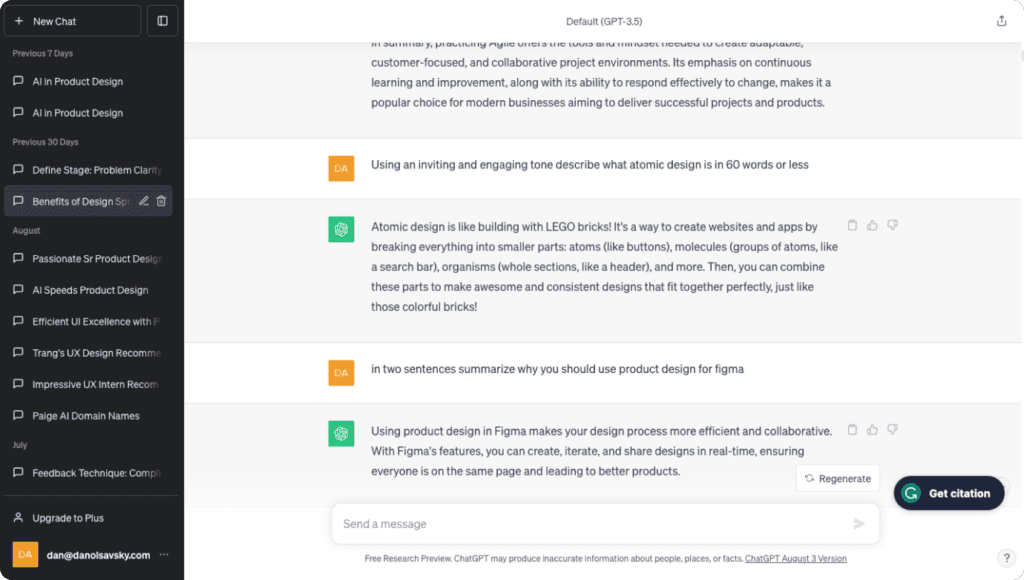
    Caption: ChatGPT is a conversational AI that can chat with you, answer follow-up questions, and even challenge incorrect assumptions.

    Chatbots: Conversations Redefined

    Chatbots are now common across digital interfaces, giving users instant access to information and services. NLP is the core technology that allows these virtual assistants to understand queries, provide relevant responses, and hold meaningful conversations.

    The Role of NLP in Chatbots

    Intent Recognition: NLP algorithms analyze wording and context to determine what users are trying to accomplish.

    Context Preservation: Chatbots can maintain context across multiple turns, understanding follow-up questions and references to earlier messages.

    Personalization: NLP-driven chatbots can tailor responses using user data, creating more engaging and user-centered interactions.

    Voice Assistants: AI Companions

    Voice assistants such as Siri, Alexa, and Google Assistant have changed how people interact with technology. NLP enables communication with devices using natural speech rather than commands or menus.

    How NLP Enhances Voice Assistants

    Speech Recognition: Spoken language is converted into text so systems can interpret commands.

    Language Understanding: Assistants can interpret slang, accents, and conversational phrasing.

    Conversational Abilities: NLP supports multi-turn conversations that feel more natural and interactive.

    Content Analysis: Unveiling User Insights

    Content analysis is essential in UX because it reveals user sentiment and feedback patterns. NLP tools are highly effective at analyzing large volumes of text to inform design decisions.

    NLP in Content Analysis

    Sentiment Analysis: Determines whether user feedback is positive, negative, or neutral.

    Keyword Extraction: Identifies recurring topics and themes across large datasets.

    Language Translation: Breaks down language barriers, enabling analysis of global feedback.

    Designing Effective Conversational Interfaces

    Creating strong conversational interfaces requires balancing technological capability with human expectation. Key considerations include:

    • Clarity and Consistency: Responses should be predictable and easy to understand.
    • User Guidance: Provide prompts or suggestions that help users know what they can ask.
    • Feedback and Error Handling: Offer informative responses when misunderstandings occur.
    • User Data Privacy: Clearly communicate how data is used and give users control where possible.

    The Future of Conversational UX

    As NLP continues to evolve, conversational UX will expand in several directions:

    • Emotion Recognition: Interfaces may detect emotional tone and respond with empathy.
    • Multimodal Conversations: Blending text, voice, and gestures into a single experience.
    • Personalized Conversations: Systems will better understand individual preferences and tailor interactions accordingly.

    Conclusion

    Natural Language Processing is reshaping UX design by enabling interactions that feel human and intuitive. From chatbots and voice assistants to large-scale content analysis, NLP improves accessibility and user focus. The future points toward increasingly engaging and personalized conversational experiences, where technology and human communication continue to merge.

    If you enjoyed reading this article, consider sharing it with a colleague or friend, and stay tuned for the next piece on AI for design automation.

  • AI for Design Automation

    AI for Design Automation

    In the fast-paced world of product design, efficiency is paramount. Artificial Intelligence is becoming a game changer in design automation. This article explores how AI is transforming the creative landscape by automating repetitive tasks. From generating design variations to streamlining layout processes, AI enhances efficiency, unlocks creative potential, and reshapes the future of design.

    The Challenge of Repetitive Design Tasks

    Design across graphic, web, and product disciplines often involves repetitive work that can be time consuming and mentally draining. Tasks such as resizing images, adjusting layouts, and producing multiple variations for A/B testing are necessary but can slow innovation and reduce time available for higher level creativity.

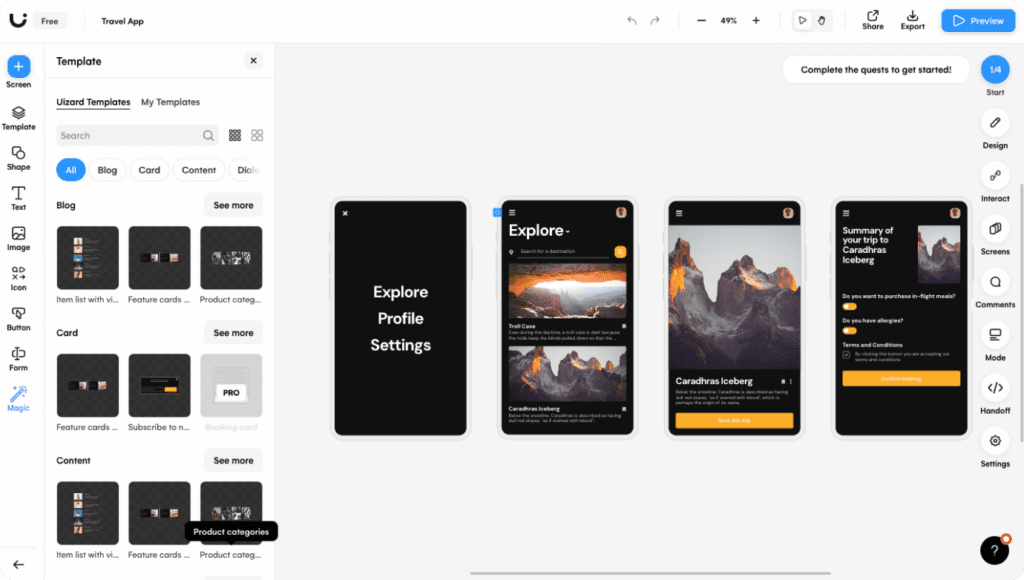
    Caption: UIzard is one of the easiest-to-use design and ideation tools powered by AI.

    The Promise of AI in Design Automation

    AI in design automation offers liberation from repetitive effort. By delegating routine tasks to intelligent systems, designers gain more time for strategic thinking and creative exploration. Key areas of impact include the following.

    AI-Generated Design Variations

    AI tools can rapidly generate multiple visual directions such as color schemes, typography pairings, and layout options. This expands creative possibilities while saving significant time.

    Layout Design Streamlining

    AI algorithms can automatically arrange elements, manage spacing, and optimize hierarchy using established design principles. This accelerates layout creation while preserving quality.

    Image Editing and Enhancement

    AI driven tools can retouch photos, remove backgrounds, and enhance clarity automatically, reducing hours of manual editing.

    Content Generation

    In marketing and product design, AI copy tools can produce ad text, product descriptions, and articles. This speeds production and maintains consistency.

    Rapid Prototyping

    AI powered platforms can convert wireframes into interactive prototypes, minimizing the need for manual coding and enabling faster validation.

    The Synergy of AI and Human Creativity

    AI does not replace creativity. It amplifies it. Designers and AI work best as partners, where AI manages the repetitive workload and humans focus on vision, storytelling, and refinement. This collaboration boosts efficiency without sacrificing originality or quality.

    Challenges and Considerations

    As adoption grows, several issues require attention.

    • Data Quality: AI systems depend on large datasets. Ensuring diversity and fairness is critical to avoid reinforcing bias.
    • Ethical Implications: Concerns such as copyright, authorship, and plagiarism must be addressed when generating automated content.
    • User-Centric Design: Automation should support human insight, not override it. Designers must maintain balance between efficiency and empathy.

    The Future of Design Automation

    AI will continue to expand its influence across creative industries.

    • Real-Time Collaboration: Designers will increasingly work alongside intelligent assistants that provide instant feedback and suggestions.
    • Hyper-Personalization: Interfaces and content will be tailored dynamically to individual preferences.
    • Cross-Disciplinary Integration: AI will connect design with marketing, analytics, and engineering, producing more holistic solutions.

    Conclusion

    AI driven design automation marks a new era of efficiency and creativity. By offloading repetitive work to intelligent tools, designers can focus on innovation, deliver higher quality outcomes faster, and adapt to an evolving digital landscape. As collaboration between AI and human creativity deepens, the future of design promises greater speed, personalization, and imaginative potential.

    If you enjoyed reading this article, consider sharing it with a colleague or friend, and stay tuned for the next piece on ethical considerations in AI driven design.

  • Accessibility and Inclusivity in AI Product Design

    Accessibility and Inclusivity in AI Product Design

    In the digital age, inclusivity and accessibility are not buzzwords. They are core principles that shape how people interact with technology. This article explores the evolving landscape of accessibility and inclusivity in design, highlighting how Artificial Intelligence is transforming the creation of products that serve a broader audience. From AI-driven screen readers to voice interfaces and captioning tools, AI is helping remove barriers and make the digital world more inclusive for everyone.

    The Imperative of Accessibility and Inclusivity

    Accessibility and inclusivity in design mean ensuring digital products and services can be used by as many people as possible, regardless of ability or disability. The goal is to create a level playing field where technology enables rather than restricts. With an aging population and a more diverse global audience, the importance of inclusive design continues to grow.

    The AI-Powered Revolution

    Artificial Intelligence has emerged as a powerful catalyst in advancing accessibility and inclusivity. AI systems can understand, adapt, and respond to individual needs, making it possible to deliver highly personalized and accessible digital experiences.

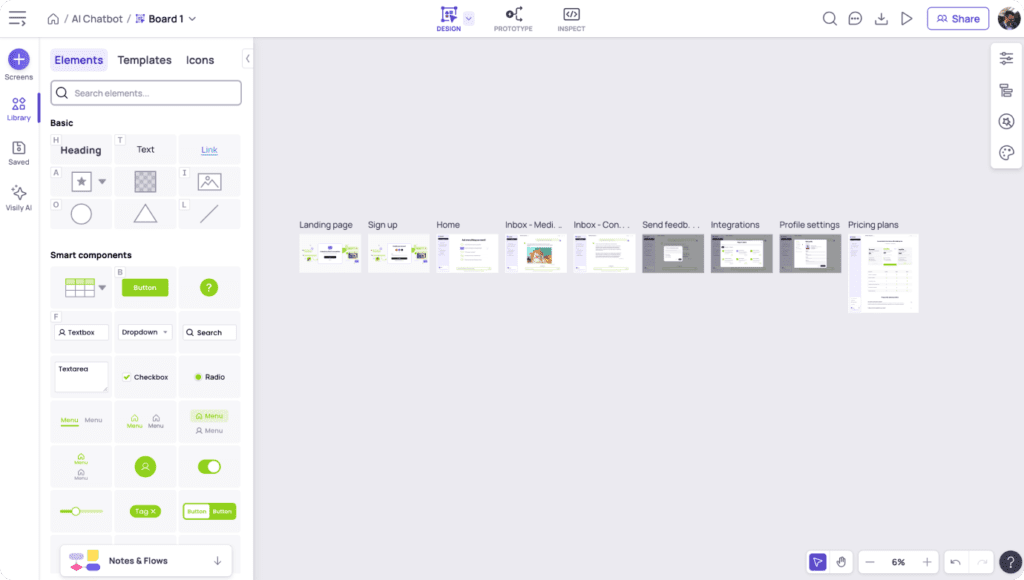
    Caption: The AI-powered app Visily can generate design prototypes in seconds.

    AI-Driven Screen Readers

    Screen readers are essential tools for people with visual impairments. AI-powered screen readers extend these capabilities by using image recognition and natural language processing to provide richer descriptions of on-screen content. They can read text, describe images, interpret charts, and explain page layouts, improving access to digital information.

    Voice Interfaces: Conversational Accessibility

    Voice interfaces have become widespread through assistants such as Siri and Alexa. For users with mobility challenges or those who prefer speech interaction, AI-driven voice systems provide meaningful access. Natural language processing allows these tools to understand spoken commands, enabling control of devices, information searches, and navigation through digital environments.

    Captioning Tools: Bridging Communication Gaps

    Captioning tools support people who are deaf or hard of hearing by making multimedia content understandable. AI-powered captioning provides real-time, high-accuracy subtitles for live events, video calls, and recorded media. These systems adapt to accents, languages, and background noise to maintain clear communication.

    Beyond Traditional Accessibility

    AI’s impact extends into additional areas:

    • Emotion Recognition: AI can analyze facial expressions and vocal tone to detect emotional cues, which can assist users who struggle with social or emotional interpretation.
    • Autonomous Vehicles: Self-driving technology has the potential to increase independence for individuals with mobility limitations.
    • Language Translation: AI translation tools break down language barriers and support communication across cultures.

    Challenges and Ethical Considerations

    Progress in AI accessibility also introduces responsibilities:

    • Data Privacy: User data collection must be handled transparently and with clear consent.
    • Bias and Fairness: AI systems must be monitored to avoid reinforcing discrimination or exclusion.
    • Universal Design: Balancing personalized accessibility with broad usability for all users requires careful design decisions.

    The Future of Accessibility and Inclusivity

    As AI evolves, several possibilities emerge:

    • AI-Personalized Accessibility: Interfaces will dynamically adjust to individual needs in real time.
    • Seamless Multimodal Interfaces: Users will fluidly switch between voice, touch, and gesture interactions.
    • Global Inclusivity: Language translation, universal design practices, and accessible content will help make digital spaces truly worldwide and inclusive.

    Conclusion

    Artificial Intelligence is reshaping accessibility and inclusivity by providing innovative tools that empower people with disabilities while improving experiences for everyone. From screen readers and voice interfaces to captioning and translation, AI is reducing barriers and expanding opportunity. The partnership between AI and thoughtful design will continue to determine whether technology becomes a bridge toward inclusion or an obstacle to overcome.

    If you enjoyed this article, consider sharing it with a colleague or friend, and stay tuned for the next piece on Natural Language Processing in UX.