Note: This article is part of a series on Figma Fundamentals.
By following the step-by-step process outlined in this lesson, you will create a base component, utilize instances for efficiency, and maintain uniformity across your design. In addition, you may practice inclusive design by exploring accessibility considerations. As you continue to apply these fundamentals in your projects, you are not just creating visually appealing interfaces, you are also fostering a user-centric approach.
Objective
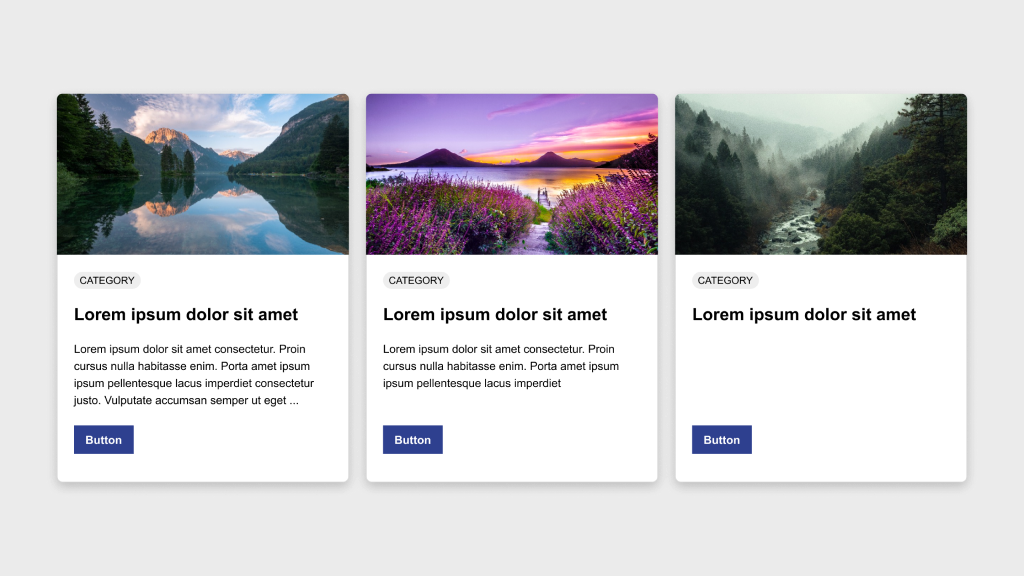
Create a row of three cards in Figma, ensuring consistency in height and structure. One card will serve as the base component while the other two will be instances of this component.
Elements
Each card should include:
- Image
- Category badge
- Title
- Description
- Button
Process
- Design the base card by arranging the elements according to the provided example.
- Convert this base card into a component by selecting it and clicking Create Component in the toolbar or using the shortcut Ctrl/Cmd + Alt + K.
- Duplicate the component twice to create two instances beside the original.
- Customize the content of the instances as needed while keeping spacing and design elements consistent.
- Ensure all three cards maintain the same height for a uniform appearance.
- Experiment with responsive behavior by adjusting layout or content and observing how the cards adapt to different screen sizes.
Bonus
Use this accessibility plugin to verify that your component passes accessibility standards.
Discussion
Once satisfied with the design, schedule a 30 minute call with me to review.

Parting Words
As we conclude this lesson in the Figma Fundamentals series, thank you for being part of the learning journey. Join me again next week as we explore a new topic.
If you would like to continue the conversation, share your thoughts in the comments. If you found this helpful, consider sharing it with your network. Until next time, keep practicing, experimenting, and refining your skills. Design is a journey of continuous improvement.
Leave a Reply