

This post is about my recent experience learning new AI tools. However, it wasn’t generated by an agent. It’s from my heart and my head, where the best ideas begin. It’s raw, real, and maybe even a little messy, but I hope you stick around and enjoy my story.
Fear. Uncertainty. Doubt… or opportunity?
The message is loud and clear: product designers are worried. Right now, that sentiment makes up about half of my LinkedIn feed. The other half? People looking for new jobs.
There’s a lot of advice and opinions out there, but I’m here to share my experience. I’ve been in this field for over 20 years and have seen it all: title changes, technology shifts, and layoff waves. Through it all, I’ve stuck to the same mindset: be prepared, look ahead, and keep grinding.
In today’s article, I’ll share how I’ve been leveling up my AI skills to become a more efficient product designer, developer, and manager.
Changing Your Mindset.
The first thing I had to do was shift my mindset. I had to stop and think, “can I do this in AI?”, before every single task. If so (or even a maybe) I would think about if the benefits of stopping to learn something new would outweigh the time I invested to learn them. You wont know until you try, you must!
Experiment Outside Your Comfort Zone.
To do this, I chose to try three different AI tools: Replit, Dotted, and Lovable. For context, I’m a hands-on learner and prefer to dive in deep with no floaties. I don’t want any onboarding widgets or explanations. I expect your tool to be self-explanatory, or you’re missing the entire point of shipping a product. That said, I rolled up my sleeves. Let’s go!
Replit
First up: Replit. I ran a handful of ideas through ChatGPT, asking it to “evaluate them through the lens of the end user in their respective market, the market size, and how profitable each might be.” I’m a businessman at heart. After reviewing the results, I decided to create a home improvement app called Hearthly.
I had ChatGPT generate a Press Release FAQ (PRFAQ), Software Design Document (SDD), and Situation Target Proposal (STP). I simply pasted them into the prompt. The generation process was lightning fast, and the output looked solid. I was impressed with the UI… until I started testing.
Ugh. Nearly every component I clicked had some sort of error. The back-and-forth QA session with the agent was frustrating, to say the least, and I burned through my credits quickly with little to show for it.
Still, I’m not giving up. Let’s keep trying…
Dotted
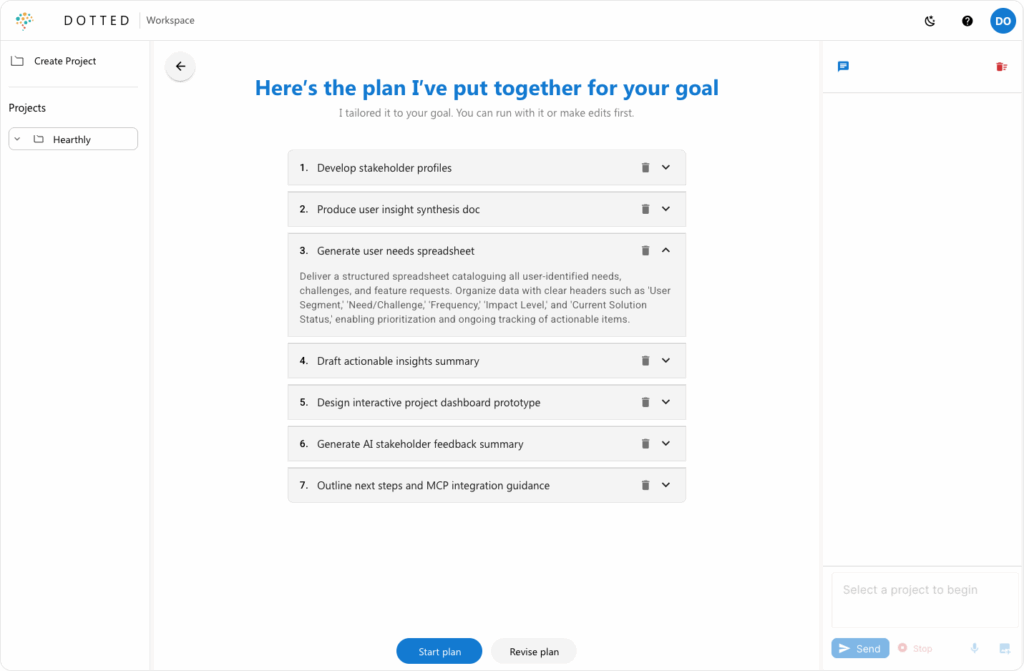
Next up, I pivoted to using Dotted. Dotted is built around the Product Management loop: Learn → Synthesize → Align → Execute. Instead of getting stuck in endless cycles, Dotted helps you move efficiently through each phase by providing AI assistance, stakeholder simulation, and integrated workflows.
It’s not just a prototyping tool.
Dotted is a full-stack product workspace built for real PM work: writing, editing, aligning, and shipping.
With Dotted, I can upload project docs and have the AI generate everything from stakeholder personas to product roadmaps, test plans, and visual prototypes. I can collaborate directly in the platform, ask questions, get summaries, and quickly pivot when things change.
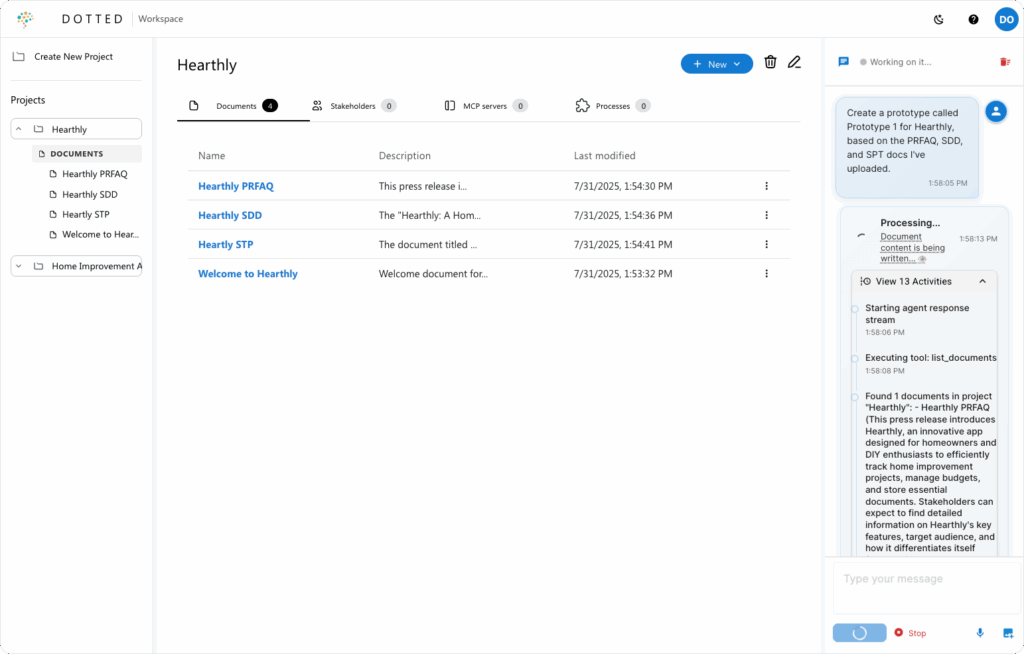
It replaces a dozen tabs, tools, and threads with one context-aware space for building products. You’re not just prototyping UI. You’re prototyping direction.
This kind of workflow keeps momentum high and decisions clear. It’s Cursor for PMs, and it’s changing how I work.
Dotted is surprisingly easy. I uploaded my project docs (PRFAQ, SDD, and STP) and hit generate. No copy and paste needed, it reads directly from your files. The results were impressive. I had a clean, fully functional HTML prototype ready to work with.
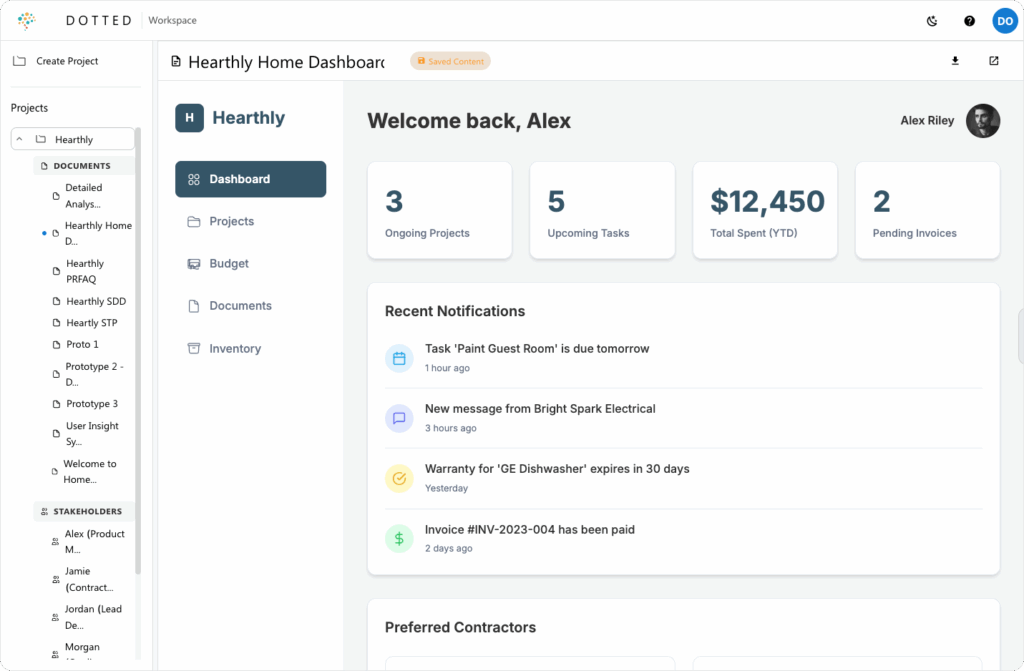
The possibilities in Dotted are honestly endless. I worked with the agent to make a few updates and was really pleased with the outcome.
This app is definitely going places. I’m adding it to my toolkit.
I’ve been able to get more done in 10 minutes here than I did in 2 hours using Replit. Seriously fantastic so far. Great work.
Lovable + Supabase
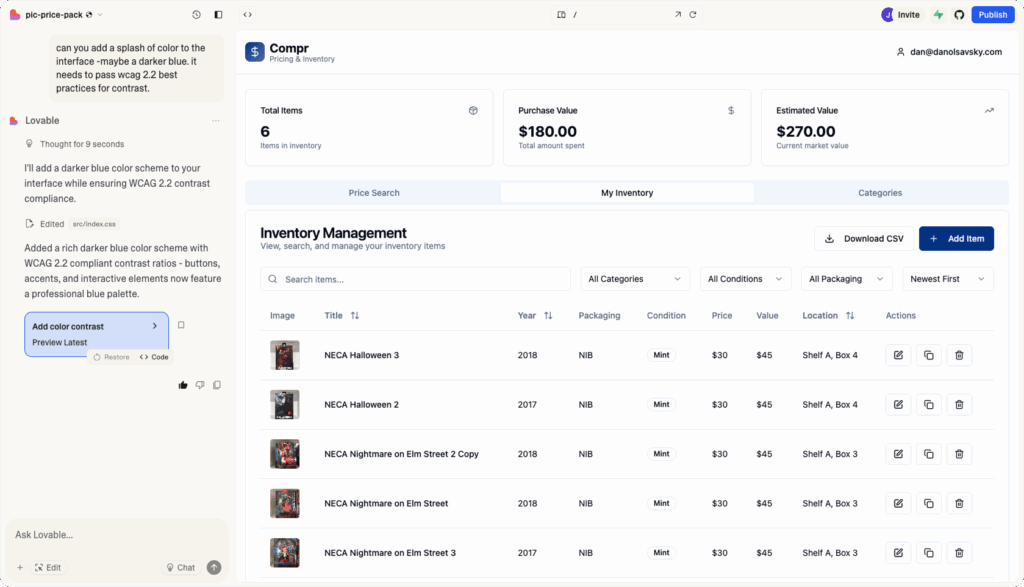
Finally, I found Lovable and well… I’m head over heels! This brought my front-end developer background, product designer, project management, and QA skills together at the same time. I’m cooking! And now, this is THE APP I’m spending the most time in.
This time, I brought another idea into play. I wanted to build an app to help me track inventory for my vintage collectibles store (yeah, I do that too). I went back to GPT and spun up another PRFAQ, SDD, and STP. I copy-pasted it all into the prompt and… woah! The results were spot on, and it was speaking to me in very human terms.
It felt familiar (Friday nights… different story). It reminded me of when I used to write acceptance tests for Cucumber, it lit up a part of my brain I haven’t used in a while. Now, I can start typing the product into existence through sets of user stories and acceptance tests. After a few GPT sessions, it just starts flowing out of my mouth and into the voice prompt.
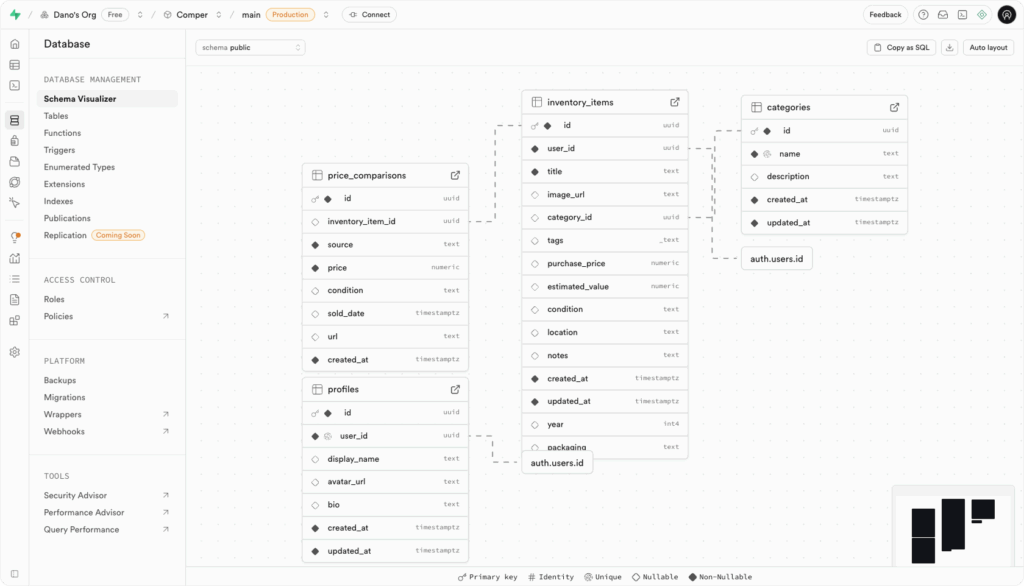
Then comes what might be my favorite part: direct integration with Supabase. And within that, edge APIs and integrations. I’m practically foaming at the mouth at this point. OAuth, user tables, storage, reports… so much functionality, all at the click of a button. The connection with Lovable? Seamless.
Now my web dev skills are firing up too. I’m doing everything, fast. Need help? I just ask GPT so I don’t burn through my Lovable credits. (For transparency, I do have a GPT subscription.)
Within a few hours, I had a fully functional app. I was already running price comps and tracking inventory for my business. As I used the app, I spotted usability improvements and rebuilt on the fly. I’m literally building an app and doing inventory at the same time. This is wild.
One of the coolest parts? Lovable seems to have some self-healing capabilities. It detects errors and auto-rebuilds. At this point… take my money. No really, I bought a bunch of credits.
Level-up your PM skills
Ask ChatGPT to “create a Press Release FAQ, Situation–Target–Proposal, and Software Design Doc for [your idea and target audience].”
You can also specify the development environment you’re building in (e.g., Lovable + Supabase stack) if you already know it.
PRFAQ = From Amazon’s product planning playbook, a mock press release and FAQ before building.
STP = A strategic framework from consulting used to clearly define a problem, goal, and solution path.
SDD = An engineering standard for outlining system architecture, technical specs, and design rationale.
Level-up your webdev skills
Learn HTML, CSS, and JavaScript through W3 Schools. Learning the basics is free and fun, and the source is as legit as it gets.
Give yourself some time to learn, carve out a few hours each week. You can ask ChatGPT to make you a custom learning style based on your schedule and learning preferences.
Reflection
Well, I think you know where you’ll find me, somewhere between testing quick concepts in Dotted and bringing the best of them into Lovable. Along the way, it’s reminded me of the old college grind: learning new things, trying them out, failing, and then trying again until something sticks. Learning is rarely easy, but just like back then, it’s always worth it.
One piece of advice I’ll share: spend a few bucks. This is the next wave of technology, and it’s here to stay. Many of the features behind the paywalls are the ones that will help you go further, faster.
Hopefully, my story helps give you some perspective.
Keep at it. We need you.
-Dan
Leave a Reply